Last Updated on June 27, 2026 by Ian Naylor
Lost links can drain rankings, traffic, and sales – and many can be fixed. If a page loses backlinks, the cause is usually one of three things: your URL broke, the publisher removed the link, or the link points to the wrong place.
I’d sum up the process up like this: find the loss, confirm the cause, fix the problem, and track the result. That means checking lost backlink reports, reviewing 404s and follow and nofollow links, restoring pages or adding 301s, and emailing editors when a link was removed. This works because you’re trying to get back links you already earned, not pitching from scratch.
A few numbers show why this matters:
- 66% of backlinks disappear over nine years
- About 8% drop within three months
- Link reclamation can convert at about 18.67%
- Cold outreach averages about 8.5%
- Quality backlinks in 2026 often cost $361 to $509
Here’s the short version:
- Broken inbound links: fix with a 301 redirect or restore the old page
- Removed links: send a short outreach email to the editor
- Wrong URLs: fix redirect paths or ask for a correction
- Unlinked mentions: ask the site to turn the mention into a clickable link
- Priority first: focus on dofollow links, stronger domains, and pages with traffic
If I were doing this today, I’d start with pages that lost high-authority referring domains in the last 30 to 90 days, match that against Google Search Console drops, and fix the highest-impact losses first.
Link Reclamation Best Practices
To ensure your recovery efforts align with a broader strategy, follow a comprehensive SEO link building checklist to maintain a healthy profile.
sbb-itb-88880ed
How to Diagnose Lost Links and Confirm the Cause of a Drop
First, make sure the drop is actually tied to backlink value.
Rankings can fall for a bunch of reasons: a crawl problem, an algorithm update, or a content change. And each one needs a different fix. So before you jump into outreach or redirects, pin down the type of loss you already found: broken inbound link, removed link, or wrong URL.
That loss type tells you where to look next:
- Backlink data for removed links
- Crawl data for broken destinations
- Redirect paths for wrong URLs and migration issues
Use Backlink and Search Data to Find Loss Patterns
Start with your backlink tool. Pull the "Lost Backlinks" report in Ahrefs or Semrush for the last 30 to 90 days. Then look for a pattern: did you lose several high-authority referring domains around the same time rankings or traffic started to slide?
Next, open Google Search Console and compare those dates against page-level clicks and impressions. If one page lost a few important referring domains shortly before the decline, that timing is a strong sign the lost links are part of the problem.
Focus first on high-authority, dofollow links from pages that get real organic traffic. Those are the links most worth checking. Then confirm whether the target URL still resolves cleanly. That one step matters a lot. If the issue is on your site, you’re dealing with a technical fix. If the issue sits on the referring site, it’s time for outreach.
Check for 404s, Redirect Problems, and URL Changes
Once you know which pages lost links, check whether the issue starts on your side. Run a crawl with Screaming Frog and compare it with GSC’s "Not found" report.
Look for:
- Pages returning 404 errors that still have active inbound links
- Redirect chains where a hop is broken or the chain is too long
- Irrelevant redirects, where the destination doesn’t match the original page and acts like a soft 404
Redirect chains often show up after site migrations. Here’s the simple version: if a link goes A → B → C and the B → C redirect fails, the link value stops at B. Fixing that by changing it to a direct A → C redirect can help recover the value without any outreach. In more complex scenarios involving partnerships, understanding ABC link exchanges can help you identify where these connections might have originated or failed.
Lost Links vs. Other SEO Problems: How to Tell the Difference
Use scope and speed to sort link loss from other SEO problems. If the issue doesn’t begin on the linking page, rule out technical or algorithmic causes before you start emailing site owners.
| Feature | Lost Link Drop | Technical SEO Issue | Algorithm Update |
|---|---|---|---|
| Scope | Page-specific or cluster-specific | Sitewide or section-wide | Often sitewide or category-wide |
| Primary Signal | Sharp drop in referring domains | Spike in 4xx/5xx errors or noindex tags |
Sudden drop across many keywords |
| Main Tools | Ahrefs, Semrush, GSC Links report | Screaming Frog, GSC Coverage report | GSC Performance report, ranking trackers |
| Speed of Impact | Gradual – weeks to months | Fast – days | Immediate – overnight to days |
| Response Path | 301 redirect or outreach | Fix crawlability before reclaiming | Content review and authority improvements |
Link Reclamation Workflows for the Most Common Cases
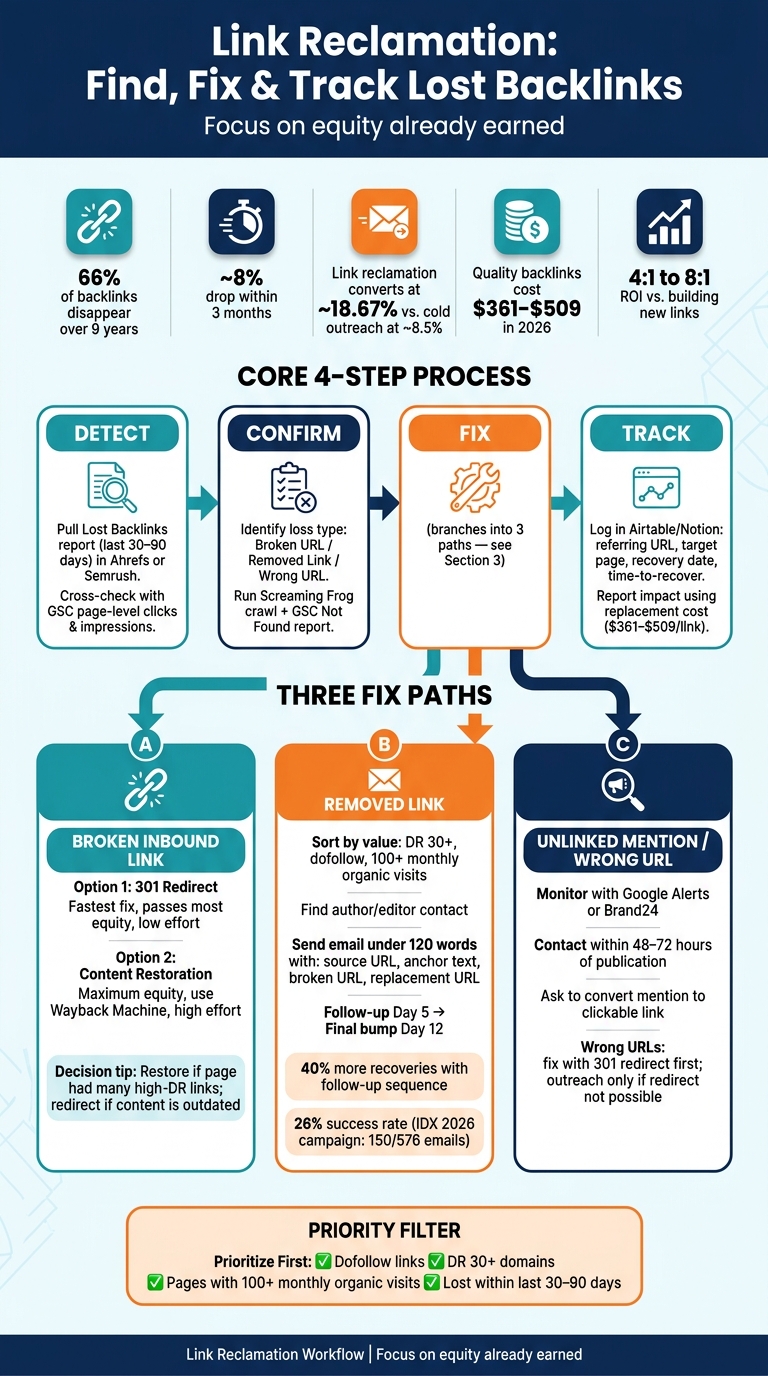
Link Reclamation Process: Find, Fix & Track Lost Backlinks
Use the loss type you confirmed above to pick the right fix. Start with technical fixes for 404s and wrong URLs. Then move to outreach if the link was removed from the publisher’s page. Most cases fall into one of three buckets: broken URL, removed link, or unlinked mention.
Fix Broken Inbound Links with Redirects or Content Restoration
When a page on your site returns a 404 but still has active inbound links, you have two paths: a 301 redirect or content restoration. The better option depends on how much link equity you’re trying to save.
A 301 redirect to the closest live page is the faster move and doesn’t require new content. It passes most of the link equity. Restoring the original content at the original URL keeps the most equity.
| 301 Redirect | Content Restoration | |
|---|---|---|
| SEO Value | High (slight dilution) | Maximum |
| User Experience | Good (similar content) | Best (exact content) |
| Implementation Effort | Low (server or CMS rule) | High (content creation) |
| Long-term Maintenance | Low (set and forget) | High (ongoing updates) |
Use the Wayback Machine to recover the original page. From there, either point the old URL to the closest match or restore the page as accurately as you can.
If the link wasn’t broken on your site and was removed from the publisher’s page instead, move to outreach.
Win Back Removed Links Through Direct Outreach
Most removed links aren’t intentional. They often vanish during CMS migrations, site redesigns, or content updates. In plain English: the editor may not have meant to delete it at all. That’s why this kind of outreach works better than a cold pitch. You’re not asking for a favor out of nowhere. You’re pointing out something that used to be there.
Before you send anything, sort by value. Put your time into dofollow links from strong, relevant pages that get organic traffic. Low-authority or nofollow links usually aren’t worth the back-and-forth. Once you have a shortlist, find the right contact – often the author or editor tied to the original page – and keep your email under 120 words.
Include:
- The source URL
- The anchor text or the surrounding context
- The broken URL
- The replacement URL
Send one follow-up on day 5 if you don’t hear back, then a last bump on day 12. That kind of follow-up sequence can drive 40% more backlink recoveries than sending one email and hoping for the best. In a 2026 campaign documented by the agency IDX, 150 out of 576 outreach emails led to reinstated links – a 26% success rate – by going after links lost to 404 errors and editorial removals on high-authority domains.
If the mention is still there but there’s no link, use the next workflow.
Turn Unlinked Mentions and Wrong URLs into Working Backlinks
Unlinked brand mentions happen when someone names your brand, product, or original research in the text but doesn’t add a hyperlink. These often convert better than cold outreach because the hard part is already done: they already mentioned you.
Use Google Alerts or Brand24 to track new mentions as they show up. When you find one, contact the author fast – ideally within 48 to 72 hours while the piece is still new. Keep the ask simple. Thank them for the mention, then ask if they’d be open to making it a clickable link.
Wrong URLs are a bit different. If a link points to an outdated page or the wrong domain version – like HTTP instead of HTTPS – a 301 redirect can often fix the problem without any outreach. Save email for cases where a redirect isn’t possible or the destination doesn’t fit the page.
Tools, Reporting, and Maintaining Link Equity
Build a Simple Tool Stack for Link Reclamation
Once recovery is done, the next job is simple: check what came back, decide what matters most, and track the work. A small set of focused tools is enough for discovery, validation, prioritization, and tracking.
| Tool | Best Use Case | Limits for Reclamation |
|---|---|---|
| Ahrefs | Find lost links and redirect chains. | Higher entry price at $129/month; granular history requires a paid subscription |
| Semrush | Cross-check lost links and competitor gaps. | Different database may miss some links Ahrefs catches; starts at $140/month |
| Google Search Console | Find 404 pages with external equity. | No granular lost-link reporting for external sites |
| Screaming Frog | Crawl for broken pages and redirect chains. | Free version capped at 500 URLs; requires manual backlink data integration |
The goal here isn’t to collect more data for the sake of it. It’s to figure out what’s worth reclaiming first. After validation, start with the losses that carry the most weight. Focus on DR 30+, dofollow links, and referring pages with 100+ monthly organic visits. The top 10–20% of opportunities usually holds most recoverable value.
For tracking, keep it clean and simple. Log the referring URL, target page, recovery date, template, and time-to-recover in Airtable, Notion, BuzzStream, or Pitchbox.
When it’s time to report impact, use replacement cost. Quality backlinks average $361 to $509 in 2026.
Use 3Way.Social to Diversify Link Sources After Recovery
After you get that lost equity back, the next move is to spread out your link sources. That’s the part many teams skip.
Recovery brings back lost equity. But it doesn’t fix concentration risk. If too many links come from the same pattern, the next loss can sting just as much.
Use 3Way.Social to diversify referring domains with AI-powered domain matching, vetted ABC exchanges, guest posting, and permanent do-follow links.
Ongoing Monitoring and Next Steps
Set a Monitoring Schedule for High-Value Pages and Referring Domains
After recovery, the job isn’t done. Monitoring helps stop the same losses from creeping back in. It lets you spot link loss early, before rankings slip and traffic takes a hit.
A simple schedule works best. That way, your most important links and pages get checked before small issues turn into bigger ones.
| Cadence | What to Check | Owner |
|---|---|---|
| Real-time | Automated alerts for high-DR and high-traffic links | SEO Specialist |
| Weekly | 404 errors and referral traffic drops on key landing pages | Web Developer / SEO |
| Monthly | Full backlink audit; check unlinked brand mentions; fix new 404s | SEO Manager / Link Builder |
| Quarterly | Content freshness audit on top-linked pages; review redirect chains | Content Lead |
| Post-Migration | Audit all legacy URLs; map 301 redirects for every page with inbound links | Web Development Team |
Speed matters here. Reach out within 48–72 hours. Put your energy into strong, relevant dofollow links, and skip spam.
Key Takeaways and Action Steps
Use the same process each time: detect, confirm, fix, and track.
That’s why link reclamation is so useful. You’re not starting from zero. You’re going after equity your site already earned. First, identify the type of loss. Then confirm the cause with data. Fix broken destinations, reach out for removed links, and turn unlinked mentions into working backlinks.
The business case is hard to ignore. In 2026, quality backlinks average $361–$509, and about 18% of all backlinks point to a 404 page or an irrelevant destination at any given time. That means link loss has a direct cost if you leave it alone. Reclamation also tends to produce a 4:1 to 8:1 ROI compared with building new links from scratch.
FAQs
How do I know if rankings dropped because of lost links?
Audit your backlink profile to check whether links that once helped your site are now broken or gone. When a link stops working because of a site migration, a deleted page, or changes on another site, the authority from that link can vanish. That can lead to lower rankings and less referral traffic.
Use SEO tools to spot lost links, with extra attention on 404 errors and removed backlinks. Then line up those losses with your keyword rankings and traffic data to see whether the drop in links matches the drop in performance.
Should I restore the old page or use a 301 redirect?
It depends on your current content goals.
If the original page is still useful and worth keeping, restoring it is usually the simplest move. You bring the link back right away, and you don’t need any outreach.
If the content was moved, updated, or merged into a newer, more relevant page, use a 301 redirect. Point the old URL to the closest match, not the homepage, so you keep as much link equity as possible.
Which lost backlinks should I reclaim first?
Prioritize lost backlinks from high-traffic pages and pages on strong sites, since those links usually carry the most SEO weight.
Start with links that now point to 404 pages or broken redirects. In many cases, the fix is simple: set up a 301 redirect to the most relevant live page.
After that, move to removed links where the referring page is still live. That’s where outreach makes sense.
To keep your efforts focused, filter lost link reports by domain authority so you can go after the opportunities most likely to matter.