Last Updated on January 5, 2026 by Becky Halls
Internal linking is one of the simplest ways to boost your website’s performance. It helps search engines understand your site structure, distributes authority across pages, and improves user navigation. Here are five effective strategies to improve your internal linking:
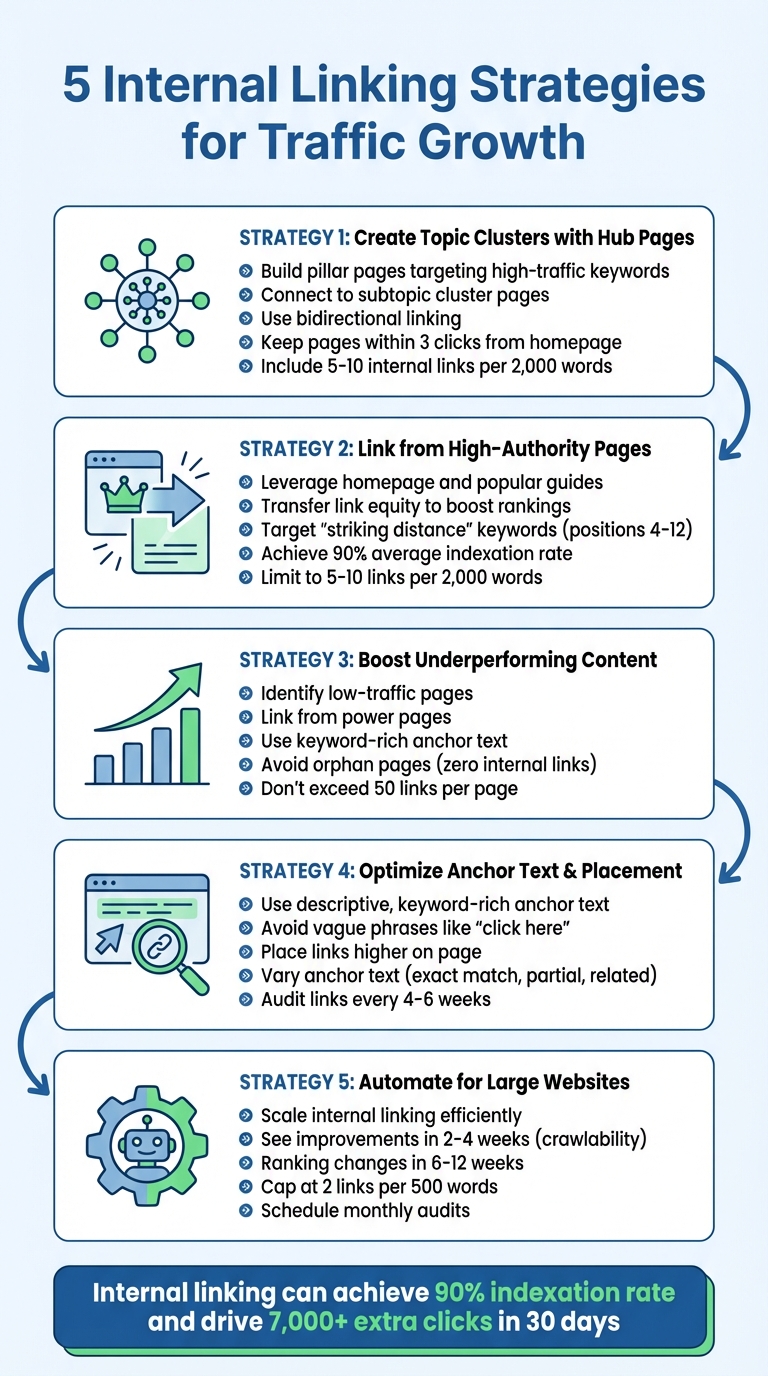
- Organize Content into Topic Clusters: Build hub (pillar) pages that link to related subtopics, creating a clear content hierarchy. This strengthens your site’s authority on specific topics and improves navigation.
- Leverage High-Authority Pages: Use popular or well-ranked pages to link to underperforming ones. This transfers link equity and boosts rankings for pages that are close to breaking into higher search positions.
- Revive Low-Performing Content: Identify pages with low traffic and link to them from stronger pages using descriptive, keyword-rich anchor text.
- Optimize Anchor Text and Placement: Use clear, relevant keywords in anchor text to guide users and search engines. Place links higher on the page to encourage clicks.
- Automate for Large Websites: Use tools to scale internal linking across large sites, ensuring consistent link distribution and faster indexing.
These strategies not only improve your website’s search rankings but also enhance user engagement by making content easier to find and explore.
5 Internal Linking Strategies to Boost Website Traffic and SEO Rankings
Internal Linking Strategy – Boost Your Site With The Right Internal Link Structure
1. Create Topic Clusters with Hub Pages
One powerful internal linking tactic involves organizing your site into topic clusters, where content revolves around a central hub page supported by subtopic pages. Think of it as a hierarchy: your homepage sits at the top, followed by pillar (hub) pages, then cluster pages, and finally individual content pages.
The pillar page is designed to target high-traffic keywords and provide a broad overview of a main topic. For example, a pillar page on “washing machines” might focus on a keyword with 18,100 monthly searches. From there, you can build cluster pages that dive into specific subtopics, like “front-load vs. top-load washers” or “energy-efficient washing machines.” To tie it all together, use bidirectional linking – connect the pillar page to all the clusters and ensure every cluster links back using clear, descriptive anchor text.
This structure doesn’t just help users; it also sends a strong signal to search engines. It shows that your site covers the topic thoroughly. Bernard Huang explains:
“A website with good interlinking between pillar content and topic clusters might convince Google that the website has extensive, authoritative information – a positive signal of a website’s quality.”
This approach can lead to faster indexing and better PageRank distribution, channeling authority from high-ranking hub pages to more specific content.
We’ve noticed that internal linking works best when you link by intent, not just topic. A ‘how to’ guide should point to ‘best tools’ and ‘pricing’ pages where it makes sense, not just another definition post.
For visitors, topic clusters offer a seamless way to explore related content. They provide a logical learning path, helping to lower bounce rates and increase time spent on your site. As Chima Mmeje puts it:
“Topic clusters are groups of related content that are linked together to create a cohesive and informative resource for users.”
We’ve seen category and hub pages act like traffic multipliers when they’re maintained. One good hub page can lift 10-20 related articles just by improving discoverability and topical clustering.
To implement this strategy effectively, start by auditing your content. Use Google’s “site:” operator to identify related pages, ensure key pages are no more than three clicks from the homepage, include 5–10 internal links for every 2,000 words, and remove orphan pages (those without any internal links). This process connects your content in a way that benefits both users and search engines.
“In our experience, the best internal linking strategy is boring and consistent: every new post should point to one money page and two supporting pages. Do that for a month and your crawl paths improve noticeably.” 3Way Social Team
2. Link from High-Authority Pages
Not all pages on your site carry the same weight. To maximize the impact of your internal linking strategy, focus on leveraging your high-authority pages – like your homepage, popular guides, or pages with strong backlinks (often called “power pages”). Linking from these pages to other content on your site helps transfer authority, or “link equity”, which signals to search engines which pages are most important. This approach not only boosts rankings for targeted pages but also positions them to climb higher in search results.
Neil Patel, Co-Founder of NP Digital, explains it well:
“Internal linking spreads the site’s strength to internal pages: If you create a strong internal linking structure, you can boost the link juice earning potential of the internal pages by creating clear click paths and indexation throughout your site.”
To make the most of this strategy, focus on pages that are close to breaking into top rankings. A great way to do this is by targeting “striking distance” keywords – pages currently ranking between positions 4 and 12 on Google. By adding internal links from your power pages to these “almost there” pages, you provide the extra authority they need to potentially land on the first page. Tools like Google Search Console and Semrush can help you identify your power pages by showing which ones drive the most organic traffic or have high Page Authority scores.
This strategy doesn’t just improve rankings – it also speeds up how quickly Google indexes new content. Search engine crawlers prioritize high-authority pages, so linking from these pages to newer or lower-performing content ensures faster crawling and indexation. Sites that combine internal linking with canonical tags and XML sitemaps often achieve an impressive average indexation rate of 90%.
For best results, place links early and make sure key pages are no more than three clicks away from your homepage. When linking from power pages, stick to the recommended 5–10 internal links per 2,000 words. Be cautious not to overdo it – using more than 50 internal links on a single page can dilute their effectiveness.
3. Boost Underperforming Content with Internal Links
Revitalizing pages that aren’t performing well can be as simple as using internal links to give them a much-needed boost.
Even great content can sometimes struggle to gain traction. By linking from your high-authority pages to these underperforming ones, you signal to search engines that these pages are worth attention. This practice not only channels authority but also helps search engines better understand and index your content. Without internal links, “orphan pages” often go unnoticed by search engines.
“We’ve seen that fixing orphan pages often unlocks quick wins. If a page has impressions but no internal links, it’s basically invisible to your own site.” 3Way Social Team
To start, pinpoint pages with low organic traffic using tools like Google Search Console. Next, identify your “power pages” – the ones with the most external backlinks – using platforms such as Semrush or Ahrefs. Once you’ve got your list, add links from these high-performing pages to the underwhelming ones. Use descriptive, keyword-rich anchor text instead of vague phrases like “click here” to make the links more effective.
Anna Uss, SEO Manager at Snyk, highlights the value of this tactic:
“Internal linking can be a powerful way to improve website performance as well as a way to get some quick wins for strategic pages that you want to appear higher in the search results.”
However, balance is key. While adding internal links can often lead to higher traffic, overloading a page with links – especially more than 50 – can dilute their value and potentially harm performance. Keep your strategy focused and intentional for the best results.
sbb-itb-88880ed
4. Improve Anchor Text and Link Placement
Anchor text and where you place your links play a big role in SEO and keeping users engaged. When your anchor text is clear and includes relevant keywords, it helps search engines understand the content of the linked page while encouraging visitors to explore more of your site.
Avoid using vague phrases like “click here” or “read more.” Instead, opt for descriptive anchor text like “structured data implementation” if you’re linking to a guide on that topic. This approach benefits both users and search engines by providing immediate context. As Brian Dean, Founder of Backlinko, explains:
“Google recommends that you’re descriptive with your anchor text… it helps users AND search engines understand that the web page I’m linking to is about [the topic].”
Placing internal links higher up on the page can reduce bounce rates and improve how long visitors stay on your site. To keep things natural, vary your anchor text by using a mix of exact match keywords, partial matches, and related terms. Also, ensure internal links open in the same tab to make navigation smoother.
For large websites in the U.S. managing thousands of pages, manually adding links isn’t realistic. Tools like ClarityAutomate can simplify this process by identifying the best linking opportunities while maintaining high-quality anchor text. Additionally, performing link audits every 4–6 weeks is a good practice to catch broken links and ensure your internal linking structure stays strong. Regularly reviewing and fine-tuning your links can help drive consistent traffic growth over time.
5. Automate Internal Linking for Large Websites
Manual internal linking works well, but when it comes to large websites, automation becomes a game-changer. It takes the same principles – like using hub pages, linking high-authority content, and optimizing anchor text – and applies them at scale, making it possible to manage massive amounts of content efficiently.
For large sites, manually adding internal links simply isn’t practical. Automation tools step in to analyze your entire site, identify linking opportunities, and add relevant links across pages. Eric Siu, Founder of Single Grain, highlights the value of this approach:
“Automated internal linking is the fastest way to strengthen site architecture, consolidate authority, and scale SEO impact without drowning teams in manual updates.”
By automating these processes, you can ensure consistent and scalable internal link distribution while freeing up valuable time for your team.
Boosting Organic Traffic with Automation
Automated systems help redistribute link equity from high-authority pages to those that need a boost, while also addressing orphan pages – pages with no internal links pointing to them. This makes it easier for search engines to crawl and index your site. Many websites notice improvements in crawlability and content discovery within 2–4 weeks, while ranking changes often follow within 6–12 weeks.
Simple Implementation for U.S.-Based Sites
A phased approach works best for implementing automated internal linking:
- Phase 1: Focus on cornerstone pages.
- Phase 2: Expand to include topic clusters.
- Phase 3: Remove links with low engagement.
Tools like seoClarity‘s ClarityAutomate Link Seeker, Semrush, and Ubersuggest make the process easier by offering centralized reporting and bulk action suggestions. Rules-based systems are a great starting point, offering guardrails like link caps, while hybrid setups that combine strict rules with AI-powered semantic matching ensure links stay relevant.
Once in place, these systems not only improve SEO performance but also make your site more user-friendly.
Improving User Experience and Engagement
Automation helps keep pages clean and easy to navigate by limiting the number of links – for example, capping it at two links per 500 words. It also ensures anchor text remains varied yet relevant. And if no suitable link is found, automated systems simply skip adding one.
Scaling for Large or Expanding Websites
As AI becomes a core part of business strategies, integrating it into internal linking is a natural step for modern SEO. Automation is especially critical for websites with millions of pages, where manual updates are unrealistic. Ryan Heuser, Technical Services & Product Manager at seoClarity, explains:
“To surface internal links at scale, ClarityAutomate™ Link Seeker automatically analyzes, creates, and publishes deep links while still providing complete control.”
To maintain consistency, set up an anchor dictionary with preferred phrases and banned terms. Schedule monthly audits to catch low-value patterns and address any issues early on. This ensures your internal linking strategy stays effective and aligned with your goals over time.
Track and Improve Your Internal Linking Over Time
Keeping tabs on your internal linking performance is what separates a decent strategy from one that truly delivers results. Alex Valencia, Co-Owner at We Do Web Content, puts it this way:
“Internal linking is one of those SEO activities most often treated as a ‘best practice,’ less often venturing into the realm of technical assessment and in-depth strategy”.
To gauge how well your internal linking is working, start by tracking key metrics.
One critical metric is crawl depth, which measures how many clicks it takes to reach a page from your homepage. Ideally, important pages should be no more than three clicks away for easy access. Google Search Console’s Crawl Stats can help you determine if search bots are finding more pages after your updates. Pair this with organic traffic data from Google Analytics 4 (GA4) to compare visitor numbers before and after your internal linking improvements. GA4’s Path Exploration feature can also shed light on where users might be dropping off. Together, these insights provide a solid foundation for routine audits.
Speaking of audits, they’re essential for improving and maintaining your internal linking strategy. Aim for a structured schedule: conduct full audits every 4–6 weeks to address broken links, redirect chains, and orphan pages. Monthly reviews can tackle 404 errors and ensure you’re preserving link equity. Quarterly audits allow you to reassess priority pages and update older content. Anna Uss, SEO Manager at Snyk, underscores the importance of this:
“Pages that have zero internal links pointing to them, known as orphan pages, run the risk of not being discovered quickly”.
Beyond technical fixes, track engagement metrics like bounce rate, pages per session, and time spent on the page. These indicators can confirm whether your internal links are guiding visitors to relevant content. For deeper insights, set up conversion tracking in Google Tag Manager to see if clicks on internal links lead to meaningful actions, such as sign-ups or purchases. Tools like Screaming Frog and Semrush can help you monitor Internal LinkRank (ILR) – a score from 0 to 100 that reflects a page’s authority based on its internal links. Keep in mind, though, that pages with over 50 internal links might see reduced traffic as the value of each link becomes diluted.
Regular audits also help you stay proactive. Replace links leading to 404 errors or redirects with direct URLs. Keep an eye on keyword rankings to ensure your anchor text is boosting search performance. Bill Gaule, SEO Strategist at Content Growth, shares a compelling example of what a well-executed strategy can achieve:
“Over the following 30 days, there were an extra 7,000 clicks to the blog pages alone”.
With consistent monitoring and optimization, your internal linking strategy can drive steady traffic growth long after the initial setup.
Internal Linking Strategies – Conclusion
The five strategies discussed – topic clusters, high-authority pages, boosting underperforming content, clear anchor text, and automation – work together to create a well-structured site that benefits both search engines and users. This cohesive approach not only improves your site’s rankings but also enhances the overall user experience.
By combining these methods, you can improve crawlability, distribute authority effectively, and increase user engagement, all of which contribute to better rankings. As Manick Bhan, Founder and CTO at LinkGraph, puts it:
“Internal link building alone can have a major impact on all areas of your SEO performance”.
The results speak for themselves. Websites that align internal links with canonical tags and XML sitemaps can achieve an average indexation rate of 90%. These precise linking techniques, as outlined earlier, directly influence both search engine indexing and user engagement.
With internal links, you have full control over your site’s architecture. You decide where to direct authority, which pages deserve priority, and how to guide users through their journey. When paired with the tracking methods previously discussed, internal linking becomes one of the most effective tools for driving long-term traffic growth.
Internal Linking Strategies – FAQs
How do topic clusters help improve SEO and enhance user experience?
Topic clusters are a way to structure your content by centering it around a main “pillar” page that addresses a broad topic. Surrounding this pillar are related sub-pages that dive into specific, long-tail keywords. These sub-pages link back to the pillar page and interlink with each other, creating a strong internal linking framework. This structure helps search engines grasp your site’s content better, enhancing crawling, indexing, and rankings for both the pillar and its supporting pages.
For visitors, topic clusters make navigating your site more intuitive. They can quickly find related information, spend more time exploring your content, and are naturally directed to key pages like product pages or lead-capture forms. Pairing this approach with quality backlinks – through platforms such as 3Way.Social – can amplify your site’s authority and improve overall SEO results.
How can I automate internal linking for large websites efficiently?
For websites with thousands of pages, managing internal links manually can be a daunting task. Thankfully, automation tools can take the heavy lifting off your plate while ensuring consistency. For instance, InLinks uses AI to analyze your site’s content, pinpoint relevant topics, and automatically generate contextual links. This eliminates much of the manual effort involved. Similarly, tools like Twylu help by scanning your site to identify orphaned pages and offering bulk link update suggestions, making it easier to maintain a well-connected structure.
If you’re a WordPress user, plugins like AIOSEO can simplify things even further. They provide internal linking suggestions as you write, seamlessly integrating the process into your workflow.
The benefits go beyond convenience. These tools improve site navigation, make it easier for search engines to crawl your pages, and give your SEO performance a boost – all of which are essential for driving more organic traffic.
How can I find the most authoritative pages on my website?
To find your website’s most authoritative pages, start by looking at external signals like the number of inbound backlinks, organic traffic levels, and metrics such as URL Rating or Page Authority. Tools like Google Search Console or SEO platforms can provide this data.
Next, review your internal link structure to identify pages that already attract the most internal links and traffic. Tools such as Screaming Frog or internal link reports from SEO platforms are useful here. Pages with steady traffic, strong engagement metrics (like low bounce rates and lengthy dwell times), and a role as internal link hubs are often your top-performing assets.
If you’re using an AI-driven SEO platform like 3Way.Social, its analytics dashboard can make this process easier by pinpointing high-performing pages and their backlink profiles. Once you’ve identified these pages, center your internal linking strategy around them to better distribute link equity, improve crawl efficiency, and drive more organic traffic.