Last Updated on May 6, 2026 by Becky Halls
APIs power SEO tools, but they can fail and disrupt workflows without warning. From authentication errors to data mismatches, these issues can cost time and money if not addressed properly. Between 2024 and 2025, global API downtime increased by 60%, with even minor outages costing $9,000 per minute. Here’s what you need to know to prevent and fix these problems:
- Authentication Problems: Expired tokens, incorrect scopes, and clock mismatches are common culprits.
- Data Format Issues: Inconsistent naming conventions, date formats, and missing fields can break integrations.
- Rate Limiting: Exceeding API request limits leads to delays and failures.
- API Updates: Sudden changes in endpoints or data structures can cause unexpected errors.
- Webhook Challenges: Timeouts, signature mismatches, and event retries can disrupt real-time data sync.
Solutions:
- Automate token refreshes and sync server clocks.
- Standardize incoming data to a single internal format.
- Monitor rate limits and use caching to reduce API calls.
- Use abstraction layers to handle API updates efficiently.
- Employ background queues for webhook processing to avoid timeouts.
Platforms like SaaS connectors simplify these tasks, saving time and reducing maintenance costs compared to custom integrations. Whether you’re managing SEO tools or building new ones, these strategies will help you keep your systems running smoothly.
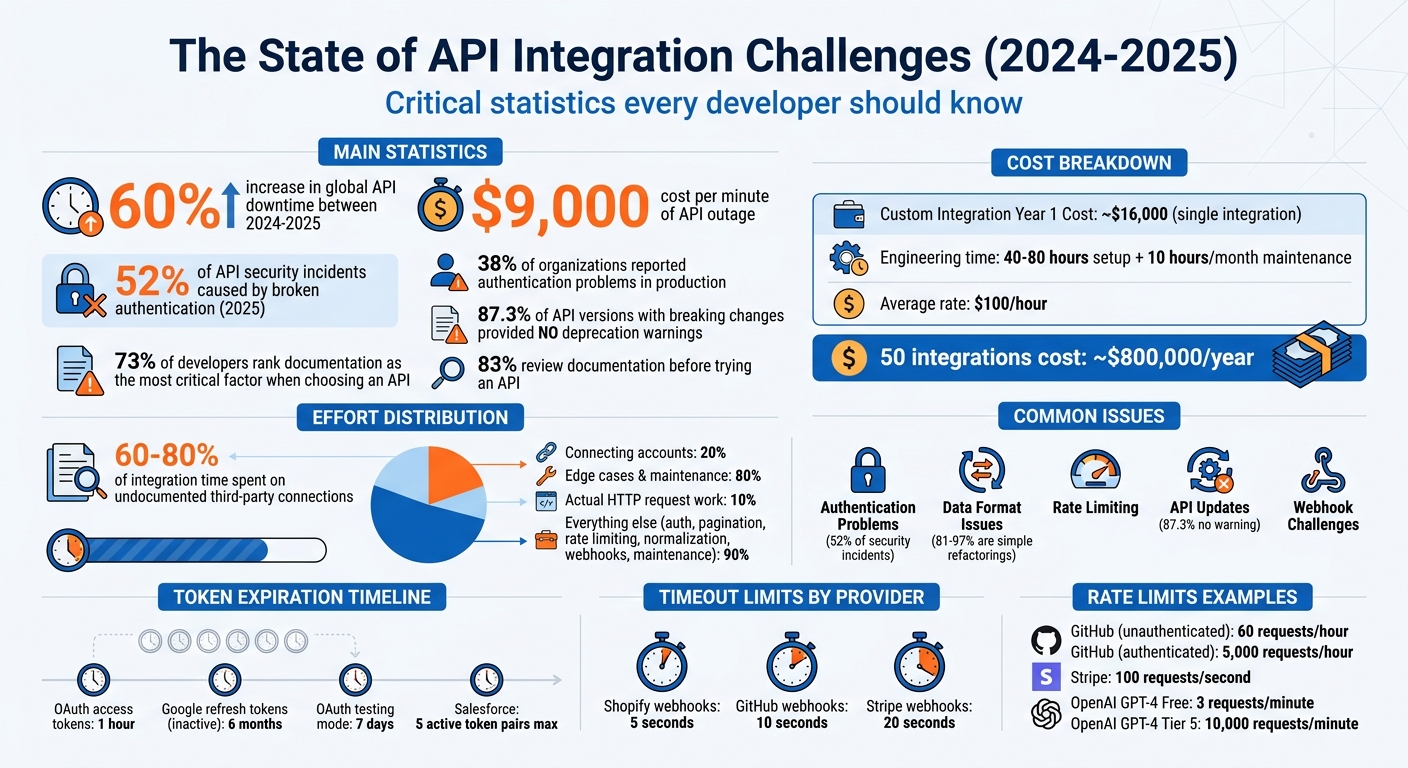
API Integration Issues: Statistics, Costs, and Common Problems
Your API Errors Suck (Here’s How to Fix Them)
sbb-itb-88880ed
Authentication Failures and Token Management
Authentication issues are a major reason why API integrations fail. In fact, broken authentication was responsible for 52% of API security incidents in 2025, and 38% of organizations reported facing authentication problems in production environments. These failures do more than just slow things down – they can completely disrupt workflows, making smooth SEO operations impossible.
Common Causes of Authentication Failures
One of the most common problems is expired or invalid credentials. For example, OAuth access tokens typically expire after one hour. Refresh tokens also have their limits: Google refresh tokens expire after six months of inactivity, and if your OAuth app is still in “testing” mode, they expire after just seven days. Salesforce handles things differently, revoking the oldest of five active token pairs if a sixth pair is generated for the same user.
Another frequent issue is copy-paste errors. Simple mistakes like extra whitespace or newline breaks can lead to “Invalid API Key” errors. Even a slight time difference (clock skew) between the client and API server can cause tokens to be rejected.
But even when authentication succeeds, you might still run into a 403 Forbidden error. This happens when token scopes or permissions don’t match what’s required. As LogicWorkflow explains:
“Authentication errors are the most common cause of n8n workflow failures”.
Practical Fixes for Authentication Issues
To avoid these pitfalls, consider the following strategies:
- Avoid hardcoding API keys. Store them securely in environment variables or use services like AWS Secrets Manager or HashiCorp Vault. This not only keeps your credentials safe but also simplifies updates when keys need to be rotated.
- Clean up hidden whitespace. Use
.trim()or regex to remove any stray spaces or line breaks from API keys during setup. - Automate token refreshes. Set up a system to refresh tokens 60-180 seconds before they expire. Use a single-flight mutex lock per account to ensure only one process handles the refresh at a time. As Truto points out:
“If your refresh path is not single-flight per connected account, you do not have a token refresh system. You have a race”.
- Sync your server clocks. Use NTP (Network Time Protocol) to ensure clocks are aligned, and add a five-minute buffer to expiration checks to account for any drift between systems.
- Test credentials regularly. Tools like curl or Postman can help you quickly identify where issues lie.
- Monitor rate limits. Check the
X-RateLimit-Remainingheaders to differentiate between actual authentication errors and rate-limit blocks that might look similar. - Track token refresh metrics. Keep an eye on the
lastTokenRefreshedAtmetric for each account to catch silent failures before they cause user-facing problems.
By addressing these common issues and implementing these solutions, you can significantly reduce authentication-related disruptions.
Next, we’ll dive into how data format inconsistencies can add even more challenges to API integrations.
Handling Data Format Inconsistencies
Consistent data formatting is just as crucial as solid authentication when it comes to smooth API integration. Even if your authentication is flawless, mismatched data formats can derail the entire process. While JSON dominates as the standard for about 76% of data payloads, it doesn’t guarantee universal consistency. For instance, APIs often vary in naming conventions: Shopify uses camelCase, Amazon opts for PascalCase, and many REST APIs rely on snake_case. These subtle differences can cause integration issues if not accounted for.
Understanding Data Format Misalignment
The challenges go beyond naming conventions. Structural differences are a frequent hurdle. For example, one API might handle an address as a nested object with fields for street, city, and zip code. Another might send it as a single, flat string. Similarly, a price might arrive as a string like "19.99" instead of the float 19.99. Date formats are another sticking point, ranging from ISO 8601 (2026-04-27T14:30:00Z) to Unix timestamps or US-style dates (04/27/2026).
Currency data also introduces complications. To avoid rounding errors, it’s a good idea to store monetary values as integer cents. Units of measurement like weight and dimensions can vary widely – think pounds versus kilograms. Mistakes in converting these units are among the costliest errors in global eCommerce.
Another tricky area is handling empty values. Different systems use different approaches: some represent missing data with null, others with an empty string (""), and some simply omit the key altogether. Interestingly, while connecting accounts may take up 20% of the integration effort, managing these edge cases can consume the remaining 80%.
Fixes for Data Format Validation
To ensure reliable integration, standardizing external data is key. Begin by creating a canonical data model – a single internal standard format to which all incoming API data is mapped. This simplifies the mapping process from a complex N-to-N setup to a more manageable N-to-1 plus 1-to-N. For consistency, store internal data in standardized units – weights in grams, dimensions in millimeters, dates in ISO 8601, and currency in cents – and convert outgoing data to meet the requirements of each external API.
Use defensive parsing to validate every field as it comes in. Provide default values for optional fields that might be missing. A four-stage validation pipeline can help: check the schema (structure), validate data types, enforce business rules, and confirm referential integrity (e.g., verifying catalog entries). Tools like JSON Schema or Zod can automate this process, catching discrepancies between live responses and documented API specs.
Normalize data early in the pipeline. This includes trimming whitespace, decoding HTML entities, standardizing field casing (e.g., country codes), and converting measurements to your internal standard. For complex data like phone numbers or dates, libraries such as libphonenumber, dayjs, or date-fns can simplify the process. Always verify the Content-Type header before parsing – if it’s text/html instead of the expected application/json, log the raw response for further analysis.
To catch issues early, set up alerts for “JSON Parse Errors” or unexpected 400/422 status codes. This helps you identify format changes before they escalate into larger problems. Instead of discarding records that fail validation, store them in an error queue for manual review. This not only helps you spot recurring issues but also allows you to fine-tune your transformation logic as needed.
Managing Rate Limiting and Scalability Challenges
Handling high-volume SEO automation often brings rate limiting into the picture. Unlike authentication errors, which usually show up during initial testing, rate limiting tends to surface only when your integration faces real-world traffic in production.
How Rate Limiting Impacts API Performance
APIs use rate limiting to safeguard their infrastructure and ensure fair access for all users. When you exceed these limits, you’ll encounter an HTTP 429 “Too Many Requests” error, which can bring your workflow to a halt. For example:
- GitHub: Allows 60 requests per hour for unauthenticated users, but increases to 5,000 for authenticated users.
- Stripe: Typically caps accounts at 100 requests per second.
- OpenAI‘s GPT-4 Free Tier: Limits users to 3 requests per minute, while Tier 5 users can make up to 10,000 requests per minute.
Things can spiral out of control when multiple systems share the same API credentials. One developer shared a cautionary tale of racking up $40,000 in cloud costs due to a failed rate limiter during a bot attack. This kind of failure can lead to a “retry storm”, where repeated attempts quickly deplete your quota. On top of that, background tasks like plugin synchronizations or monitoring tools can silently eat into your request limits without immediate visibility.
Let’s look at some strategies to tackle these challenges.
Strategies for Handling Scalability Bottlenecks
Dealing with rate limits effectively requires proactive monitoring and smart adjustments. Here are some key approaches:
- Monitor API Response Headers: Pay attention to headers like X-RateLimit-Remaining (to track your remaining requests) and X-RateLimit-Reset (to know when your quota will refresh). Setting alerts at 80% usage can help you adapt your request rates before hitting the limit.
- Use Exponential Backoff: When you hit a limit, double the wait time between retries (e.g., 1s, 2s, 4s) and add random jitter to avoid synchronized retries. Always respect the Retry-After header if it’s provided by the server.
- Implement Request Queuing: Use algorithms like Token Bucket or Leaky Bucket to pace your requests. Instead of sending them all at once, queue them to release at controlled intervals.
- Cache Responses: For data that doesn’t change often – like keyword difficulty scores or user profiles – cache the results to minimize redundant API calls.
- Batch Requests: Where possible, use batch endpoints to process multiple items in a single API call, reducing the overall number of requests.
- Deploy a Circuit Breaker: If an API consistently struggles, a circuit breaker can temporarily stop outgoing requests, preventing your system from overloading itself.
A real-world example of these strategies in action is 3Way.Social, which effectively applies these techniques to manage scalability and maintain performance under high demand.
Addressing API Updates and Versioning Conflicts
Dealing with API updates can be a tricky part of maintaining SEO integrations. Even if you’ve mastered challenges like rate limits and authentication, changes in APIs can throw a wrench into your system. Providers might alter endpoints, rename fields, or even retire entire versions with little to no warning. These shifts can turn a well-oiled integration into a source of unexpected errors overnight.
Understanding Breaking Changes in APIs
Breaking changes in APIs can take many forms, each with its own potential to disrupt your integration. Here’s a quick breakdown:
- Structural changes: These include adjustments like renamed or removed fields, changes in data types (e.g., a string becoming an integer), or a single value being replaced with an array.
- Contractual changes: Examples include new required parameters, endpoints suddenly returning 404 errors, or response formats shifting from XML to JSON.
- Security updates: These might involve retiring older authentication methods or introducing new token formats.
One of the biggest challenges is the lack of advance notice for deprecations. Research has found that 87.3% of API versions introducing breaking changes did not provide deprecation warnings in the previous version. This often leaves developers scrambling to fix issues only after they surface in production. Interestingly, between 81% and 97% of these breaking changes are simple refactorings – like renamed fields or moved methods – rather than major overhauls. For instance, a field that once returned dates in ISO 8601 format might suddenly switch to Unix timestamps, leading to dropped or corrupted data in your sync pipeline.
Take HubSpot’s v1 Contact Lists API as an example. Originally scheduled for deprecation on September 30, 2025, its sunset date was later extended to April 30, 2026. After this date, all v1 endpoints will return HTTP 404 errors. Developers relying on this API will need to migrate to the v3 version to avoid disruptions. Without active monitoring, integrations depending on the older version would simply stop functioning.
These challenges highlight the importance of building integrations with adaptability in mind.
Managing API Versioning
To handle API changes effectively, your integration should be designed with flexibility from the outset. One approach is to use abstraction layers like adapters or interpreter engines. These can separate vendor-specific logic from your core code, making updates faster and less disruptive. As noted by Truto Blog:
“Moving integration logic from hardcoded adapters to declarative data turns API deprecation responses from multi-day code deployments into 15-minute config updates”.
Validate responses before processing them. Tools like JSON Schema can ensure required fields exist and have the right data types. This step helps catch unannounced changes – such as a field suddenly becoming null or a string changing to an integer – before they cause crashes.
Stay informed by subscribing to changelogs and monitoring documentation. Many providers share deprecation updates via newsletters or developer portals. Automated tools can track changes in API documentation, status pages, and OpenAPI specs to keep you ahead of potential issues.
When an API fails, implement circuit breakers to halt requests to broken endpoints and enable fallback options. This could mean relying on cached data temporarily or switching to a secondary source. Modular code design also makes it easier to swap out API versions without needing to rebuild your entire system. Platforms like 3Way.Social show how well-structured integrations can adapt to API changes without disrupting workflows for users.
The Role of Documentation in Integration Success
Even with solid systems in place to manage API updates, poor documentation can throw a wrench into integration efforts, dragging out timelines and turning straightforward tasks into frustrating challenges. Just as proper handling of authentication and data formats is critical to integration success, clear and accessible API documentation is a cornerstone of reliable performance.
Challenges with Poor API Documentation
The importance of documentation quality can’t be overstated. 73% of developers rank it as the most critical factor when deciding whether to use an API, and 83% review the documentation before even trying an API. Yet, many developers find themselves sifting through outdated materials – broken examples, obsolete syntax, and incomplete code snippets – just to make a single successful API call.
Unclear or cryptic error messages only add to the frustration. Imagine encountering an error like “Error 7042” or a generic “Bad Request” with no explanation of what went wrong or how to fix it. These vague messages often lead to what developers describe as:
“3 AM debugging sessions”
where trial and error becomes the only way forward.
Inconsistent endpoint naming, varying authentication methods, and shifting response formats (like toggling between JSON and XML) further complicate the process. These inconsistencies force developers to spend extra time writing workaround code just to handle these discrepancies.
Undocumented rate limits can also cause unexpected interruptions. On top of that, 60-80% of integration time is often spent figuring out undocumented connections to third-party services like Auth0 or Stripe. Many API documents treat the API as if it exists in a vacuum, failing to explain how it integrates into broader workflows.
As APIVerve aptly puts it:
“Documentation is the API’s resume. And like resumes, some are polished, some are sloppy, and some make you wonder if anyone actually read it before publishing”.
Tools and Techniques for Better Integration
To tackle these challenges, there are several practical tools and strategies that can simplify the integration process.
Start with the 30-Second Test before committing to an API. Within 30 seconds, you should be able to identify the API’s purpose, authentication method, base URL, and basic request/response structure. Follow this up with a 5-Minute Quickstart, where you execute a basic API call using tools like curl within five minutes.
If the documentation proves inadequate, external tools can help validate API behavior. Programs like Postman, Insomnia, or curl allow you to test API calls independently of your application code. This can clarify whether issues stem from your implementation, the API itself, or misunderstandings caused by unclear documentation. Additionally, tools like Browser DevTools or proxies such as mitmproxy let you intercept real-time traffic to examine headers and payloads.
Creating internal playbooks can also be a game-changer. Document specific workflows, authentication methods, API key storage locations, known limitations, and troubleshooting tips tailored to your environment. These playbooks become invaluable for onboarding new team members or revisiting an integration after months of inactivity.
Whenever possible, prioritize using official SDKs. These often simplify complex tasks like authentication renewal, retries, and error handling, reducing the workload on your team. If the API provider offers an OpenAPI or Swagger specification, use it as a reliable reference to generate interactive documentation and ensure consistency with the API.
For instance, in 2024, Stripe managed to reduce its API-related support tickets by 40% after revamping its documentation. The updated materials included interactive API explorers, comprehensive code examples, and detailed error codes with actionable solutions. This overhaul not only eased developer onboarding but also significantly reduced the need for support, leading to higher adoption rates.
Platforms like 3Way.Social highlight how thorough documentation and pre-tested connectors can streamline the integration process. By focusing on clear and well-maintained documentation, teams can spend less time deciphering API specs and more time building impactful features. These improvements are essential for those looking to rank higher on Google by ensuring their technical infrastructure remains stable. These strategies, when combined with earlier integration improvements, help minimize downtime and make troubleshooting far more efficient.
Ensuring Reliability in Webhook Synchronization
When it comes to syncing real-time SEO data, reliability is just as important as clear documentation. Unlike traditional API polling, webhooks send data instantly when an event occurs. This speed is invaluable but introduces challenges that can disrupt workflows if not managed properly.
Common Webhook Sync Issues
One of the most common pain points with webhooks is signature verification failures. These issues often arise from mismatched authentication keys, changes to request bodies during verification, or even clock discrepancies. Such errors can result in rejected events, leaving your system with outdated SEO data.
Another significant issue is timeouts. If your webhook endpoint processes tasks like database queries or external API calls synchronously, it may exceed the timeout limits set by providers. For instance, Shopify allows only 5 seconds, GitHub offers 10 seconds, and Stripe provides up to 20 seconds. Missing these windows leads to failed deliveries and repeated retries, which can snowball into larger problems.
Infrastructure challenges also play a role. DNS resolution failures, firewall restrictions, or load balancers acknowledging requests before your application processes them can create false positives. In these cases, the provider believes the delivery succeeded, but your system never actually handled the event. On top of that, sudden bursts of events – also known as webhook storms – can overwhelm your receiver, triggering rate limits and causing important updates to be dropped.
Finally, data inconsistencies can wreak havoc. JSON parsing errors, often caused by content-type mismatches or unexpected schema changes, can break your data ingestion pipeline. As Hooklistener aptly put it:
“Webhook failures can disrupt entire user workflows” – Hooklistener
Addressing these problems is essential for ensuring a smooth flow of real-time data.
Improving Webhook Reliability
To maintain a reliable SEO automation workflow, it’s crucial to address authentication, data format issues, and processing delays. A good starting point is fast acknowledgment: respond with a 200 OK status immediately after verifying the signature and store the raw event. Delegate further processing to a background queue system like Redis or AWS SQS to prevent timeouts. As Hunchbite explains:
“The sender doesn’t care what you do with the webhook… It only knows whether your server responded with a 2xx status code within its timeout window” – Hunchbite
Implement idempotency to avoid processing the same event multiple times. Use the sender’s unique event ID to check if the event has already been handled before taking any action, such as updating backlink counts or triggering alerts.
For retries, use exponential backoff with jitter. This method spaces out retries (e.g., 1 second, 10 seconds, 100 seconds) and adds randomness to prevent synchronized retry waves that could overwhelm your system. Providers have varying retry policies – Stripe, for example, retries approximately 15 times over 3 days, while GitHub retries only 3 times.
Set up Dead Letter Queues (DLQ) to capture events that fail after all retry attempts. This ensures no critical SEO data updates are permanently lost. You can manually review these failed events, fix the issues, and replay them. Monitoring processing lag – by tracking the time between receivedAt and processedAt – can also help identify when your system needs more resources.
For signature verification, use the raw, unmodified request body. This ensures accurate HMAC-SHA256 verification and avoids formatting issues. Tools like ngrok or webhook.site are invaluable for testing local endpoints.
Platforms like 3Way.Social apply these reliability strategies to ensure consistent delivery of backlink notifications, guest posting opportunities, and domain updates. By combining these practices with robust authentication and documentation, you can create a webhook infrastructure that keeps your SEO integrations running smoothly, even during high-demand periods or temporary disruptions.
Custom Integrations vs. SaaS Platforms
Choosing between custom API integrations and pre-built SaaS connectors is a critical decision when tackling SEO tool challenges. This choice has a direct impact on how scalable and efficient your API-based SEO workflows will be.
Here’s the reality: the actual HTTP request is just the tip of the iceberg – it accounts for only 10% of the total integration effort. The bulk of the work lies in handling authentication, pagination, rate limiting, data normalization, webhooks, and ongoing maintenance. Building a custom integration typically requires 40–80 hours of engineering time, plus an additional 10 hours per month for upkeep. With an average engineering rate of $100 per hour, you’re looking at about $16,000 in the first year for just one integration. Multiply that by 50 integrations, and the costs can skyrocket to approximately $800,000 in a year.
SaaS platforms, on the other hand, simplify the process significantly. They can slash setup times from weeks (or even months) to just hours or days. These platforms also handle API changes, token refreshes, and schema updates for you – eliminating the ongoing engineering workload. This streamlined approach is invaluable for SEO automation, where multiple tools often need to work together for tasks like tracking backlinks, monitoring keywords, and analyzing domains.
When comparing these options, it’s essential to weigh costs, maintenance requirements, and security considerations.
Security Considerations
Custom integrations give you complete control over data pipelines, but this control comes with risks. If authentication isn’t handled carefully, vulnerabilities like leaked tokens or compromised keys can arise. SaaS platforms, however, automate OAuth flows and token management, significantly reducing these risks. They also take on much of the burden for compliance with standards like GDPR, SOC 2, and HIPAA, making them a safer choice for many teams.
Finding the Right Balance
A hybrid strategy often works best. Use custom integrations for unique data sources that provide a strategic edge. For everything else, rely on SaaS platforms like 3Way.Social to handle standardized tools. This approach allows your team to focus on high-value SEO tasks, such as improving rankings, earning quality backlinks and boosting domain authority.
Comparison Table: Custom Integrations vs. SaaS Platforms
| Factor | Custom API Integration | SaaS Platform (e.g., 3Way.Social) |
|---|---|---|
| Setup Time | Weeks to months per source | Hours to days per source |
| Year 1 Cost | ~$16,000 for a single integration | Varies based on subscription fees |
| Maintenance | ~10 hours per month per integration | Managed by the vendor |
| Scalability | Costs increase with each integration | Scales through configuration |
| Authentication | Manual OAuth flows and token handling | Automated and centralized |
| Security Compliance | High burden for standards like GDPR | Reduced compliance scope |
| Data Normalization | Manual mapping for each provider | Unified schemas across connectors |
| API Updates | Monitored and fixed by your team | Managed by the vendor |
This breakdown highlights the strengths and trade-offs of each option, helping you make an informed decision based on your specific SEO needs.
Wrapping It Up
API integration comes with its fair share of challenges. While connecting systems may only take up about 20% of the work, the heavier lifting – like managing edge cases, handling errors, and maintaining those integrations – accounts for the other 80%. From dealing with authentication problems to navigating rate limits and fixing data format mismatches, tackling these issues has become more important than ever.
To stay ahead, it’s all about preparation and using the right tools. Start by thoroughly reviewing API documentation, paying close attention to authentication methods, rate limits, and error codes. Implement circuit breakers to prevent cascading failures, and always validate API responses before processing them. Don’t forget strategies like exponential backoff (retrying at intervals like 1, 2, and 4 seconds) to handle rate limits effectively. And whenever possible, opt for webhooks instead of polling to reduce unnecessary API calls.
These approaches can make even the most complex integrations feel manageable. For teams juggling multiple SEO tools, platforms like 3Way.Social can take much of the burden off your shoulders. By automating tasks like authentication, token refreshes, data normalization, and keeping up with API updates, these platforms let your team focus on what truly matters – boosting rankings, earning quality backlinks, and growing domain authority.
The question is: are you ready to face these challenges head-on? By sticking to structured workflows and using solutions like 3Way.Social, you can sidestep 90% of common API headaches and build integrations that are ready to grow with your SEO goals.
FAQs
How can I tell if an API failure is auth, rate limits, or downtime?
When diagnosing issues, pay close attention to the HTTP status code and accompanying error message:
- 401/403: These codes point to authentication or permission-related problems. Double-check your credentials or access permissions.
- 429: This indicates you’ve hit a rate limit, meaning too many requests have been sent in a short period. You may need to slow down or adjust your request rate.
- 500/502/503: These suggest server-side issues, such as downtime or internal errors.
For more clarity, review the response body – it often contains extra details that can help you identify and resolve the problem.
What’s the best way to normalize mismatched fields and date formats across APIs?
To handle mismatched fields and inconsistent date formats, rely on data mapping and transformation techniques to bring different structures into alignment. For dates, consider using a standard format like ISO 8601 (YYYY-MM-DDTHH:mm:ssZ). This involves parsing incoming date strings, validating them, and then serializing everything in the same format. Field mismatches can be resolved by standardizing data types, structures, and units, which ensures smoother integration and reduces the chances of errors.
How do I keep webhooks reliable during spikes and prevent duplicate events?
To keep your webhooks reliable during traffic spikes, consider these strategies:
- Exponential backoff with jitter: This method spaces out retry attempts in a randomized way, reducing the risk of overwhelming your system during high-demand periods.
- Idempotency: By ensuring each event is processed only once, even if it’s delivered multiple times, you avoid duplicate actions or data inconsistencies.
- HMAC-SHA256 signatures: Use these to verify the authenticity of incoming payloads and block any spoofed requests, adding an extra layer of security.
- Dead-letter queue: For events that fail to process, redirect them to a dead-letter queue. This allows you to review and reprocess those events later, ensuring no information slips through the cracks.
These steps help maintain system stability and data integrity, even under challenging conditions.