How to Optimize Guest Post Content for Better Rankings
Choose authoritative hosts, target long-tail keywords, use natural anchors, place contextual mid-content links, and track performance.

Last Updated on October 13, 2026 by Becky Halls
Guest posting can significantly improve your website’s SEO, authority, and visibility. But to see real results, you need to optimize your guest posts strategically. Here’s the key to success:
- Focus on Quality Backlinks: Posts with 1-2 backlinks outperform those with 3+ by 89%. Aim for links from sites with Domain Authority (DA) above 40 for 4.3x more impact.
- Avoid Over-Optimization: Use varied anchor text and avoid identical exact-match anchors across multiple domains to reduce penalty risks by up to 340%.
- Target the Right Websites: Look for host sites with steady organic traffic (1,000+ monthly visitors) and strong SEO metrics. Avoid low-quality sites.
- Keyword Strategy: Use long-tail keywords that align with the host site’s niche and the audience’s search intent.
- Content Placement Matters: Backlinks in the middle third of the content (30-70% length) perform best.
- Consistency Wins: Publishing 2-4 guest posts monthly leads to 68% better ranking improvements than irregular efforts.
- Track and Refine: Use tools like Google Analytics and Ahrefs to monitor performance and adjust your strategy.
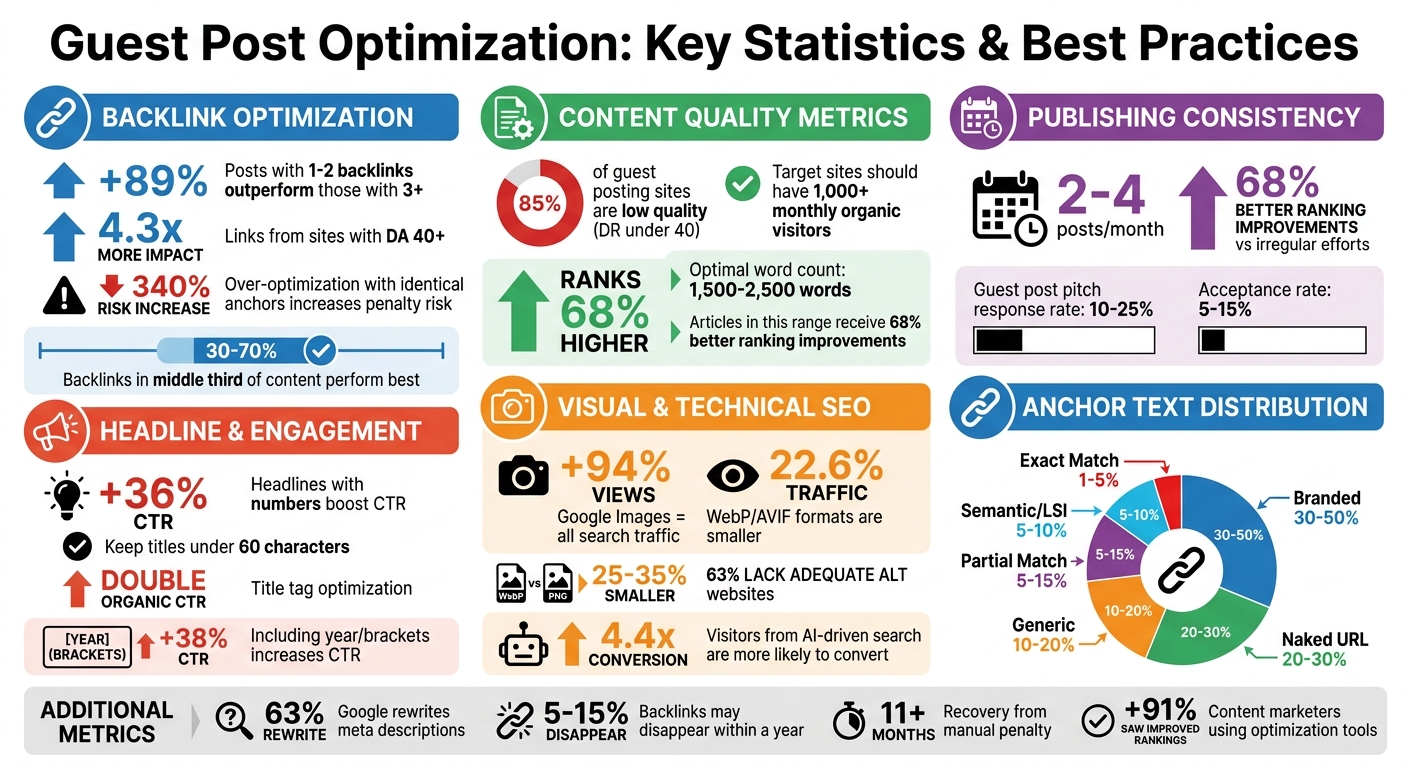
Guest Post Optimization Statistics and Best Practices
5 Proven Guest Blogging Tips to Boost Your SEO (Even If You’re Just Starting Out!)
sbb-itb-88880ed
Research and Planning Your Guest Post Strategy
Before diving into writing, it’s crucial to invest time in research and planning. This phase is all about pinpointing the right host sites, uncovering relevant keywords, and ensuring your content strikes a chord with the target audience. Skipping this step could lead to wasted efforts and limited results.
Why does this matter? Because not all guest posting opportunities are created equal. In fact, around 85% of guest posting sites are considered low quality, often with a Domain Rating (DR) under 40 and fewer than 10,000 monthly organic visitors. These sites won’t do much for your SEO or referral traffic. To make your efforts count, focus on identifying high-value opportunities that align with your goals.
How to Find Quality Host Websites
Finding the right websites to host your guest posts requires careful vetting. Look for sites with authority, an engaged audience, and solid editorial standards.
Start with advanced Google search operators to narrow down your options. Use search strings like:
- "write for us" + [niche]
- inurl:guest-post + [topic]
- intitle:"guest post" + [keyword]
These search operators help you bypass irrelevant results and locate sites actively seeking contributors.
Another effective approach is to perform a competitor backlink analysis using tools like Ahrefs or Semrush. This reverse-engineering method can reveal which sites in your niche are already publishing guest content. If your top competitors are earning links from a particular site, chances are it has a strong audience and solid SEO metrics.
Don’t rely solely on metrics like Domain Authority (DA) or Domain Rating (DR), as these can sometimes be misleading. Instead, check for steady organic traffic – ideally over 1,000 monthly visitors – and ensure the site ranks for meaningful keywords beyond just branded terms. A high DA site with little organic traffic won’t provide much SEO value.
"A DA 40 website perfectly aligned with your niche will typically deliver better results than a DA 70 website with minimal audience overlap." – Posticy
Be cautious of sites with questionable outbound links. If you notice excessive external links or spammy anchors (e.g., gambling, crypto, or pharmaceutical topics), it’s likely a low-quality site. High-quality hosts prioritize editorial integrity and maintain strict standards for external links.
Lastly, review the site’s editorial guidelines. Reputable sites often require well-researched, human-written content (usually 1,500–2,500 words) and include detailed author bios. These elements align with Google’s EEAT (Experience, Expertise, Authoritativeness, and Trustworthiness) framework, which is key for search rankings. Avoid sites that accept all topics without proper vetting or clear style guidelines – they’re unlikely to boost your SEO efforts.
Once you’ve identified quality hosts, it’s time to align your keyword strategy with their content.
Keyword Research for Guest Posts
Effective keyword research ensures your guest post aligns with the host’s content while also supporting your SEO goals.
Start with seed keywords that reflect the host site’s niche or the specific products and services you want to discuss. Use these broad terms to generate related ideas, then focus on long-tail keywords that are less competitive but highly relevant. This strategy allows you to reach a targeted audience without clashing with the host site’s cornerstone content.
Match keywords to the appropriate search intent:
- Informational: For example, "how to optimize guest posts"
- Commercial: Such as "best guest posting tools"
- Transactional: Like "guest posting services"
For instance, if your keyword is "industrial automation", focus on creating informational content like guides or tutorials. If the keyword is "industrial automation software", a commercial approach – such as comparison charts or product reviews – would be more effective.
Use tools like Google’s "People Also Ask" feature and related searches to uncover additional keyword opportunities. Platforms like Reddit, Quora, and YouTube comments can also highlight real-world questions and pain points that traditional tools might overlook. These insights often reveal valuable keywords, even if they show low search volume in standard tools.
A keyword gap analysis can further refine your strategy. Look for terms that the host site’s competitors rank for but the host does not. Targeting keywords where the site ranks on the second page (positions 11+) can help you create content that fills a gap and boosts their SEO performance.
Once you’ve nailed down the right keywords, the next step is tailoring your content to the host site’s audience.
Matching Content to the Host Audience
Even the best keyword-optimized guest post won’t succeed if it doesn’t resonate with the host site’s readers. Understanding and aligning with the audience’s preferences is critical.
Start by reviewing the host website’s existing content. Pay attention to their tone, style, and branding to ensure your post feels like a natural fit. Analyze their top-performing articles to identify popular topics, preferred formats (e.g., listicles, how-to guides, or case studies), and structural patterns. Whether the site leans toward technical jargon or a conversational tone, mirroring their style increases your chances of success.
Evaluate audience engagement by looking at comments, shares, and other indicators. A site that publishes multiple guest posts daily but receives little interaction might not be worth your time.
Follow the site’s editorial guidelines closely. If they specify a word count of 1,500 words or require specific formatting, stick to those requirements. Adhering to their guidelines can significantly improve your acceptance rate – guest post pitch responses typically range from 10% to 25%, while acceptance rates hover between 5% and 15%.
Finally, include internal links to the host site’s existing content within your guest post. This demonstrates that you’ve done your homework and helps search engines see how your post fits into the broader context of their site.
"Guest posting, guest blogging, is like being a guest at someone else’s party – you bring a little something to share, meet new people, and maybe even make some new friends." – Mailchimp
Writing SEO-Optimized Guest Post Content
Once you’ve chosen the right host site and nailed down your keyword strategy, the next step is crafting content that’s both clear and optimized for search engines. Your writing should balance readability with SEO best practices to achieve maximum impact.
Creating Keyword-Rich Headlines and Subheadings
Headlines and subheadings aren’t just for organizing your content – they also signal relevance to search engines and readers. To start, place your primary keyword early in the H1 title tag to clarify your post’s subject. For instance, instead of writing "A Complete Guide to Optimizing Blog Posts for SEO", go with something like "How to Optimize Blog Posts for SEO (2026 Guide)."
Keep your title under 60 characters to avoid truncation in search results. Adding modifiers like "Best", "Guide", "2026", or "Step-by-Step" can also target long-tail keywords and improve click-through rates. Numbers work wonders too – headlines with figures can boost click-through rates by 36%.
Use a logical heading structure throughout your post. Stick to one H1 for the title, H2 tags for main sections (aim for 5–8), and H3 tags for subsections (2–4 per H2). This hierarchy helps search engines understand your content better and increases the likelihood of appearing in featured snippets. Interestingly, visitors from AI-driven search are 4.4 times more likely to convert than those from traditional search.
When crafting subheadings, make them descriptive and keyword-rich. Avoid vague labels like "Step 1" and instead use specific alternatives, like "How to Compress Images for Faster Loading." This approach not only helps readers skim effectively but also improves accessibility for screen readers.
| Heading Level | Purpose | Keyword Usage |
|---|---|---|
| H1 | Main page title (one per page) | Primary keyword (front-loaded) |
| H2 | Major content sections | Primary and secondary keywords |
| H3 | Subsections and supporting details | Secondary and related keywords |
| H4-H6 | Deeply nested sub-subsections | Specific long-tail terms |
These headline strategies set the stage for writing content that engages both readers and search engines.
Writing Quality Content That Engages Readers
To rank well, aim for a word count between 1,500 and 2,500 words. Still, don’t sacrifice quality for length – your content should provide actionable, original insights supported by credible data.
Start with a 100–150 word introduction that grabs attention, establishes your authority, and previews the main points. Make sure to include your primary keyword within the first 100 words.
Keep paragraphs short – 2 to 4 sentences – to ensure readability, especially on mobile devices. Sprinkle in 5–6 key statistics from reliable sources to build trust and authority.
For AI-driven search, consider an "answer-first" approach. Begin sections with a 40–60 word summary that could function as a featured snippet. Additionally, phrasing H2 headings as conversational questions (e.g., "How do I…?" or "What is…?") aligns well with real search queries.
Be mindful with your links. Use 1–2 contextual backlinks per 1,000–1,500 words to avoid triggering spam filters. Including more than three contextual backlinks can increase scrutiny from Google’s algorithms by 340%, and recovering from a manual penalty can take over 11 months.
Once the text is polished, enhance it further with visuals.
Adding Images and Visual Elements
Visuals not only make your content more engaging but also enhance its SEO potential. Posts with images receive up to 94% more views, and Google Images accounts for 22.6% of all search traffic.
Name your image files descriptively with keyword-rich terms separated by hyphens (e.g., guest-posting-workflow-diagram.webp) instead of generic names like IMG_4521.jpg. Use alt text that’s specific and naturally incorporates your target keyword. For example, instead of "diagram", write "guest posting workflow diagram showing five steps from research to publication."
Choose modern image formats like WebP or AVIF, which are 25–35% smaller than JPEG or PNG files without compromising quality. Keep file sizes under 100KB to improve Core Web Vitals, especially Largest Contentful Paint (LCP). Always define width and height attributes to prevent layout shifts, and use lazy loading (loading="lazy") for images below the fold.
"Audits show image optimization delivers the fastest page speed improvements. Switching to WebP and adding proper alt text are two changes that take minutes per image but can improve your LCP score by 40%." – Atilla Kuruk, SEO & AI Search Specialist
For how-to guides, include screenshots or visuals with each step to improve clarity and engagement. Custom graphics and original images can also enhance E-E-A-T (Experience, Expertise, Authoritativeness, and Trustworthiness) and attract backlinks. Considering that 63% of websites lack adequate alt text, optimizing your images is a simple way to stand out.
Optimizing Links and Anchor Text
To build on the earlier discussion about strategic content and keyword placement, fine-tuning your links and anchor text is essential for maximizing SEO results. The effectiveness of a link depends heavily on how naturally and thoughtfully it is integrated into the content.
Placing Contextual Backlinks
For backlinks to appear natural to search engines, aim to place them in the middle third of your content – roughly between the 30% and 70% mark of the total text. Avoid placing links in the opening or closing paragraphs, as search engines may interpret this as promotional intent.
Stick to a guideline of one contextual link per 800–1,500 words. Research shows that guest posts containing just 1–2 backlinks outperform those with three or more by 89% in search rankings. To enhance the relevance of each backlink, surround it with 2–3 concise sentences that explain its importance. Instead of using generic phrases like "click here", incorporate the link into a sentence that provides meaningful context.
Using Varied and Natural Anchor Text
Your anchor text should mimic how people naturally link to content. A balanced anchor text profile can help you avoid penalties for over-optimization. Here’s a breakdown of recommended anchor types and their ideal distribution:
| Anchor Type | Recommended Range | Example |
|---|---|---|
| Branded | 30–50% | "3Way.Social" or "Ahrefs" |
| Naked URL | 20–30% | "https://example.com" |
| Generic | 10–20% | "guide" or "learn more" |
| Partial Match | 5–15% | "tools for guest posting strategy" |
| semantic/LSI keywords | 5–10% | "link building platforms" |
| Exact Match | 1–5% | "guest post optimization" |
Use branded anchors for homepage links, while partial-match or semantic anchors are better suited for deep links to internal pages. Additionally, vary your phrasing across different publications. For instance, if one guest post uses "SEO optimization tools", try alternatives like "ranking improvement platforms" or "search visibility software" in another. This diversity signals to search engines that your links are genuine editorial mentions rather than part of a coordinated effort.
Adding Internal Links to Host Content
When writing guest posts, include internal links to the host site’s key resources. Aim to add 1–2 internal links to their pillar pages or relevant guides within your content. This not only improves the flow of authority across their site but also shows that you’re genuinely contributing value rather than just inserting promotional links.
Find natural ways to reference the host’s existing content. For example, if they have a detailed guide on content marketing and you’re discussing audience research, you might write: "Understanding your target audience’s pain points is crucial before crafting any content strategy", and link to their guide. This strategy strengthens your relationship with the host site and increases the likelihood of future collaborations.
Keep in mind that links in the main body content carry far more SEO weight than those placed in author bios, sidebars, or footers. While it’s fine to include a branded link in your author bio, focus on securing at least one contextual link within the article itself for maximum impact.
Maintaining Relevance and Tracking Results
Publishing a guest post is just the beginning. To keep your SEO efforts on track, you need to ensure the content remains relevant and delivers ongoing value. This means working closely with host site standards, optimizing meta tags, and regularly reviewing performance to fine-tune your strategy.
Aligning Content with Host Site Requirements
Your guest post should blend seamlessly into the host site’s existing content framework. Start by studying their recent articles to understand their preferred tone, word count, and formatting. For example, B2B SaaS sites often favor detailed pieces over 2,000 words, while e-commerce blogs might lean toward posts between 1,200 and 1,800 words. Notably, articles between 1,500 and 2,500 words tend to rank 68% higher.
Choose evergreen topics that remain relevant over time, rather than chasing fleeting trends. Your content should also align with the host site’s topical clusters – the interconnected themes they focus on. This ensures your post fits naturally into their content library. To strengthen this connection, ask the host to link your post to their pillar pages. This not only boosts your post’s visibility but also signals its importance to search engines.
To improve rankings, match your post’s format to the top-performing search results for your topic. For instance, if listicles dominate the top 10 results, structure your post similarly. Adding an FAQ section based on "People Also Ask" queries can capture long-tail keywords and address common questions, increasing your chances of appearing in featured snippets and AI-generated overviews.
Once your content is aligned, optimizing meta tags can further enhance its visibility.
Writing Effective Meta Titles and Descriptions
Meta tags are often the first thing users see in search results, making them crucial for driving clicks. They also play a key role in how AI-driven search engines like ChatGPT and Perplexity evaluate a page’s authority. Your meta tags should complement the keyword and heading strategies you’ve already implemented.
For title tags, aim for 50–60 characters and place your main keyword near the start. Including numbers or brackets, such as “[2026 Update],” can boost click-through rates (CTR) by up to 38%.
"Title tags are the highest-ROI optimization in all of SEO. I have seen sites double their organic click-through rate by simply rewriting title tags with a number, a year, and a clear value proposition." – Atilla Kuruk, SEO & AI Search Specialist
Meta descriptions should be 150–160 characters for desktop and about 120 characters for mobile. Use this space to highlight your value proposition and include a call to action like “Learn how,” “Get started,” or “Read more.” Avoid quotation marks, as Google may cut off the description at the first quote. Keep in mind that Google rewrites meta descriptions around 63% of the time, so craft descriptions that directly address the user’s needs to improve the chances of your snippet being displayed.
Tracking Performance and Adjusting Your Approach
After aligning your content and optimizing meta tags, it’s time to measure how well your guest post is performing. Use tools like Google Analytics with UTM parameters (e.g., ?utm_source=guestpost&utm_medium=blog) to track traffic from specific posts. Monitor referral traffic, engagement metrics, keyword rankings, and conversions to get a complete picture.
Google Search Console can help you confirm link discovery and track keyword ranking changes. Tools like Ahrefs or SEMrush are useful for analyzing backlink profiles and monitoring domain authority. Keep in mind that 5–15% of backlinks may disappear within a year, so set up alerts to recover any lost links.
Conduct quarterly audits of your backlink profile to identify and remove harmful links from questionable sources like link farms. Review which host sites and topics have delivered the best results, and use those insights to plan future guest posts. Consistency matters: publishing 2–4 high-quality guest posts per month can lead to 68% better ranking improvements compared to sporadic efforts.
Tools for Guest Post Optimization
Optimizing guest posts isn’t just about writing great content; it’s about using the right tools to streamline outreach, analysis, and content refinement. These tools can save you hours of manual effort while boosting the effectiveness of your guest posting strategy.
Using 3Way.Social for Link Exchanges and Guest Posting

Traditionally, finding quality guest post opportunities meant a lot of manual work – emailing site owners, negotiating terms, and checking domain authority. 3Way.Social simplifies this process with AI-driven domain matching, connecting you to relevant, high-quality host sites. Its network of SEO professionals ensures you avoid poor-quality links, focusing instead on authoritative domains.
The platform’s ABC link exchange model ensures fair trades based on domain metrics, avoiding lopsided deals. Plus, it provides permanent do-follow links and advanced link diversification, which supports natural anchor text variation – critical for maintaining strong SEO. With pricing starting at $49/month for basic exchanges and $99/month for premium domain matching, 3Way.Social can cut down manual outreach time by up to 70%. That means more time to focus on crafting compelling content.
Analyzing Competitor Guest Post Strategies
Tools like Ahrefs and SEMrush are invaluable for analyzing competitors’ guest posting tactics and uncovering opportunities. For example, Ahrefs’ Site Explorer lets you search for competitors and filter results using terms like "guest post" or "contributed by" to identify where they’ve published. According to SEMrush data from 2024, this approach can uncover twice as many opportunities as manual research.
Metrics like Domain Rating (DR), anchor text usage, and referral traffic are key to evaluating potential sites. If competitors consistently post on domains with a DR above 50, those are good candidates for your strategy, too. Organize these opportunities into categories like "replicate", "improve", or "skip" to prioritize efforts. Notably, Ahrefs has earned a 4.8/5 rating on G2 across more than 2,500 reviews, with users calling it a "game-changer for guest post discovery". Pricing starts at $99/month for Ahrefs Lite, while SEMrush Pro costs $129.95/month.
Once you’ve pinpointed the right opportunities, the next step is ensuring your content is optimized for success.
Content Optimization Tools
Even a well-placed guest post can fall flat without proper content optimization. Tools like Surfer SEO, Clearscope, and Frase help ensure your content aligns with search intent by analyzing top-ranking pages. For example, Surfer SEO calculates a Content Score by comparing your draft to the top 10 results for your target keyword. It evaluates factors like keyword density, latent semantic indexing (LSI) terms, and readability. According to Surfer SEO’s 2024 report, 91% of content marketers saw improved rankings using these tools.
The process is simple: input your target keyword, generate an outline based on top-performing pages, and aim for a Content Score above 90. These tools also help fine-tune headlines, subheadings, and internal links, which are critical for guest post performance. Surfer SEO’s Essential plan starts at $59/month and boasts a 4.7/5 rating on Capterra.
For the best results, combine these tools: use Ahrefs to find opportunities, 3Way.Social to secure placements, and Surfer SEO to optimize your content. This multi-tool approach ensures your guest posting efforts are efficient and impactful.
Conclusion
Guest posting remains a powerful way to build your brand’s authority and secure high-quality backlinks that can improve your organic search rankings. The key isn’t about publishing as many posts as possible – it’s about focusing on reputable, niche-specific websites and creating content that genuinely resonates with their audience.
To make the most of your efforts, start by identifying top-tier prospects using targeted search techniques. Craft personalized guest post pitches that highlight how your content will benefit their readers. Once accepted, focus on keyword research and SEO-friendly content to meet both search engine standards and the host site’s editorial guidelines. Place contextual links naturally within the content, use varied anchor text, and leverage your author bio to enhance your professional image. These steps set the stage for meaningful results.
After your post goes live, amplify its reach by sharing it on social media and through email campaigns to attract readers and drive traffic. Monitor performance metrics like views, conversions, and backlink quality to evaluate success and fine-tune your approach for future opportunities. This methodical, data-driven approach ensures your guest posting efforts yield lasting benefits rather than short-lived wins.
FAQs
How do I pick guest post sites that are actually worth it?
When selecting guest post sites, aim for relevance and authority. Look for niche-specific, high-quality websites that reflect expertise, authoritativeness, and trustworthiness (E-E-A-T). Choosing sites closely tied to your industry ensures your backlinks come from credible sources. This focused strategy not only boosts your SEO but also helps your content perform better in search rankings.
What’s the safest anchor text mix for guest post backlinks?
The safest way to approach anchor text is by focusing on naturalness and variety. This helps you steer clear of over-optimization penalties. Here’s a balanced breakdown:
- Branded anchors: Make up 20-35% of your links. These include your brand name or variations of it.
- Naked URLs: Account for 8-20%. These are plain URLs without any additional text.
- Generic or related keywords: Should cover 12-35%. These are broad terms or phrases relevant to your content.
- Exact match keywords: Keep these under 5% to avoid appearing spammy.
This mix follows SEO best practices, creating a natural link profile and minimizing the chances of penalties.
How can I measure if a guest post improved my rankings?
To figure out if a guest post has boosted your rankings, keep an eye on your backlink profile and search visibility over time. Tools like Google Search Console can help you analyze anchor text distribution and the relevance of the backlinks you’ve gained.
Also, compare your keyword rankings before and after the guest post goes live to spot any noticeable shifts. Performing regular audits of these metrics will give you a clearer picture of how your guest posting efforts are influencing your search performance.