Last Updated on May 23, 2026 by Ian Naylor
One weak password can destroy months of SEO work. For SEO professionals managing tools like Google Analytics, Search Console, and ad accounts, the stakes are high. Cyberattacks are evolving, with 22% of breaches in 2025 linked to stolen credentials. Two-factor authentication (2FA) is your best defense, blocking over 99.9% of automated attacks.
Key Takeaways:
- What is 2FA? It requires two forms of ID to log in, like a password and a code from your phone.
- Why it matters: SEO accounts are prime targets for phishing, de-indexing, and data theft.
- Best methods: Use FIDO2 hardware keys or passkeys for critical accounts like domain registrars and CMS platforms.
- Team security: Enforce 2FA for all users, audit access regularly, and secure shared logins.
2FA isn’t just an extra step – it’s the line between security and disaster. Start with your email and high-risk accounts, and ensure your team follows suit. Your clients trust you with their digital assets – don’t let a breach ruin that trust.
Think 2FA Is Bulletproof? Here’s Why You’re Still Vulnerable
sbb-itb-88880ed
What is Two-Factor Authentication (2FA)?
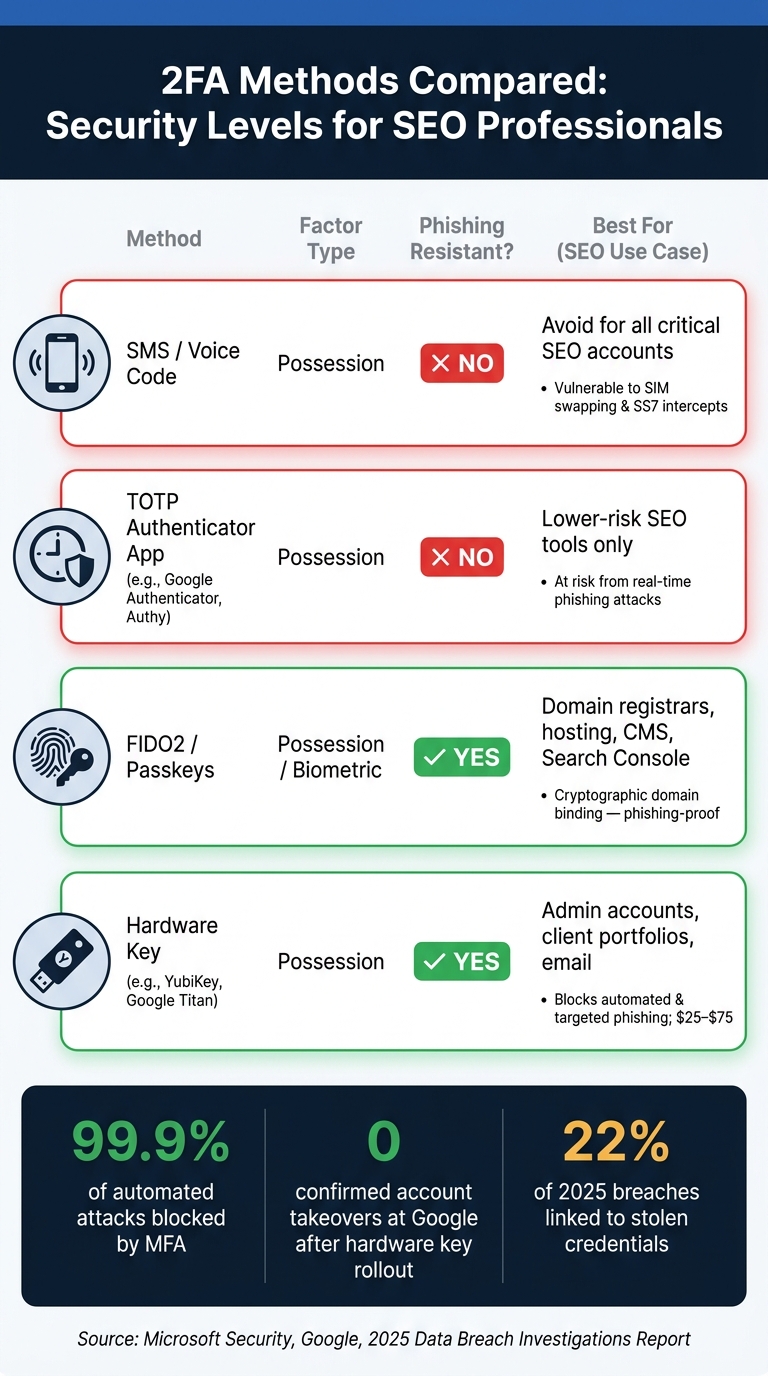
2FA Methods Compared: Security Levels for SEO Professionals
Two-factor authentication (2FA) adds an extra layer of security by requiring two separate forms of identification to access an account. Think of it like a safe-deposit box where you need two keys: one you know (like your password) and one you have (such as a phone or hardware key) or are (like a fingerprint or facial recognition).
To clarify, 2FA is a subset of multi-factor authentication (MFA). While MFA can involve two or more factors, 2FA specifically uses exactly two.
How 2FA Works
Setting up 2FA involves registering a second factor. Once activated, you’ll log in by entering your password and then confirming your identity with a second factor – this could be a six-digit code from an app, a hardware key tap, or even a biometric scan.
Not all second factors are equally secure. Here’s a quick breakdown of common methods and their strengths:
| Method | Factor Type | Phishing Resistant? | Notes |
|---|---|---|---|
| SMS/Voice Code | Possession | No | Vulnerable to SIM swapping and SS7 intercepts |
| TOTP App (e.g., Google Authenticator, Authy) | Possession | No | Safer than SMS but still at risk from real-time phishing attacks |
| FIDO2/Passkeys | Possession/Biometric | Yes | Uses cryptographic domain binding, making it phishing-proof |
| Hardware Key (e.g., YubiKey) | Possession | Yes | Extremely secure; prevents both automated and targeted phishing |
FIDO2 and passkey methods stand out due to domain binding, which ensures authentication is tied cryptographically to the legitimate website. Even if you’re tricked into visiting a fake login page, the verification won’t work unless it’s the correct domain.
Why SEO Professionals Are Adopting 2FA
For SEO professionals handling high-stakes accounts – like Search Console or domain registrars – security is non-negotiable. A single compromised login can lead to massive ranking losses or even data theft. This is why 2FA has become a go-to security measure in the industry.
The stats speak for themselves: enabling MFA can block 99.9% of automated account hacks. For example, after Google mandated hardware security keys for its 85,000+ employees in 2017, it reported zero confirmed account takeovers.
"We have had no reported or confirmed account takeovers since implementing security keys at Google." – Google Spokesperson
Starting with free authenticator apps like Google Authenticator, Microsoft Authenticator, or Authy is a practical option. But for critical accounts – like domain registrars or administrative access – hardware keys such as YubiKey (priced between $25 and $70) provide unmatched security. As OWASP aptly states, "Any MFA is better than no MFA".
Security Risks SEO Professionals Face
SEO professionals handle sensitive digital assets like search rankings, client websites, analytics, and ad accounts. These assets make them attractive targets for cyberattacks, as compromising them can yield significant rewards for attackers.
Common Cyber Threats in SEO Work
Cyber threats have advanced far beyond simple password theft. One of the most dangerous methods today is Adversary-in-the-Middle (AiTM) phishing. This tactic uses a proxy server to intercept both login credentials and two-factor authentication (2FA) codes in real time, giving attackers immediate access to accounts.
Another growing threat is search ad poisoning. In January 2026, a malvertising campaign on Google Search impersonated Ahrefs using fake sponsored ads hosted on platforms like Squarespace and surge.sh. Push Security detected this attack, which exploited AiTM techniques to steal session cookies and target Google Ad Manager accounts.
Adding to the problem is the Tycoon2FA phishing kit, which played a role in 62% of phishing attacks blocked by Microsoft by mid-2025.
"The attacker’s job is to find a credential whose blast radius is many orders of magnitude larger than the cost of phishing it." – Gblock.app
SEO agencies face additional risks from centralized management platforms. In May 2026, attackers launched a campaign called "WrongPress", using fraudulent Google Ads to mimic the ManageWP login page. This breach compromised 200 accounts, endangering tens of thousands of WordPress sites. Since each ManageWP account typically oversees hundreds of sites, the attackers were able to inject malicious plugins and steal data at scale.
These sophisticated tactics not only compromise security but can also directly harm SEO performance.
How Security Breaches Hurt SEO Performance
When attackers gain access to a Search Console account, the damage can be swift and severe. They might submit bulk URL removal requests, delete sitemaps, or revoke ownership access. These actions can cause pages to vanish from Google’s index within days, and recovering from such incidents can take weeks or even months.
Beyond de-indexing, attackers often turn compromised sites into spam hubs. They inject hidden content like pharmaceutical keywords, foreign-language spam, or links to malicious sites. Using cloaking, they serve normal content to human visitors while search engines see the spam. These infections, known as the "Japanese Keyword Hack" and "Pharma Hack", can remain undetected for months, gradually eroding the site’s domain authority. They may also lead to severe penalties, either manually applied or algorithmic.
The fallout isn’t limited to search rankings. Around 75% of visitors abandon a site immediately after encountering a browser security warning. On top of that, AI-driven tools like ChatGPT and Perplexity actively exclude domains flagged for security issues from their citation databases. This means a breach can not only harm your Google rankings but also remove your site from AI-powered discovery tools.
"The most expensive part of a website breach is not the IT cleanup. It’s the months of lost marketing-sourced revenue while search engines and AI answer engines decide whether to trust you again." – Liam Dunne, Growth Marketer, Discovered Labs
For agencies managing multiple clients, a single compromised management account can have devastating consequences. It can expose entire client portfolios – sometimes involving dozens or hundreds of websites – leading to broken client trust and long-term reputational damage.
These risks highlight the importance of integrating 2FA into SEO workflows to protect both accounts and reputations.
How 2FA Protects SEO Accounts and Workflows
The risks to SEO accounts and workflows are real, but two-factor authentication (2FA) provides a strong defense. Multi-factor authentication (MFA) blocks the majority of account compromise attempts, making it an essential layer of security for managing SEO assets. Let’s explore how 2FA helps safeguard high-risk accounts and team workflows.
Protecting High-Risk Accounts with 2FA
Some accounts are more critical than others. For example, your email account is often the gateway to everything else – domain registrars, hosting providers, CMS platforms, and analytics tools. If attackers compromise your email, they can reset passwords for nearly every connected account. That’s why securing your email with 2FA should always come first.
Once email is protected, focus on other high-priority accounts like domain registrars, web hosting, CMS platforms (e.g., WordPress or Shopify), and tools like Google Search Console and Analytics. But it’s not just about enabling 2FA – it’s about choosing the right method. Here’s a breakdown of how different 2FA options stack up for these critical accounts:
| 2FA Method | Phishing-Resistant? | High-Risk Account Suitability |
|---|---|---|
| SMS Code | No | Minimal protection; avoid for critical accounts |
| Authenticator App (TOTP) | No | Acceptable for lower-risk SEO tools |
| Push Approval | Partial | Suitable if number matching is enabled |
| FIDO2 / Passkey | Yes | Best choice for domain registrars, hosting, CMS, and Search Console |
Why does this matter? A breach in any of these high-risk accounts can lead to ranking drops, de-indexing, or stolen data – issues that can take months to resolve. For accounts with admin-level access to client data or production systems, hardware security keys like YubiKey or Google Titan (priced around $25–$75) offer unmatched protection. Google’s own experience proves their value:
"We have had no reported or confirmed account takeovers since implementing security keys at Google." – Google Spokesperson
While protecting individual accounts is critical, team workflows present their own challenges.
Keeping Team-Based SEO Workflows Secure
Team environments bring a unique risk: shared access. Whether it’s a CMS, an analytics tool, or an SEO platform like 3Way.Social, shared logins mean that a single compromised password can jeopardize the entire account. This is where 2FA becomes indispensable, ensuring that a leaked or reused password alone isn’t enough to grant access.
To protect team workflows, enforce 2FA for all users – not just individuals. Regularly audit active sessions and remove access for former team members or contractors. These practices not only secure your operations but also build client confidence. Clients need to know their assets are safe in your hands. As Alex Fischer, Tech Lead & Automation Architect at Tareno, explains:
"If a social account matters to your brand or revenue, password-only access is not enough."
For teams managing multiple client accounts, FIDO2 authentication provides the strongest defense against phishing. A real-world example? In 2022, Cloudflare successfully thwarted an advanced phishing campaign that breached other major tech companies, including Twilio. Their secret? Requiring FIDO2 hardware keys and disabling weaker MFA methods.
How to Add 2FA to Your SEO Workflow
Which Accounts to Secure First
Start with your email. It’s the gateway to everything else, so securing it should be your top priority. Next, lock down your domain registrar and hosting accounts. These are critical because a breach here can bring down entire client websites. Brian Jackson from Kinsta emphasizes this point:
"Security starts with the basics… one of [the] recommendations is to enable two-factor authentication."
After securing your email and hosting, focus on your CMS. With WordPress powering 61.7% of the market, it’s a frequent target for attacks. Then, move on to tools like Ahrefs, which hold sensitive data like backlink profiles and technical SEO site audits. Finally, secure your social media and ad accounts, as these directly impact revenue if compromised.
Once your own accounts are protected, ensure your team follows the same practices to safeguard shared resources.
Making 2FA Work Across a Team
Require 2FA for everyone on your team. For tools like Ahrefs, workspace owners can enforce this by enabling the "Require two-factor authentication" option for all users, including guests.
For shared accounts, consider scanning the QR code on multiple devices or storing the secret seed securely in a team vault. This ensures no single person becomes a bottleneck for access. Password managers like Bitwarden or 1Password can securely share TOTP codes among team members.
Always save backup codes immediately after enabling 2FA. Store them in a password manager or, for highly sensitive accounts, in a secure physical location. As Andrey Kirillov from the Ahrefs Help Center advises:
"We will prioritize the security of your account over the ease of access recovery."
Solving Common 2FA Problems
Lost your phone? Backup codes are your fastest way back into accounts. If you’re part of a team, a workspace admin can reset 2FA for you. For personal accounts, a secondary trusted device that’s still signed in can often verify your identity. Just like with team accounts, make sure your personal recovery options are solid.
If your authenticator app’s codes aren’t working, check your device’s date and time settings. Enable "Set Automatically", as TOTP codes rely on precise timing, and even a small discrepancy can cause them to fail.
For added convenience, choose an authenticator app with encrypted cloud backup, like Authy or the latest version of Google Authenticator. These allow you to recover codes on a new device without starting over. But steer clear of using Google Voice numbers for 2FA. If you lose access to your Google account, you might also lose access to Voice, making recovery nearly impossible.
How 2FA Supports SEO Continuity and Client Trust
Reducing Downtime from Security Incidents
SEO accounts are critical to daily operations. Platforms like Search Console, Analytics, CMS, and ad tools are deeply interconnected. If one account gets hacked, the disruption can ripple through, halting publishing schedules, breaking reporting systems, and freezing paid campaigns simultaneously.
Two-factor authentication (2FA) acts as a barrier against stolen credentials, reducing the risk of downtime. Microsoft highlights that multi-factor authentication (MFA) decreases account compromise risk by over 99.9%. That’s not just a small improvement – it’s the difference between narrowly avoiding disaster and facing a complete operational shutdown. For example, hardware security keys offer strong protection against phishing attacks, making them ideal for safeguarding high-value accounts like domain registrars or primary email addresses.
"MFA can block over 99.9 percent of account compromise attacks." – Melanie Maynes, Microsoft Security
By preventing security breaches, 2FA not only keeps workflows running smoothly but also bolsters trust in your ability to manage sensitive accounts.
Building Client Confidence Through Secure Practices
Keeping systems secure is essential for maintaining client trust. When clients grant access to their critical tools, consistent use of 2FA shows that you prioritize their security. Whether it’s your email, SEO tools, or platforms like 3Way.Social that manage campaign data, using 2FA demonstrates a commitment to safeguarding their assets.
Trust is everything. According to the 2025 Data Breach Investigations Report, stolen credentials were the starting point in 22% of analyzed breaches. If a client’s backlink campaign or Search Console access is compromised, the consequences go beyond lost rankings – they lose faith in you. Implementing 2FA across your workflow is a straightforward way to show you’re serious about protecting their business.
"If a social account matters to your brand or revenue, password-only access is not enough." – Alex Fischer, Tech Lead & Automation Architect, Tareno
Google’s own success story underscores this point. After introducing mandatory hardware security keys for all 85,000+ employees in early 2017, the company reported zero confirmed account takeovers in the following period. That level of security doesn’t just protect internal operations – it also strengthens the trust of clients who rely on your expertise.
Conclusion: Making 2FA Part of Your SEO Security Plan
The argument for using 2FA couldn’t be clearer. In 2025, stolen credentials were the root cause in 22% of analyzed breaches. SEO accounts – like Search Console, CMS platforms, ad tools, and analytics – are prime targets for attackers. A single breach could wipe out months of hard work.
Start by securing your primary email, then safeguard critical accounts using authenticator apps or hardware keys. These measures can stop most attacks in their tracks. Yet, according to recent data, only 28% of Americans currently use 2FA on any account. This indicates many SEO professionals are leaving themselves exposed to potential threats.
"The biggest mistake is not choosing the imperfect method. It is choosing no second factor at all." – Tareno Blog
This quote highlights how crucial it is for SEO professionals to make 2FA part of their routine security practices.
If you oversee a team or manage client accounts on platforms like 3Way.Social, the stakes are even higher. Steps like auditing team access regularly, storing backup codes offline, and transitioning from SMS to FIDO2 keys or passkeys can strengthen your defenses and maintain client trust.
With phishing tactics evolving – AI-generated phishing attempts now boast a 54% click-through rate compared to 12% for traditional methods – staying proactive is essential. 2FA isn’t just a one-time fix; it’s a habit that helps you keep up with an ever-changing threat landscape. By integrating 2FA into your SEO workflow, you can protect your clients, secure your hard work, and stay ahead in a rapidly shifting digital world.
FAQs
Which SEO accounts should I secure with 2FA first?
Securing your most important accounts should be your first step. Focus on accounts like your primary email, banking platforms, and any social media profiles tied to publishing, ads, or administrative controls. These are often prime targets for unauthorized access, so they should be at the top of your list for enabling two-factor authentication (2FA).
What’s the safest 2FA method for domain and CMS access?
A hardware security key that supports FIDO2/WebAuthn is the most secure method for two-factor authentication (2FA) when accessing domains and content management systems (CMS). This approach provides phishing-resistant, domain-specific authentication, making it immune to phishing attacks. With this added layer of security, your accounts and sensitive work are far better protected.
How do I handle 2FA for shared team logins?
When handling two-factor authentication (2FA) for shared team accounts, it’s crucial to prioritize security and efficiency. The best approach is to use a team-based 2FA tool equipped with features like access control, instant revocation, and audit logs. These tools allow you to manage access securely without compromising sensitive information.
Avoid risky practices like sharing static QR codes or screenshots of 2FA keys. Instead, opt for a centralized, encrypted platform to store and manage 2FA codes. This ensures that only authorized team members can access them.
To keep things running smoothly, make sure to document access procedures clearly. Regularly audit who has access, and if a team member leaves, revoke their access immediately. These steps help maintain a secure and efficient workflow for your team.