Last Updated on March 10, 2026 by Becky Halls
Negative SEO happens when competitors use bad links to harm your site’s rankings. These links often come from spammy websites and can trigger penalties from Google, leading to traffic drops of 50%-90%. Over 422,000 sites faced such attacks in 2024 alone.
Here’s how to protect your site:
- Spot attacks early: Use tools like Ahrefs or Semrush to monitor backlinks for sudden spikes or toxic links.
- Audit backlinks: Check for spammy links, overused anchor text, or unusual domains.
- Remove harmful links: Contact webmasters or use Google’s Disavow Tool.
- Prevent future attacks: Monitor new backlinks, build quality links, and secure your site with SSL and updates.
Quick action and a strong backlink profile can safeguard your rankings and reputation.
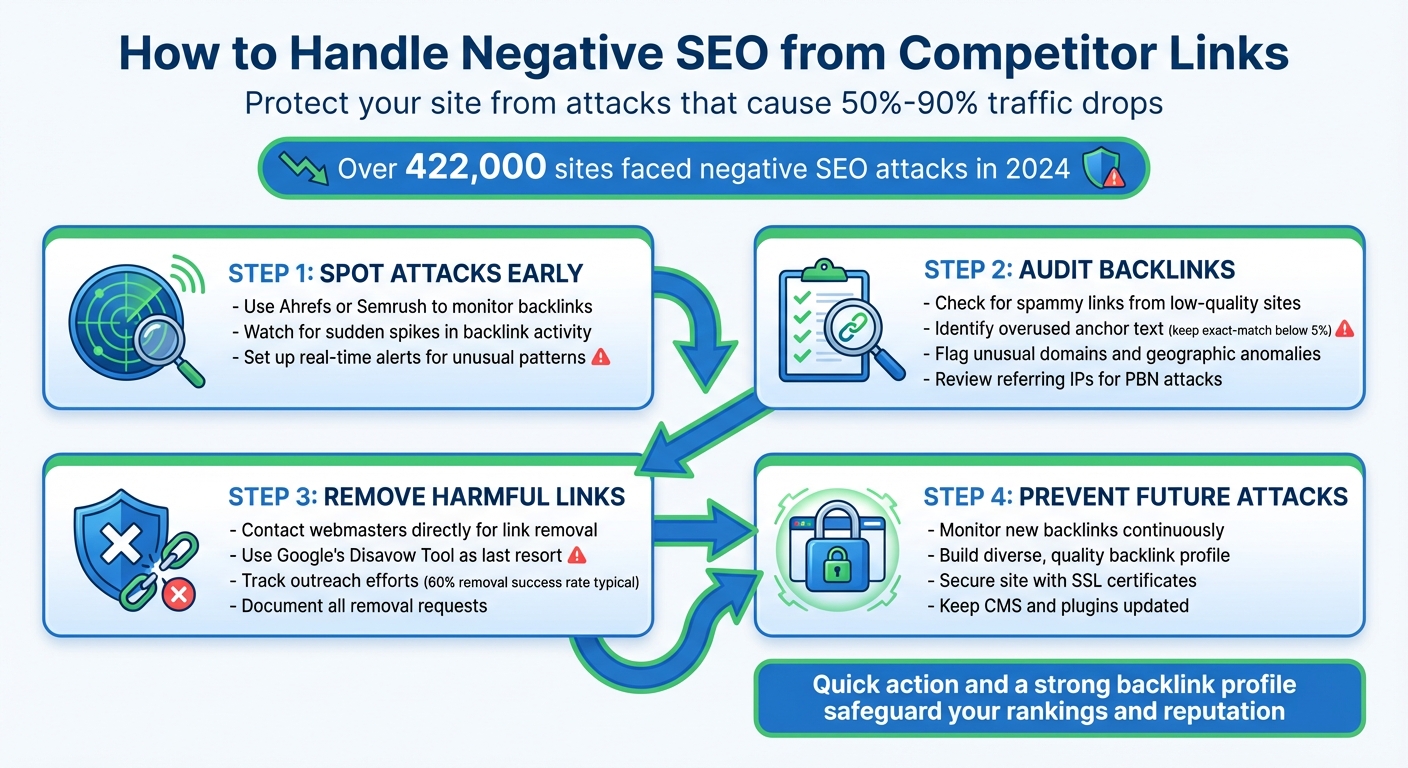
4-Step Process to Protect Your Site from Negative SEO Attacks
Negative SEO Tactics That Still Work in 2023
sbb-itb-88880ed
How to Identify Negative SEO Attacks
Spotting negative SEO early is crucial to protect your site’s rankings and avoid long recovery periods. By staying vigilant, you can address issues before they spiral out of control.
Track Your Backlink Activity
Keeping an eye on your backlink profile is your first line of defense. Use tools like Ahrefs or Semrush to set up real-time alerts, so you’re notified of any unusual activity.
Be on the lookout for sudden spikes in backlinks. For instance, if your site usually gains 10–20 new referring domains each month but suddenly sees over 500 links appear in a single weekend, that’s a major warning sign. In January 2026, a financial services company experienced this exact scenario, noticing a sharp rise in low-quality directory links that coincided with a 40% drop in organic visibility. Catching anomalies like these early can save you from lengthy recovery efforts.
Make it a habit to review Google Search Console’s “Links” and “Security & Manual Actions” reports on a weekly basis. These reports can help you spot issues before they escalate.
Lastly, evaluate the quality of your new links. Not all backlinks are helpful – some can actively harm your SEO.
How to Spot Toxic Links
Certain backlinks can damage your site’s rankings. Pay attention to links from sites with thin content, excessive pop-ups, or missing contact details. Links from irrelevant industries are another red flag – for example, a gambling website linking to a children’s education blog.
Anchor text ratios are another key indicator. Keep exact-match keyword anchors below 5% of your total anchor text. One ecommerce retailer learned this the hard way when they were hit with over 1,000 spammy backlinks from adult content and pharmaceutical sites. These links used over-optimized anchor text matching their main keywords, leading to a Google manual action. It took them 45 days to recover their rankings.
Other red flags include geographic and domain anomalies. A sudden influx of links from unusual Top-Level Domains (TLDs) like .xyz, .top, or .asia, especially with foreign-language anchor text, could signal automated spamming. Similarly, if many new referring domains share the same IP subnet, it might indicate a Private Blog Network (PBN) attack.
| Warning Sign | What to Check | Tool to Use |
|---|---|---|
| Sudden Traffic Drop | Performance Report | Google Search Console / GA4 |
| Backlink Spike | New Backlinks Alert | Ahrefs / Semrush |
| Spammy Anchor Text | Anchors Report | Ahrefs Site Explorer |
| Manual Penalty | Manual Actions Tab | Google Search Console |
| PBN Links | Referring IPs Report | Ahrefs / Semrush |
Marie Haynes, Founder of Marie Haynes Consulting, advises: “I would still disavow links if… you see a drop in traffic that coincides with the onslaught of links and there is no other explanation for the drop”.
How to Audit Your Backlink Profile
Once you’ve identified suspicious links, the next step is performing a thorough audit to assess their potential risks. This process helps you quantify harmful links and decide on the best course of action.
Tools for Backlink Analysis
Start with Google Search Console (GSC). It provides a list of links that Google has indexed. However, GSC doesn’t show every backlink, so it’s smart to pair it with third-party tools for a more complete picture.
Here’s a breakdown of some popular tools and what they offer:
- Semrush: Tracks over 43 trillion links and uses more than 50 risk indicators to calculate a Toxicity Score (ranging from 0–100).
- Ahrefs: Monitors over 30 trillion links and is especially good at identifying sudden spikes in referring domains.
- Moz: Features a database of about 40.7 trillion links and includes a Spam Score to predict if a domain might face penalties.
| Tool | Database Size | Key Metric | Starting Price | Best For |
|---|---|---|---|---|
| Google Search Console | Google’s index | Manual Actions | Free | Official penalty notifications |
| Semrush | 43 trillion+ | Toxicity Score | $139.95/month | Comprehensive risk assessment |
| Ahrefs | 30 trillion+ | Domain Rating | $129/month | Tracking link velocity spikes |
| Moz | 40.7 trillion+ | Spam Score | $39/month | Budget-friendly audits |
Using multiple tools ensures you don’t miss backlinks that one platform might overlook. For example, in 2023, a site migration audit that corrected 404 errors and fixed redirects resulted in doubling monthly traffic within three months. With this data in hand, you can classify backlinks based on their risk levels.
How to Categorize and Prioritize Risky Links
Divide harmful backlinks into three categories: Remove (highest priority), Disavow (when removal isn’t possible), and Monitor/Whitelist (low-risk or natural links).
Pay special attention to do follow links with a Toxicity Score of 60–100, links from low-authority domains, or links that seem irrelevant to your content. Watch out for patterns like multiple links from the same IP address, which could signal manipulative practices. Additionally, review anchor text ratios – overuse of exact-match, high-volume keywords is often a red flag.
“Whether you like it or not, every site is accountable and responsible for all inbound links pointing at it.”
– Modestos Siotos, Technical SEO Director, iCrossing UK
Focus on links targeting your most important “money pages”, as these are more vulnerable to algorithmic penalties. Before wrapping up your audit, re-crawl the collected links to confirm they’re still active and returning a 200 OK status. This final step ensures your audit results are accurate and actionable, paving the way for effective removal or disavowal strategies.
How to Remove or Disavow Harmful Links
Dealing with harmful backlinks is a key step in protecting your website from negative SEO. The process involves two main actions: requesting link removal directly from webmasters and disavowing any links that can’t be removed.
Contact Webmasters to Request Link Removal
Start by exporting a list of toxic backlinks into a spreadsheet. Then, gather contact details for the site owners. You can find this information on the “Contact Us” page, social media profiles, WHOIS records, or by using tools like Hunter.io.
When reaching out, use an email address tied to your domain (e.g., yourname@yourdomain.com). Why? Because over half of link removal requests sent from generic email domains are ignored by webmasters. Keep your message short and professional. Be specific about the URL on their site and the page on your site it links to. Always request a complete removal of the link rather than just adding a “nofollow” attribute.
“If you are planning on conducting a link removal request program, you must send all emails from an address with a corresponding @domain.”
– Neil Patel, Co-founder, KISSmetrics
Track your outreach efforts in a spreadsheet, noting dates, contacts, and outcomes. For example, one website successfully removed 120 out of 200 toxic links (60%) through manual outreach before using the disavow tool for the rest. If a webmaster asks for payment to remove a link, don’t pay. Instead, document the request and include the link in your disavow file.
If manual removal isn’t possible or doesn’t yield results, move on to disavowing the remaining harmful links.
How to Create and Submit a Disavow File
For links that can’t be removed, Google’s Disavow Tool comes into play. Create a plain text file (.txt) encoded in UTF-8 or 7-bit ASCII, listing one URL or domain per line. To disavow an entire domain, use the “domain:” prefix. For example, domain:spammysite.com will block all links from that domain, including subdomains.
Here’s a quick breakdown of the syntax:
| Entry Type | Syntax Example | What It Does |
|---|---|---|
| Individual URL | https://spam.com/page1.html |
Ignores only that specific page |
| Entire Domain | domain:spammysite.com |
Ignores every link from that domain |
| Comment | # Added Feb 2026 |
Internal note (ignored by Google) |
Keep a backup of your file, as uploading a new one will overwrite any previous submissions. The file can include up to 100,000 lines and must not exceed 2MB. To submit it, use a URL-prefix property in Google Search Console, as the tool doesn’t work with Domain properties.
Once submitted, processing can take a few weeks, and it may take several months to see improvements in rankings. Remember, disavowed links will still appear in your Search Console Links report even after they’ve been processed.
“This is an advanced feature and should only be used with caution. If used incorrectly, this feature can potentially harm your site’s performance in Google Search results.”
– Google Search Central
The disavow tool is a last resort. Google’s algorithms already ignore most low-quality links automatically. It’s best reserved for situations like manual actions for “unnatural links” or when dealing with a large influx of spam that automated systems might miss.
How to Prevent Future Negative SEO Attacks
Preventing negative SEO attacks starts with proactive monitoring and building a strong foundation of quality backlinks. Once harmful links are removed, staying vigilant is key to protecting your rankings.
Set Up Alerts for New Backlinks
Real-time alerts can help you catch suspicious backlink activity early. Tools like Ahrefs Backlink Alerts allow you to set up daily notifications for new backlinks, making it easier to identify potential threats as they arise by checking for backlinks.
Keep an eye out for unusual spikes in referring domains or backlinks. These could signal link farming or other malicious activities. Monitoring “Lost Backlinks” is equally important, as it helps detect unauthorized removal attempts where competitors may target your strongest links. For automated monitoring, Semrush’s Backlink Audit tool offers scheduled recrawls (weekly or monthly) and email alerts for changes in your link profile’s toxicity.
| Alert Type | Purpose | Tool Example |
|---|---|---|
| New Backlinks | Spot sudden increases in spammy or low-quality links | Ahrefs, Similarweb |
| Lost Backlinks | Identify fake removal requests or lost authority | Ahrefs, Semrush |
| Ranking Drops | Detect algorithmic penalties or site hacks | Semrush Position Tracking |
| Brand Mentions | Catch smear campaigns or fake negative reviews | Semrush Brand Monitoring |
Review these alerts for red flags like unusual TLDs or keyword-heavy anchor text. It’s also worth analyzing referring IP addresses to spot Private Blog Network (PBN) attacks, which often involve clusters of links from the same subnet.
By staying aware, you can catch issues early and maintain a resilient backlink profile.
Build a Strong Backlink Profile with 3Way.Social
A strong backlink profile is your best shield against negative SEO attacks. When your site has a diverse mix of high-quality, editorial links, it becomes less vulnerable to the effects of spammy backlinks.
3Way.Social offers a solution for creating a robust and varied backlink network. Using AI-powered domain matching, the platform connects you with vetted websites in your niche, ensuring that the links you acquire are relevant and trustworthy. With features like permanent do-follow links and advanced link diversification, you can build a balanced backlink profile that minimizes the impact of toxic links.
“Long-term SEO stability comes from earning relevant, editorial backlinks that reflect genuine authority and trust, not from constant cleanup.”
– Carlos Silva, Content Marketer, Semrush
The platform also includes quality control filters to help you avoid risky patterns, such as IP clustering, irrelevant anchors, or exact-match “money” anchor text. By focusing on relevance and editorial standards, 3Way.Social helps you build a resilient link profile that can withstand competitor attacks.
Diversify Your Link Sources
Expanding your backlink sources is another effective way to protect against future attacks. Aim to acquire links from a wide range of reputable sources, such as:
- Local chambers of commerce
- Industry directories
- Trusted news outlets
- Educational institutions
Creating high-quality, well-researched content and educational blog posts can naturally attract backlinks, reducing the need to purchase them. Google’s Penguin 4.0 algorithm, integrated into the core in 2016, works in real time to devalue spammy links without penalizing entire websites. This makes a diversified and natural backlink profile even more important.
“A strong SEO foundation acts as natural protection against many negative SEO tactics.”
– Saloni Kohli, Content Strategist, Writesonic
Beyond link-building, take steps to secure your site. Use SSL certificates, regularly update your CMS and plugins, and implement security headers to prevent hackers from injecting spammy links. Adding self-referencing canonical tags on all pages can also help protect against content scraping and fake URL parameter attacks.
Conclusion
Negative SEO attacks are no small issue, with over 422,000 sites affected in 2024 alone. To protect your site, it’s crucial to stay vigilant. Regularly monitor your backlink profile using tools like Ahrefs or Google Search Console. A monthly review can help you catch toxic links early. Setting up real-time alerts for new backlinks is another smart move to detect suspicious activity before it harms your rankings. If you identify harmful links, request their removal, and if that doesn’t work, carefully use Google’s Disavow Tool as a last resort.
“Time is the most powerful factor in minimizing or eliminating damage from an attack.” – Hilary Bird, SEO Specialist
Once you’ve dealt with immediate threats, it’s time to focus on prevention. Diversify your backlink profile with high-quality, authoritative links. This not only strengthens your site but also makes it more resistant to spam attacks. Platforms like 3Way.Social offer AI-powered tools to match your site with trustworthy domains and establish permanent, relevant backlinks. Beyond backlinks, keep your CMS and plugins updated, use strong passwords, and secure your site with SSL certificates to guard against link injection hacks.
Thanks to Google’s Penguin 4.0 algorithm, spam links are now devalued rather than leading to site-wide penalties. A strong and diverse backlink profile can dilute the impact of toxic links, keeping your rankings intact. By combining quick detection, effective removal, and preventive strategies, you can shield your site from negative SEO and maintain its long-term performance.
FAQs
How can I tell if a backlink spike is a negative SEO attack?
Monitoring your backlink profile is crucial to protecting your site’s rankings. Be on the lookout for sudden surges in low-quality or irrelevant links, especially those coming from questionable domains. These can damage your rankings or even lead to manual penalties.
To identify potential negative SEO attacks, keep an eye out for patterns of spammy or unnatural links that appear out of nowhere. Using specialized tools to evaluate link quality can help you detect spikes in harmful or manipulative backlinks, allowing you to take action before they cause serious harm.
When should I use Google’s Disavow Tool instead of ignoring spam links?
If you’ve been hit with a manual penalty for “unnatural links” or suspect harmful backlinks are dragging down your search performance – and you can’t remove them yourself – Google’s Disavow Tool might be your best option. Here are the key scenarios where using it makes sense:
- You’ve received a manual penalty or warning from Google.
- You’ve been involved in link schemes that break Google’s rules.
- Your site has accumulated a large number of spammy backlinks, potentially triggering Google’s spam detection systems.
In most cases, Google’s algorithms are designed to ignore low-quality links automatically, so using the tool isn’t always necessary unless manual intervention is explicitly required.
How long does it take to recover rankings after a negative SEO link attack?
Recovering your rankings after a negative SEO link attack can be a lengthy process, often taking 3 to 6 months or more. The timeline largely depends on how severe the attack was and the steps you take to address it. Key factors include identifying and disavowing harmful links as well as working to improve the overall quality of your backlink profile.