Last Updated on January 23, 2026 by Becky Halls
Internal linking is one of the most effective ways to improve your website’s SEO. It helps search engines discover and index your content, distributes ranking authority across your site, and improves user navigation. Here’s a quick summary of the key points:
- Boost Crawlability: Ensure every important page is within 3 clicks from the homepage. Use tools like Screaming Frog or Semrush to identify deep or orphaned pages.
- Anchor Text Optimization: Use descriptive, keyword-rich anchor text that matches the linked content. Avoid overusing exact-match keywords to keep links natural.
- Logical Site Structure: Organize content using a pyramid structure with pillar pages linking to related cluster pages. Keep link depth shallow for better visibility.
- Strategic Link Placement: Place important links in the top 30% of your content and link from high-authority pages to weaker ones to distribute ranking power effectively.
- Limit Links Per Page: Stick to 5–10 internal links per blog post and avoid exceeding 50 links on a single page to maintain clarity and SEO value.
- Regular Audits: Use tools to identify broken links, orphaned pages, or outdated links. Update internal links whenever new content is published.
- AI Tools: AI-powered tools can automate link recommendations, detect orphaned pages, and suggest varied anchor text for better efficiency.
“We’ve seen internal linking outperform publishing new content when a site already has ‘nearly ranking’ pages. Two or three well-placed links from strong pages can shift positions faster than a fresh post.” Becky Halls, Strategist at 3Way Social
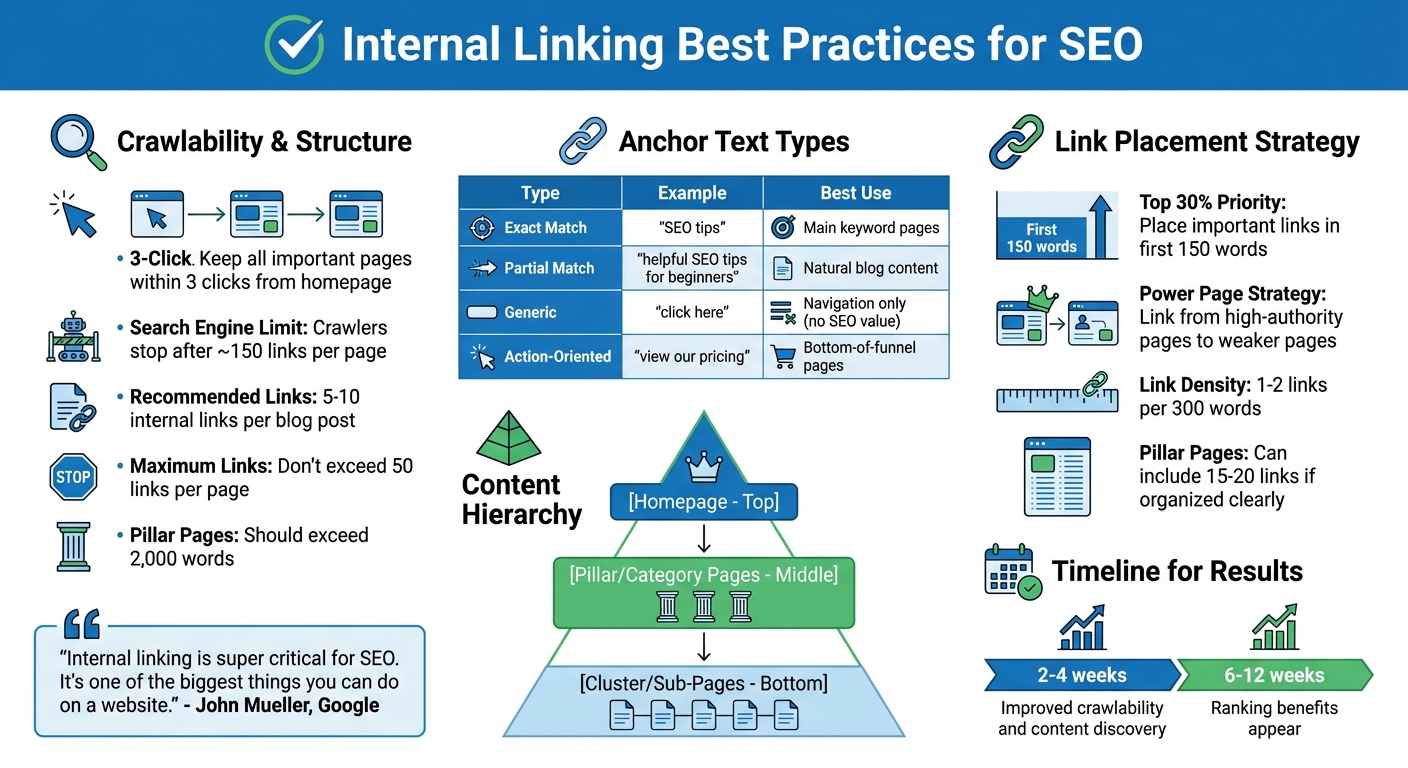
Internal Linking Best Practices: Quick Reference Guide for SEO
Internal Linking Strategy: How to Set it Up
Improve Crawlability and Indexing
Search engines find your pages by following internal links, which act as pathways connecting your content. Without these connections, even your most valuable content might go unnoticed. A well-organized internal linking structure not only helps search engines discover your pages but also spreads ranking power (link equity) from your strongest pages to newer or less-visited ones. Keep in mind that search engines often stop crawling after about 150 links on a single page. Make sure every important page is easily accessible from your homepage.
Keep All Pages Within 3 Clicks
To improve crawlability, make sure key pages are never more than three clicks away from your homepage. This “three-click rule” is a widely accepted SEO practice: pages buried deeper than this are often deprioritized by search engines, which can hurt their rankings. A pyramid structure works well for this – start with your homepage, then link to category or pillar pages, and finally to sub-pages. Breadcrumb navigation is another great way to reinforce these pathways. As Google’s Gary Illyes has said:
“We treat [breadcrumbs] as normal links in e.g. PageRank computation.”
If some pages are too buried, use tools like Screaming Frog or Semrush to audit your site’s click depth. Look for pages that take four or more clicks to reach, and link them directly from high-authority pages like your homepage or major category pages. You can also add sidebar widgets for “Popular Posts” or “Related Articles” to create shortcuts to deeper content.
Find and Link Orphaned Pages
Orphaned pages – those without any internal links – are nearly invisible to both users and search engines. Even if these pages are listed in your XML sitemap, crawlers may still have trouble finding and indexing them without internal links. Tools like Screaming Frog, Ahrefs, or Semrush can help identify orphaned pages by comparing your XML sitemap with the URLs that have been crawled.
Once you’ve identified orphaned pages, link them from high-authority pages that already generate organic traffic. If a page is outdated or no longer useful, consider using a 301 redirect to guide users to relevant content. Alternatively, if the page serves no purpose, it might be best to remove it altogether.
“In our experience, fixing orphan pages is one of the quickest wins. The moment a page gets linked from a relevant hub or a high-traffic post, it stops being invisible and starts getting impressions.” Ian Naylor, Founder at 3Way Social
Combine XML Sitemaps with Internal Links
While XML sitemaps provide a list of URLs for search engines, internal links add context and authority. Use a regularly updated XML sitemap to help search engines discover your pages, and pair it with strategic internal linking to guide crawlers and distribute authority effectively. Be mindful of your crawl budget – avoid hidden links or redirect chains that could complicate indexing.
Anchor Text Strategy and Best Practices
Anchor text – the clickable words in a hyperlink – plays a crucial role in guiding both search engines and users. It provides context about the destination page, helping search engines understand its relevance and giving users a clear idea of what to expect. Generic phrases like “click here” or “read more” miss the opportunity to add value. Instead, aim for descriptive, keyword-rich phrases that clearly reflect the linked content. For instance, instead of saying “learn more”, use something like “enterprise CRM integration guide” to better inform users and search engines alike.
Use Descriptive, Keyword-Rich Anchor Text
When crafting anchor text, focus on including relevant keywords that fit naturally into the surrounding content. This approach not only helps search engines associate your content with specific search queries but also makes navigation more intuitive for users. Stick with concise and descriptive phrases – a few specific words are far more effective than hyperlinking long sentences or entire paragraphs. Replace vague terms with phrases that directly reflect the linked page’s content. Additionally, diversify your anchor text to avoid potential issues with over-optimization.
Vary Anchor Text to Avoid Over-Optimization
Using the same exact-match keyword repeatedly can send red flags to search engines, making your links look unnatural. Instead, mix things up with exact-match anchors (e.g., “SEO tips”), partial-match variations (e.g., “helpful SEO tips for beginners”), and topically related phrases. This variety not only keeps your linking strategy natural but also allows you to cover different aspects of a topic without keyword stuffing. Research suggests that pages with 50 or more internal links may see declining performance, emphasizing the importance of quality and diversity over sheer quantity.
Different types of anchor text work best in specific situations, as shown in the table below:
| Anchor Text Type | Example | Best Use Case |
|---|---|---|
| Exact Match | “SEO tips” | Linking to a main page focused on that keyword. |
| Partial Match | “helpful SEO tips for beginners” | Naturally woven into blog content. |
| Generic | “click here” | For navigation purposes, but offers no SEO value. |
| Action-Oriented | “view our pricing” | Ideal for bottom-of-funnel pages like pricing. |
Match Anchor Text to Linked Content
The anchor text you use should accurately describe the content of the linked page. Misleading or vague links can frustrate users, increase bounce rates, and confuse search engines about which page should rank for a specific topic. For example, if you’re linking to a pricing page, use clear, action-oriented text like “view our pricing” instead of a generic phrase. Also, avoid linking to different pages using the same anchor text, as this can dilute relevance and make it harder for search engines to determine which page is authoritative for a particular topic. Regularly audit your links to ensure they remain accurate, especially after content updates on the linked pages.
“We’ve noticed the links that actually get clicked (and seem to help SEO most) are the ones placed mid-paragraph where the reader genuinely needs the next step. Footer and ‘related posts’ links rarely do much.” Becky Halls, Strategist at 3Way Social
Build a Logical Content Hierarchy
A solid internal linking strategy starts with a clear and organized site hierarchy. Think of it like a pyramid: at the top is your homepage, followed by your main category or pillar pages, and finally, specific content or cluster pages at the base. This structure not only helps users navigate your site easily but also guides search engines in understanding your content. Plus, it ensures link equity flows efficiently to the most important pages.
Create Pillar and Cluster Page Relationships
The “Hub and Spoke” model is a great way to organize your content. Here’s how it works: broad pillar pages act as the hub, linking to more specific cluster pages (the spokes), and those cluster pages link back to the pillar. For instance, a pillar page about “washing machines” could target 18,100 searches per month and serve as a top-level resource. Supporting cluster pages might dive into subtopics like “front-load vs. top-load washers” or “best washing machines under $500.” This two-way linking strengthens the connection between related topics, signaling search engines that your content is both comprehensive and relevant.
Pillar pages should be detailed, ungated, and typically exceed 2,000 words to establish them as authoritative resources. From these cornerstone articles, link to your supporting posts to highlight their importance. Don’t forget to check for orphan pages – those without any internal links – and connect them to relevant content or navigation menus to keep them visible. By building and maintaining these hierarchical relationships, you ensure that your link equity is distributed effectively across your site.
Keep Crawl Depth to 3 Clicks or Less
A flat site structure, where all pages are accessible within three clicks, is key for efficient link equity distribution and faster indexing by search engines. Use elements like main menus, sidebars, and footers to create shortcuts to deeper pages. Breadcrumb links are another handy tool – they show users where they are within your site’s hierarchy and provide quick navigation back to higher-level categories. Features like “Popular Posts” or “Related Articles” in sidebars can also bring attention to deeper content.
Regular SEO audits are crucial for spotting pages buried too deep in your site’s structure. If any exceed the three-click rule, adjust your internal links to improve their visibility and ensure a smoother user experience. By keeping crawl depth minimal and navigation intuitive, you make it easier for both users and search engines to explore your site efficiently.
Place Internal Links Strategically
Placing internal links thoughtfully can enhance your site’s visibility and ensure that both users and search engines can easily access your most important content. This method not only improves navigation but also distributes link equity effectively, boosting the performance of underperforming pages. By focusing on crawlability and using anchor text wisely, you can maximize the impact of your internal links. Here’s how to make them work harder for your site.
Add Links in the Top 30% of Content
Including links near the start of your content – ideally within the first 150 words – can significantly improve their visibility and click-through rates. People tend to focus on the beginning of a page, and search engines prioritize these early links when crawling your site. However, avoid cramming too many links into the opening paragraph. Instead, weave important links naturally into the first 150 words.
Contextual links placed within the main body of your text hold the most SEO value. They help establish a clear connection between related pages. As Gael Breton, Co-Founder of Authority Hacker, explains:
“In content, as long as it contextually makes sense to link to another page of your site, you should do it”.
Beyond embedding links in your content, consider adding them to navigational menus, sidebar widgets like “Related Posts”, or footers for resources and legal pages.
Link from High-Authority Pages to Weaker Pages
Your website likely has “power pages” – those with strong backlinks or high organic traffic. Linking from these authoritative pages to newer or weaker content helps distribute PageRank and boost the ranking potential of those pages. This approach also helps search engines find and index less prominent pages more quickly, strengthening your overall content strategy.
To identify your high-authority pages, use tools like Google Search Console, Ahrefs, or Semrush. Once identified, link to pages that are underperforming but have potential – such as those sitting on the second or third page of search results. Ensure that the topics are contextually related for the best results.
Limit Internal Links Per Page
While internal linking is essential, overloading a page with too many links can dilute their value and overwhelm users. Search engines typically stop crawling after about 150 links, so aim to keep the number well below that. For clarity and focus, avoid exceeding 50 links per page.
For most blog posts, 5–10 internal links work well, or roughly 1–2 links per 300 words. Longer content, such as 2,000-word articles, can handle 5–10 links comfortably. Comprehensive pillar pages may include 15–20 links if they’re organized clearly. The key is to prioritize relevance and avoid cluttering the page with unnecessary links. Focus on embedding your most important links within the main body text, as links buried in footers or sidebars carry less weight.
sbb-itb-88880ed
Improve User Experience Through Internal Links
Internal links are a simple yet powerful way to help users find related content and navigate your site more effectively. When visitors can easily discover information that interests them, they tend to stick around longer and engage more deeply. Plus, well-placed internal links can strengthen your site’s overall SEO performance.
Place Links in Relevant Context
The key to effective internal linking is context. Add links where they naturally fit, guiding readers to content that complements or expands on the topic at hand. For example, you can use links to clarify complex terms or provide additional insights on a related subject. The goal is to enhance the reading experience by offering a logical next step. Avoid cramming links at the end of an article – this can feel forced and unhelpful. Instead, integrate them seamlessly into the flow of your content.
Make Links Readable and Accessible
Accessibility is crucial when designing internal links. Use a distinct color and underline to make links stand out, and ensure there’s enough contrast between the text and background for easy readability. Replace vague phrases like “click here” or “read more” with descriptive anchor text that clearly conveys where the link will take the user. For image-based links, include meaningful alt text to ensure assistive technologies can communicate their purpose. Also, make sure your site is fully navigable with a keyboard – this is essential for the over 1 billion people worldwide who live with disabilities that may affect their interaction with digital content.
Audit and Maintain Internal Links Regularly
Keeping your internal links in check is an ongoing task. As your website grows with new pages, updated content, and shifting priorities, problems like broken links, orphaned pages, and uneven link distribution can creep in. These issues can quietly harm your SEO efforts. Regular audits are essential to catch and fix them, ensuring your internal linking strategy stays solid and effective.
Run Periodic Link Audits
SEO tools like Screaming Frog, Ahrefs, and Semrush are your best friends when it comes to auditing internal links. These tools simulate how search engine bots crawl your site, flagging broken links (404 errors), redirect chains, and pages buried more than three clicks deep. Compare the crawl data with your XML sitemap or Google Search Console records to spot discrepancies. Pay close attention to “nofollow” tags that may have been applied unintentionally and ensure your HTTPS pages aren’t linking to outdated HTTP URLs, which can trigger security warnings. These audits provide actionable insights to keep your internal linking strategy aligned with your site’s growth.
Add Links to New Content
Whenever you publish new content, make it a point to link to it internally. Adding at least one link to new pages prevents them from becoming orphaned. You can update high-traffic pages with links to your new material or use Google’s site:yourdomain.com "keyword" search operator to find older posts naturally related to your new content. This process integrates fresh content into your site’s structure and ensures link equity flows to these pages. As Google’s John Mueller emphasizes:
“Internal linking is super critical for SEO. It’s one of the biggest things you can do on a website to guide Google and visitors to the pages that you think are important”.
By proactively linking to new content, you set a strong foundation for both user navigation and search engine indexing.
Track Internal PageRank Distribution
Google has confirmed that PageRank remains a factor in its ranking algorithm. While you can’t measure PageRank directly, tools like Ahrefs’ URL Rating or Moz’s Page Authority offer useful proxies. Focus on your “power pages” – those with high traffic or strong backlink profiles – and use them to link strategically to pages that need a boost. SEO tools can also help identify pages with few or no internal links, highlighting areas where your content could use more support. Keep in mind that spreading link equity too thin can backfire; studies suggest that pages with 50 or more internal links may see a drop in traffic. Balancing your internal link distribution is key to maintaining a healthy site structure.
Use AI-Powered Tools for Internal Linking
As your website grows, manually managing internal links becomes a daunting task. That’s where AI-powered tools come in, offering a way to simplify and improve your internal linking strategy. By combining manual best practices with AI-driven solutions, you can create a more efficient and optimized internal linking structure.
Automate Link Recommendations with AI
AI tools have advanced far beyond basic keyword matching. They now use contextual analysis to identify relationships between topics, uncovering meaningful link opportunities. For example, an AI tool might link a page about “customer retention strategies” to one discussing “reducing churn rates”, even if those exact phrases aren’t explicitly mentioned together. This deeper understanding of content meaning makes internal linking more effective.
Automation doesn’t stop at discovery. These tools also help detect orphaned pages – those isolated from your site’s structure – ensuring they are indexed by search engines. Additionally, they create varied anchor text to avoid over-optimization, keeping your links natural and SEO-friendly. Many websites notice improvements in crawlability and content discovery within 2–4 weeks of implementing AI tools, with ranking benefits appearing in 6–12 weeks.
To get started, it’s best to take a measured approach. Limit how often the same page is linked to from multiple sources to prevent overlinking. Begin with a small section of your site, review the results manually, and scale up once you’re confident in the tool’s accuracy.
Manage Link Exchanges with 3Way.Social
While internal linking is great for improving crawlability, external links are key to building your site’s authority. AI can also enhance your external link strategy, and 3Way.Social offers a solution tailored to this need. The platform uses AI to match your domain with high-quality backlink opportunities, creating a balanced link strategy that strengthens both your internal structure and external authority.
3Way.Social ensures you’re only exchanging links with reputable sites that align with your niche and authority level. It also facilitates three-way link exchanges – where Site A links to Site B, Site B links to Site C, and Site C links back to Site A. This avoids the pitfalls of direct reciprocal linking while spreading authority across your site. When paired with a strong internal linking strategy, this method not only boosts your rankings but also reinforces your site’s topical relevance and expertise.
Conclusion
A strong internal linking strategy is a cornerstone of effective SEO. It lays the groundwork for a well-organized site that benefits both search engines and visitors. By maintaining shallow crawl depths, using clear and descriptive anchor text, and linking related content through pillar-cluster structures, you provide search engines with clear paths to index your site efficiently while guiding users to the most relevant pages.
“Internal linking is super critical for SEO. It’s one of the biggest things you can do on a website to guide Google and visitors to the pages that you think are important.” – John Mueller, Senior Search Analyst, Google
When done right, internal linking enhances crawlability, speeds up content discovery, and ensures that link equity flows to the pages that matter most. The key is finding the right balance – prioritizing relevance and context over simply adding more links.
To keep your internal linking strategy effective, schedule regular link audits. These audits help identify broken links, locate orphaned pages, and update older content with links to newer articles, ensuring your site remains healthy and fully optimized.
Combining manual efforts with AI tools can take your internal linking to the next level. And when you pair this with strategic external link building – using platforms like 3Way.Social – you create a powerful, well-rounded approach that boosts your site’s authority and visibility over time.
FAQs
What’s the best way to find and fix orphaned pages on my website?
To address orphaned pages on your website, the first step is to audit your internal linking structure. Pinpoint pages that lack links from other sections of your site. These pages are often overlooked by search engines and can be difficult for users to find.
After identifying them, incorporate relevant internal links to these pages from other related content on your site. This not only makes it easier for search engines to crawl but also improves navigation for users, ultimately strengthening your site’s SEO. Make it a habit to review your internal links regularly to keep all pages interconnected and accessible.
How can I use anchor text effectively for SEO without over-optimizing?
To make anchor text work well for SEO without going overboard, aim for it to be descriptive, relevant, and flow naturally within your content. Avoid stuffing exact match keywords into your links, as search engines may flag this as spammy. Instead, mix things up with variations that match the linked content while still being easy to read.
Skip generic phrases like “click here” or “read more.” These don’t give users or search engines much to go on. Instead, craft anchor text that adds value by clearly signaling what the linked page is about. Finding this balance not only boosts SEO but also keeps your content engaging and easy to navigate for readers.
How can AI improve the management of internal links for better SEO?
AI takes internal link management to the next level by examining your website’s structure, content, and keywords. It identifies the most effective linking opportunities, helping ensure that critical pages get the attention they deserve. This improves both their visibility and the flow of link equity, while also enhancing search engine crawlability and making navigation smoother for users.
On top of that, AI tools can spot and resolve common issues such as orphaned pages, broken links, or anchor text that isn’t optimized. By automating these processes, AI not only saves you time but also streamlines your site’s organization. This scalable approach to internal linking can significantly enhance your SEO efforts, making your site more effective and user-friendly.