Last Updated on June 9, 2026 by Becky Halls
Spam backlinks harm your site’s rankings and credibility. These low-quality links often come from link farms, PBNs, or irrelevant sources. Ignoring them can lead to ranking drops, penalties, or reduced visibility in AI-driven search tools. Here’s how to detect and remove spam backlinks:
- Detect spam backlinks: Use tools like Google Search Console, Ahrefs, or SEMrush to identify harmful links or find backlinks Google has indexed for your site. Look for red flags such as irrelevant niches, manipulative anchor text, or clusters of links from the same IP range.
- Audit your backlink profile: Categorize links into toxic, suspicious, and clean. Focus on toxic links, which often signal spammy practices.
- Remove harmful links: Start with manual removal by contacting webmasters. If unsuccessful, use Google’s Disavow Tool as a last resort.
- Prevent future issues: Regularly audit your backlink profile, monitor new links, and focus on earning high-quality, relevant backlinks.
Spam backlinks can quietly damage your SEO efforts, but with regular monitoring and cleanup, you can maintain a strong and trustworthy link profile.
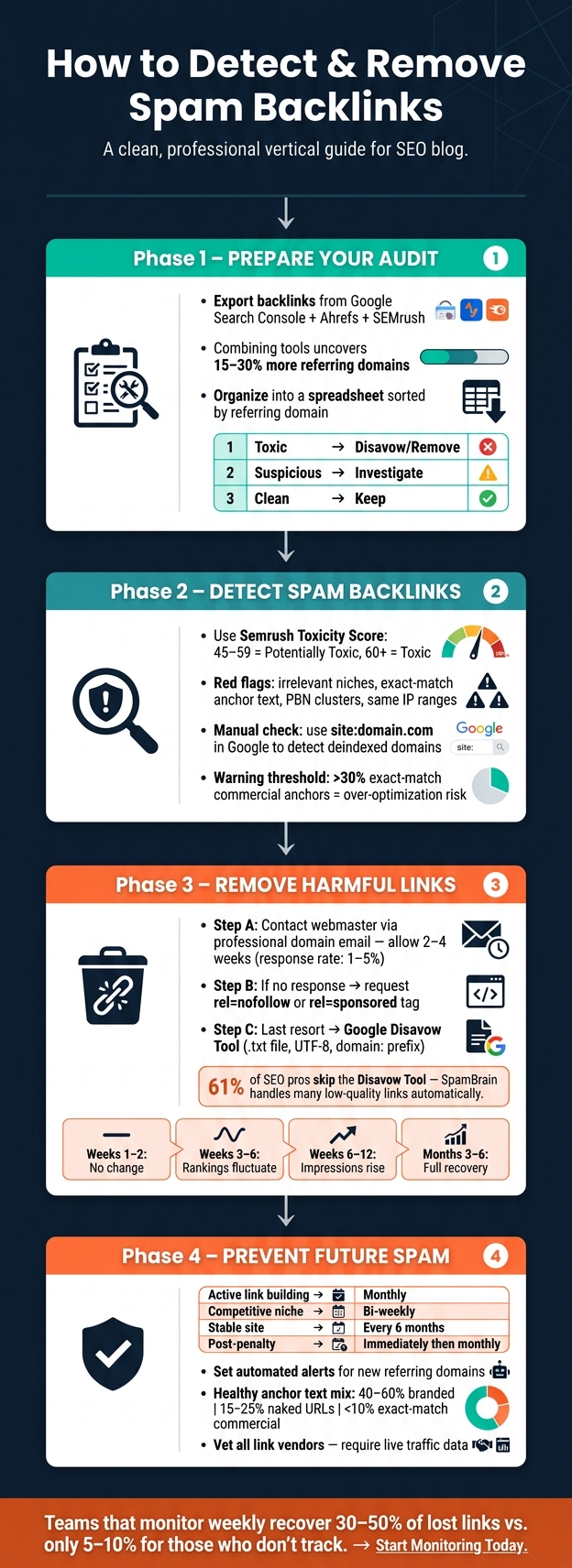
How to Detect & Remove Spam Backlinks: Step-by-Step Process
Preparing for a Backlink Audit
What You Need Before Starting
Getting ready for a backlink audit means gathering the right tools to make the process smoother. Begin with Google Search Console (GSC) to see the links Google associates with your site. Then, turn to third-party tools like Ahrefs, SEMrush, and Moz to analyze metrics such as Domain Rating (DR), Toxicity Scores, and anchor text distribution. Make sure to check the Manual Actions report in GSC – if your site has been flagged for unnatural links, it will directly affect how you proceed. Lastly, have a plain text editor like Notepad++ or Sublime Text ready for formatting your disavow file.
How to Export and Organize Backlink Data
To get a comprehensive picture of your backlinks, combine exports from GSC, Ahrefs, and SEMrush. By doing this, you can uncover 15–30% more referring domains than relying on just one tool. Consolidate these reports into a single Google Sheets or Excel spreadsheet, and sort them by referring domain to avoid missing any critical data.
Organize your links into three categories:
| Category | Action | Common Signals |
|---|---|---|
| Toxic | Disavow or remove immediately | PBNs, AI-generated spam, paid link farms |
| Suspicious | Investigate manually | Low-authority sites, irrelevant niches |
| Clean | Keep | Editorial mentions, niche-relevant blogs |
This system helps you stay focused and ensures you don’t mistakenly disavow links that are actually benefiting your site. Once your data is sorted, you’ll be ready to strengthen your link profile.
Using Quality Platforms to Support Link Building
After cleaning up harmful links, it’s time to think about building stronger, sustainable backlinks. A backlink audit often highlights gaps in your link profile, making it clear that strategic link-building is essential. This is where platforms like 3Way.Social come in handy. Their AI-powered domain-matching feature connects you with vetted, relevant sites for ABC link exchanges and guest posting. By using tools like these, you can secure high-quality, permanent do-follow links that enhance your profile long-term – avoiding links you’ll just have to audit out later.
sbb-itb-88880ed
How to Detect Spam Backlinks
Red Flags That Signal a Spam Backlink
Spotting spam backlinks often starts with identifying patterns that just don’t add up. For instance, if a gambling site links to a wedding photography blog, it’s a clear mismatch and a potential red flag. Another clue lies in the linking page’s content. Pages filled with thin, AI-generated text, no author information, and intrusive ads are typically not credible.
Anchor text can also give away manipulative links. Phrases like “buy cheap backlinks” or unrelated keywords from adult or pharmaceutical industries are often used to game search rankings rather than provide value to readers. On a technical level, watch for domain clusters sharing the same IP range, identical site designs, or similar registration dates – these are typical markers of a Private Blog Network (PBN).
“A toxic backlink is a link that violates Google’s spam policies, was built with the intent to manipulate PageRank, or comes from a source so blatantly problematic that it could invite a manual action when it shows up as part of a pattern.” – Jack Johnson, Operations Director, Rhino Rank
Spotting these red flags is the first step in tackling the issue effectively.
Step-by-Step Detection Process
Start by analyzing your backlink data using tools like Semrush’s Toxicity Score or Moz’s Spam Score. These tools use scales to help identify potential issues – Semrush, for instance, flags scores between 45 and 59 as potentially toxic, while anything above 60 is considered toxic and needs immediate attention. However, as Jack Johnson from Rhino Rank points out, “Treat tool scores as triage, not a verdict. Prioritise what you review by hand. And don’t use a tool score as the only reason to disavow.”
After narrowing down the list, conduct a manual review. Use the site:domain.com operator in Google to see if the flagged domain appears in search results. If it’s missing, that’s a sign the domain may be deindexed, possibly due to penalties. Visit the site to check if it loads properly, has coherent content, provides real contact information, and shows signs of organic traffic. Be wary of pages linking to hundreds of unrelated commercial sites with keyword-heavy anchors – this is a hallmark of a link farm.
Anchor text distribution is another area to scrutinize. If more than 30% of your backlinks use exact-match commercial keywords, it signals over-optimization, which Google could penalize.
Once you’ve identified problematic backlinks, it’s time to evaluate their impact on your overall backlink profile.
How to Gauge the Severity of the Problem
After pinpointing suspect links, the next step is to measure their impact. A handful of irrelevant, low-authority backlinks might not be a big deal – Google’s SpamBrain system, active since 2018, often neutralizes such links automatically. But if you uncover hundreds of links from deindexed domains, PBNs, or AI-generated content farms, it’s a much bigger issue.
To gauge the severity, check Google Search Console under “Security & Manual Actions.” If you see a penalty notice, immediate action is required. In the absence of a notice, any ranking drops are likely due to algorithmic devaluation. Assess the proportion of toxic links compared to your overall backlink profile. A profile with 5% toxic links is manageable, but if 40% of your links are toxic, you’ll need to take significant steps, including manual removal requests and submitting a disavow file.
“Bad backlinks are a problem not just because they can lead to penalties by Google. Backlinks with a negative traffic trajectory also provide a decreasing ROI as they age.” – Greg Heilers and Morgan Taylor, SEO Experts, Jolly SEO
Looking ahead, spammy backlink profiles could pose even more risks. AI search engines like ChatGPT and Perplexity increasingly rely on backlink patterns to determine credibility. A spam-laden profile doesn’t just hurt your Google rankings – it also reduces the chances of being cited as a reliable source by AI systems.
How to Remove or Neutralize Spam Backlinks
Sorting Links by Priority
Once you’ve identified spam backlinks, the next step is to deal with them effectively. Start by grouping these links by referring domain – if one spammy domain links to your site 15 times, treat it as a single issue, not 15 separate ones. Then, sort the links into three priority levels:
| Priority | Source Type | Recommended Action |
|---|---|---|
| High | PBNs, link farms, hacked sites, sites causing manual actions | Contact the site; if removal isn’t possible, disavow right away |
| Medium | Irrelevant niches, low-quality directories, links with moderate toxicity scores (45–75) | Review manually and disavow if patterns emerge |
| Low | Nofollow links, older links from small but legitimate sites | Monitor; Google often ignores these |
Focus on clusters of links with exact-match anchor texts or shared IP addresses. On the other hand, isolated low-quality links typically don’t need immediate action.
How to Request Manual Removal
For manual removal, use a professional email address tied to your domain (e.g., name@yourwebsite.com) to increase credibility. Look for the webmaster’s contact details on their “About” or “Contact” page, through a WHOIS lookup, or with tools like Hunter.io.
Keep your email short and professional. Specify the exact URL where the unwanted link appears, explain your request for its removal, and maintain a neutral tone. If the webmaster refuses to remove the link, ask if they can add a rel="nofollow" or rel="sponsored" tag instead.
Track each outreach attempt, noting the domain, method, date, and any responses. Allow 2–4 weeks for replies, but keep in mind that response rates are often low – typically between 1% and 5%.
If you don’t get a response or the link isn’t removed, the next step is to disavow it.
How to Use Google’s Disavow Tool
The Disavow Tool should be a last resort, used only after manual removal attempts fail. It’s particularly useful if you’re dealing with a manual action, a large number of spammy links, or links that clearly violate Google’s guidelines.
Interestingly, a 2026 survey revealed that 61% of SEO professionals don’t use the Disavow Tool at all, as Google’s SpamBrain algorithm often automatically neutralizes low-quality links.
If you decide to proceed, prepare a plain .txt file (encoded in UTF-8) listing problematic sources. Use the domain: prefix (e.g., domain:spammy-site.com) to block all links from a domain rather than listing individual URLs. Comments can be added using the # symbol. The file can be up to 2MB in size and include a maximum of 100,000 lines.
Once your file is ready, upload it to Google Search Console. Recovery times vary: minor issues may resolve within 4–8 weeks, while more severe cases can take 3–6 months.
As John Mueller, a Search Advocate at Google, explains:
“If there are some links that you can’t remove yourself, or some that require payment to be removed, then having those in the disavow file is fine as well.”
Using the Disavow Tool helps eliminate harmful signals, but it’s essential to replace lost link equity with high-quality backlinks. Platforms like 3Way.Social can support this effort by connecting you with trusted, relevant sites for ABC link exchanges and guest posts. This approach helps rebuild your backlink profile with strong, do-follow links that contribute to long-term SEO success.
Keeping Your Backlink Profile Clean
How Often to Run Backlink Audits
Clearing out spam backlinks is just the first step. To keep your backlink profile in good shape, regular audits are essential to prevent new spam from sneaking in.
| Scenario | Recommended Frequency |
|---|---|
| Actively building links | Monthly light review + quarterly deep audit |
| Competitive niche or negative SEO history | Bi-weekly or monthly |
| Stable site with no active outreach | Every 6 months |
| Post-penalty or after a ranking drop | Immediately, then monthly until stable |
| Site migration or rebrand | Before and after the move |
For most businesses, a quarterly audit strikes a balance – frequent enough to catch issues early without becoming a time sink. However, if you’re actively building links or working in a highly competitive environment, a monthly light review is a smarter approach to catch problems before they escalate.
Certain situations demand immediate attention. For instance, if you notice a sudden drop in organic traffic, receive a manual action notice in Google Search Console, or complete a site migration, don’t wait – initiate an audit right away. A consistent audit schedule not only helps track recovery but also reduces the risk of future issues.
Tracking Results After a Cleanup
Recovering from backlink cleanups isn’t instant – it takes time. Setting the right expectations can help you stay focused on the metrics that matter.
Before starting a cleanup, document your current organic traffic, keyword rankings, and any manual action status in Google Search Console. These serve as your baseline for tracking progress. Post-cleanup, monitor GSC’s “Performance” and “Manual Actions” reports to measure improvements. Typically, you’ll see recovery unfold in stages:
| Recovery Phase | What to Expect |
|---|---|
| Weeks 1–2 | No visible changes as Google processes signals |
| Weeks 3–6 | Rankings may fluctuate; some pages might even dip temporarily |
| Weeks 6–12 | Impressions begin to rise |
| Months 3–6 | Full recovery of clicks and rankings, provided no other issues exist |
Teams that actively monitor progress weekly recover 30–50% of lost high-value links, compared to just 5–10% for those who don’t track consistently. Regular monitoring not only speeds up recovery but also provides insights to prevent future spam issues.
How to Avoid Spam Backlinks Going Forward
Once your backlink profile is cleaned up, the next step is keeping it that way. A few proactive measures can go a long way toward maintaining a strong, healthy profile.
- Set up automated alerts in your preferred SEO tool to flag new referring domains or sudden spikes in link activity. Spotting a potential negative SEO attack early – within days, not months – can significantly limit the damage.
- Vet link vendors carefully if you’re outsourcing link building. Always request live traffic data for sample placements and ensure they rely on manual outreach rather than automated tools or private blog networks. Links from sites with real traffic and relevant audiences are far more valuable.
As Srikar Srinivasula, Founder of Rankz, explains:
“Quantity alone doesn’t win. The quality and relevance of those links are what actually move the needle.”
For safer link-building strategies, consider platforms like 3Way.Social. They connect you with niche-relevant sites for ABC link exchanges and guest posts. Since every partner site is screened for domain relevance, the links you gain are permanent, do-follow, and far less likely to cause profile issues.
Lastly, keep an eye on your anchor text distribution. A healthy profile typically includes 40–60% branded anchors, 15–25% naked URLs, and under 10% exact-match commercial keywords. If exact-match anchors exceed 15–20%, Google might flag your profile as over-optimized.
Toxic Backlinks: How to Find Them & Disavow Them [2024]
Conclusion on How To Detect And Remove Spam Backlinks
Spam backlinks can seriously harm your site’s domain authority and rankings. As Outreach Monks aptly states:
“Spam backlinks undermine both trust and authority”.
To tackle this, focus on three key habits: audit regularly, remove strategically, and build proactively. A streamlined profile with 200 high-quality, relevant links will always perform better than one cluttered with 2,000 low-value connections. Always try manual removal first before turning to the disavow tool.
Beyond rankings, your backlink profile plays a crucial role in modern search features. AI-driven tools like Google AI Overviews and platforms such as ChatGPT and Gemini increasingly prioritize brands with clean, authoritative link signals. A spam-laden profile can lead to penalties and reduced visibility in AI-generated answers.
Recovery times depend on the extent of the problem. Once toxic links are removed, focus on replacing them with high-quality editorial links. Tools like 3Way.Social can simplify this process by connecting you with vetted, reliable link opportunities.
The ultimate goal? A strong backlink profile built on relevance, real traffic, and editorial trust.
How To Detect And Remove Spam Backlinks – FAQs
Do I really need to disavow spam backlinks?
In most situations, there’s no need to disavow spammy backlinks – Google’s algorithms are pretty good at identifying and ignoring them on their own.
However, the disavow tool becomes necessary if you’re dealing with a significant number of spammy links that have triggered a manual action in Google Search Console. It’s also worth considering if your site is at risk because of previous link schemes. Keep in mind, though, that disavowing links carries some risk. Before resorting to it, try removing harmful links manually to prevent any potential damage to your site.
Can removing backlinks hurt my rankings?
Removing backlinks can negatively affect your rankings if you mistakenly get rid of high-quality links that contribute positively to your site. It’s best to focus on eliminating harmful or spammy backlinks only when it’s absolutely necessary – like after a manual action from Google or if manipulative links are clearly damaging your site’s performance. Keep in mind, Google often ignores low-quality links on its own. So, prioritize manual removal over using the disavow tool to ensure you don’t lose valuable link equity.
How can I tell if I’m being hit by negative SEO?
Keep an eye on your backlink profile for any sudden influx of low-quality or irrelevant links. If you notice hundreds or even thousands of suspicious links appearing out of nowhere, it could be a red flag. Use Google Search Console to check for penalties under the Security & Manual Actions section.
Other signs to watch for include unexpected drops in rankings, noticeable declines in traffic, or unusual spikes in the use of exact-match anchor text. Regularly auditing your backlinks using tools that evaluate link quality is a smart move. Pair these tools with manual reviews to identify and confirm any harmful links before taking further action.