Custom Scripts vs. SEO Tool APIs for Reporting
Compare custom scripts and SEO tool APIs for reporting—costs, setup time, flexibility, maintenance, and hybrid options.

Last Updated on October 9, 2026 by Ian Naylor
When it comes to automating SEO reporting, two main options stand out: Custom Scripts and SEO Tool APIs. Both have their strengths and limitations, and the choice depends on your team’s skills, budget, and reporting needs.
Key Insights:
- Custom Scripts: Offer flexibility to combine data from multiple sources (like Google Search Console, GA4, and backlinks monitor tool). They’re cost-effective but require coding skills and regular maintenance.
- SEO Tool APIs: Provide vendor-supported, easy access to structured data. They’re faster to set up and maintain but come with higher subscription costs and less customization.
Quick Example: A mid-sized agency could cut reporting costs from $750/month to $150–$280/month using custom scripts while reducing reporting time from 3–5 hours to under 40 minutes per client.
Quick Comparison:
| Factor | Custom Scripts | SEO Tool APIs |
|---|---|---|
| Cost | Lower ($150–$280/month) | Higher (e.g., $499/month for Semrush) |
| Setup Time | 2–4 hours per client | 45–90 minutes per client |
| Flexibility | High (combine multiple data sources and compare the best backlinks checker tools) | Limited to API features |
| Maintenance | Manual updates required | Vendor handles updates |
| Best For | Complex, multi-source reporting | Quick, standard needs |
Key Takeaway:
Use Custom Scripts for tailored, budget-friendly reporting if you have coding expertise. Opt for SEO Tool APIs for ease of use and vendor-managed reliability. Combining both can create a powerful, efficient reporting system.
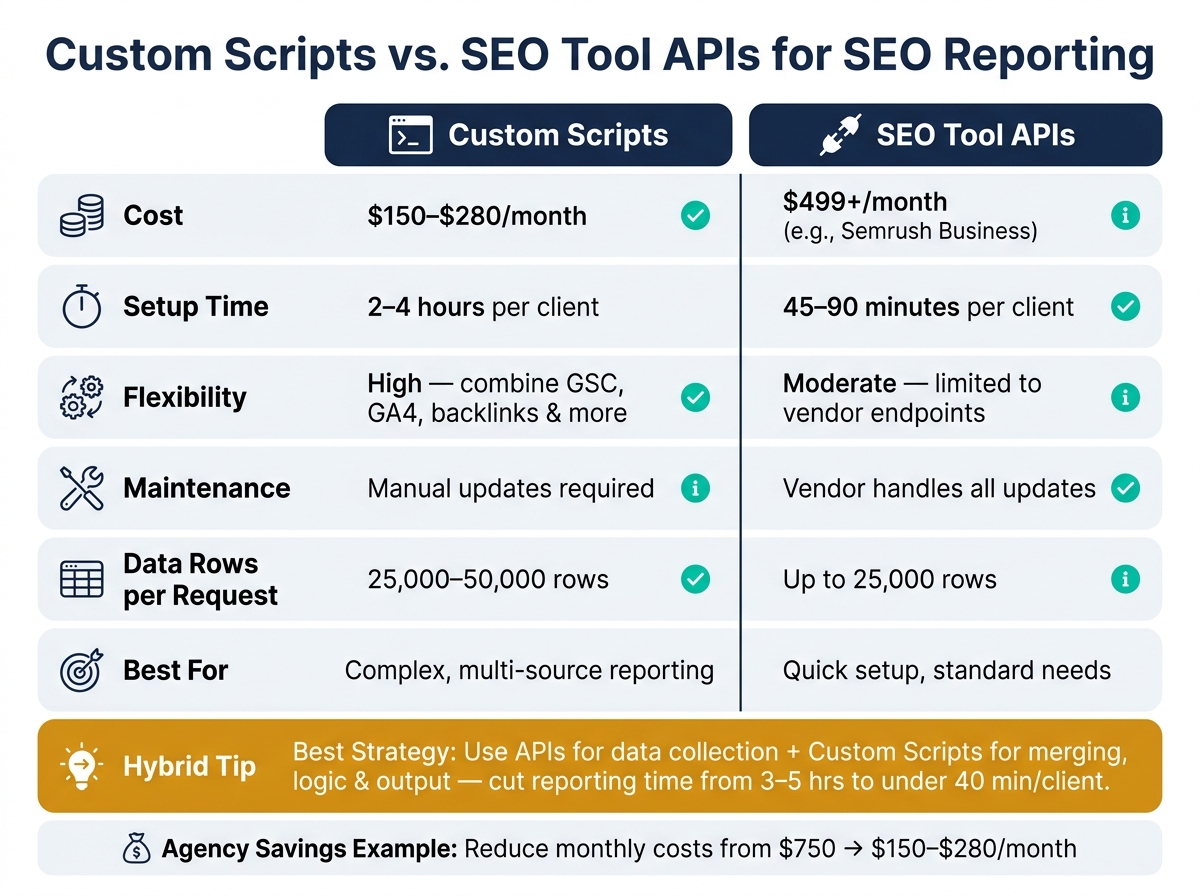
Custom Scripts vs. SEO Tool APIs: Side-by-Side Comparison
Custom Scripts for SEO Reporting
What Are Custom Scripts?
Custom scripts are essentially small programs, often written in Python, JavaScript, or Google Apps Script, that automate the process of fetching, processing, and organizing data into reports. They follow a basic ETL model: Extract data from a source (like an API), Transform it into a usable format, and Load it into a destination such as Google Sheets, BigQuery, or a custom dashboard. This structured workflow forms the backbone of how these scripts simplify SEO reporting tasks.
Strengths of Custom Scripts
Custom scripts shine when flexibility is essential. Unlike pre-packaged tools, they aren’t limited by user interfaces or built-in restrictions. For instance, the Google Search Console web interface limits exports to 1,000 rows. But with a custom script using the API, you can extract between 25,000 and 50,000 rows in a single request, and store that data indefinitely – well beyond the standard 16-month retention period.
They also allow you to combine data from multiple platforms into a single, cohesive report. Take this example: a Python script can pull keyword ranking data from Google Search Console, traffic metrics from GA4, and backlink stats from a tool like 3Way.Social. By merging these datasets, you gain a complete view of your SEO performance. This approach is particularly powerful for identifying actionable trends. In March 2026, a digital marketing agency used this method to analyze Google Search Console and Google Ads data in just 90 seconds, uncovering 2,742 search terms with wasted ad spend and identifying 351 opportunities to cut costs.
"When data extraction and formatting takes 45 seconds instead of three hours, the analyst’s entire cognitive budget is available for interpretation." – Joseph Mourinho, SEO Syrup
Custom scripts can also enhance monitoring. They can be programmed to send real-time alerts via Slack or email when specific anomalies occur – like a 20% drop in impressions, a 5-position ranking loss, or a sudden spike in crawl errors. This transforms reporting from a static task into a dynamic, proactive system. However, the benefits of custom scripts come with their own set of challenges.
Limitations of Custom Scripts
The biggest hurdle with custom scripts is the technical expertise required to create and maintain them. You need to understand API authentication (usually OAuth 2.0), work with data manipulation tools like Pandas, and implement robust error-handling mechanisms. Additionally, while Google Apps Script is free, it comes with execution time limits – 6 minutes for standard accounts and 30 minutes for Workspace accounts. This can cause problems for large-scale data pulls or complex crawls, which may time out.
Maintenance is another concern. APIs change, website structures evolve, and rate limits can tighten, meaning scripts might fail silently without proper logging. As one developer put it:
"The web editor is a bit basic although you can bypass it with clasp, debugging is a nightmare, and you’re constantly switching between tabs." – Capconvert
Another limitation is data lag. For example, Google Search Console data typically has a 2–3 day delay. If your script doesn’t account for this, it may retrieve incomplete data. To avoid this, always set query end dates at least three days prior to ensure accuracy.
While custom scripts are undeniably powerful, their technical requirements and maintenance demands make them a tool best suited for those with the necessary expertise.
sbb-itb-88880ed
Vibe Code Your Own SEO Tools With LLMs | Whiteboard Friday | Gus Pelogia
SEO Tool APIs for Reporting
While custom scripts require technical coding expertise as part of a step-by-step SEO strategy, SEO tool APIs offer a simpler, vendor-supported way to access and integrate data.
What Are SEO Tool APIs?
SEO tool APIs let your application directly access search performance data programmatically, bypassing the need to manually log into dashboards and export data. Instead, your application sends a structured POST request – often with a JSON payload – defining parameters like date ranges and dimensions (e.g., query, page, country, or device). The API then returns structured, ready-to-use data.
Authentication is handled through OAuth 2.0 or service accounts. For automated server-side workflows, service accounts are the go-to choice since they eliminate the need for manual logins or token refreshes.
Strengths of SEO Tool APIs
One big advantage of SEO tool APIs is their ability to handle larger data volumes. For instance, the Google Search Console API can return up to 25,000 rows per request – far more than the 1,000-row limit of its web interface. Plus, you can combine up to five dimensions in a single request, making it easier to perform complex, multidimensional analyses.
These APIs also integrate seamlessly with BI tools like Looker Studio and Google BigQuery, enabling automated and scheduled reporting. For example, the PageSpeed Insights API, which allows up to 25,000 free queries per day, is ideal for tracking Core Web Vitals at scale. Since these APIs are maintained by their respective vendors, they tend to be more reliable than custom scripts that rely on web scraping.
Limitations of SEO Tool APIs
That said, SEO tool APIs have their drawbacks. For example, Google Search Console data is delayed by 48 to 72 hours before it becomes available via the API, which makes real-time monitoring impossible.
Rate limits are another challenge. The Google Search Console API allows 1,200 queries per 100 seconds and a daily quota of 30,000 queries. For the URL Inspection API, the limit is even stricter – 2,000 URLs per property per day. These restrictions can temporarily halt bulk reporting until quotas reset.
Data completeness is also an issue. The API excludes anonymized queries (those made by very few users) for privacy reasons, which can result in discrepancies between query-level clicks and total page clicks in the web interface. For high-traffic sites, it’s often necessary to retrieve dimensions like query and page separately and merge them during analysis.
Here’s a quick summary of these limitations:
| Limitation | GSC API Value | Reporting Impact |
|---|---|---|
| Data Lag | 48–72 hours (up to 3 days) | Real-time monitoring isn’t possible; reports are retrospective |
| Row Limit | 25,000 per request | Pagination logic is needed for larger sites |
| Data Retention | 16 months | External storage is required for long-term trend analysis |
| Rate Limit | 1,200 queries / 100 seconds | Bulk reporting may pause when limits are reached |
| Anonymized Queries | Varies by volume | Can cause discrepancies between query-level and page-level totals |
Custom Scripts vs. SEO Tool APIs: Side-by-Side Comparison
Comparing Key Factors
Here’s a closer look at how custom scripts stack up against SEO tool APIs in terms of cost, flexibility, and upkeep:
| Factor | Custom Scripts | SEO Tool APIs |
|---|---|---|
| Setup Requirements | Requires coding expertise or AI-assisted tools | Involves API key generation and OAuth/service account setup |
| Flexibility | High – lets you combine data from various sources like Google Search Console, GA4, and backlinks | Moderate – limited to what the vendor’s API endpoints allow |
| Maintenance | Needs regular updates to adapt to API changes | Minimal – updates are managed by the vendor |
| Scalability | High – supports automation with tools like GitHub Actions or cron jobs for managing several sites | High – limited only by API rate restrictions |
| Cost | Around $150–$280/month for an agency with 15 clients | Starts at $500+/month (e.g., Semrush Business plan costs about $499/month) |
For a mid-sized agency, switching to custom scripts could reduce monthly software expenses from $750 to as low as $150–$280. While custom scripts provide complete control over data tracking and reporting, SEO tool APIs offer a simpler, hands-off option.
"Software companies own the data, but you do not need their interface to use it." – Joonas Rotko, Founder, That Marketing Buddy
This comparison lays the groundwork for understanding how these methods can be integrated with link-building platforms.
Connecting Each Approach to Link-Building Platforms
Both custom scripts and SEO tool APIs can be utilized for backlink reporting, but they achieve this in different ways. Custom scripts allow for more granular tracking and customization, while SEO tool APIs deliver prepackaged datasets that are quicker to implement.
Platforms like 3Way.Social enhance both approaches by offering consistent backlink data through permanent do-follow links and domain-matched exchanges. Custom scripts give you complete control over how backlink tracking and reporting are handled, whereas SEO tool APIs provide a streamlined, low-effort starting point with fewer customization options.
Choosing the Right Approach for Your SEO Reporting
Your choice should depend on your team’s technical expertise, budget, and how much control you want over your data. Building on the earlier comparison, here’s a closer look at when each method fits into your workflow.
When to Use Custom Scripts
Custom scripts shine when your reporting needs go beyond what standard tools can handle. For instance, they’re ideal for combining data from multiple sources into a branded report. They’re also perfect for delta reporting – rather than sending out repetitive weekly summaries, these scripts trigger alerts only when something noteworthy happens, like a ranking drop of over 5 positions or a traffic decrease of more than 50% and at least 10 clicks.
"The barrier to entry has dropped from ‘hire a developer’ to ‘describe what you want.’" – Joonas Rotko, Founder, That Marketing Buddy
Thanks to AI coding tools, even non-developers can now create functional Python scripts by simply describing what they need in plain English.
When to Use SEO Tool APIs
If your team lacks development resources, SEO tool APIs are a great alternative. They’re quick to set up – usually taking 45–90 minutes per client compared to the 2–4 hours needed for custom scripts. As mentioned earlier, APIs are easier to implement and maintain because vendors handle updates. For example, if an endpoint changes, it’s the vendor’s responsibility to fix it. However, cost can be a limiting factor. Full API access to platforms like Semrush requires a Business plan, which costs $499/month – an expense that can add up quickly for larger teams.
Using Both Together
Combining custom scripts with SEO tool APIs can create a powerful, efficient reporting system. A common approach is to use APIs to gather most of your data, then apply custom scripts to merge that data, add logic, and generate a final output, such as a Looker Studio dashboard or a Slack alert. For instance, you could:
- Use a SERP API for rank tracking.
- Pull backlink data from 3Way.Social to monitor link-building progress.
- Write a lightweight Python script to combine all this information into a single Google Sheet.
This hybrid method can save significant time and help you spot critical SEO issues faster.
"The goal of automating SEO reporting is not to stop thinking about your clients’ data. It’s to stop doing the mechanical work that prevents you from thinking about it." – Fusedash
A phased approach works best when adopting this strategy. Start by automating a single task, like monthly rank tracking, before overhauling your entire reporting system. This step-by-step process allows you to build trust in the system while minimizing disruptions to your current workflow. It’s a practical way to refine your SEO reporting strategy over time.
Conclusion: Key Takeaways
Here’s a quick recap to help you decide between custom scripts and SEO tool APIs.
Custom scripts offer unmatched flexibility and lower long-term costs but require technical expertise and ongoing maintenance. On the other hand, SEO tool APIs are faster to implement and simpler to maintain, though they come with higher subscription fees and limited customization options.
For example, a mid-sized agency could slash its monthly reporting expenses from around $750 to just $150–$280 while reducing reporting time from 3–5 hours to under 40 minutes per client. This kind of efficiency not only simplifies reporting but also helps you monitor essential link-building metrics more effectively.
| Factor | Custom Scripts | SEO Tool APIs |
|---|---|---|
| Cost | Lower (pay-as-you-go) | Higher (fixed subscriptions) |
| Flexibility | Total control | Limited to tool features |
| Setup Time | Longer (2–4 hours/client) | Faster (45–90 minutes/client) |
| Maintenance | Your responsibility | Handled by the vendor |
| Best For | Complex, multi-source reporting | Quick setup, standard needs |
A hybrid strategy – combining APIs for data collection with lightweight scripts for analysis – can strike a perfect balance. It keeps costs under control while focusing on the metrics that matter most. Masakazu Imai, Web Developer at ORECTIC, highlights the value of automation:
"If you perform SEO audits manually, you will almost certainly stop doing them within three months… you get tired of looking at the same metrics every week." Following a technical SEO site audit checklist can help identify which of these repetitive tasks are most ripe for automation.
Start small: automate one task, verify the results, and then expand your system. This approach frees up time for deeper strategic analysis while laying the groundwork for ongoing improvements in your reporting process.
FAQs
Which SEO reporting tasks should I automate first?
When starting with automation, focus on repetitive, rule-based tasks you currently manage manually. Avoid diving into complex processes right away – it’s better to first ensure the manual approach delivers reliable results. Some tasks worth automating include:
- Taking weekly snapshots from Google Search Console.
- Generating Looker Studio dashboard reports using GA4 and GSC connectors.
- Scheduling crawl reports to catch broken links.
- Setting up automated alerts for rank tracking.
- Performing URL inspections to monitor the status of newly published content.
By automating these, you free up time for more strategic work while maintaining high-quality results.
How do I avoid API limits and data delays in automated reports?
To work around API limits and avoid data delays, there are a few smart strategies you can implement:
- Batch requests: Group multiple queries into a single request whenever possible. This reduces the number of calls and helps you stay within API quotas.
- Store raw data: Save raw responses locally or in a database. This prevents loss of historical insights, especially when APIs have retention limits.
- Optimize query parameters: Refine your queries to fetch only the data you truly need, minimizing unnecessary overhead.
Additionally, consider scheduling smaller, frequent requests. This approach spreads out your usage, keeping you within limits while maintaining a steady flow of data. Automating data pulls with scripts or cloud functions can also ensure your data stays up-to-date. Just make sure to monitor your quotas closely to avoid throttling or unexpected delays.
When does a hybrid setup (APIs + scripts) make the most sense?
A hybrid setup works best when you need to blend structured data from SEO tool APIs with customized reporting that standard dashboards can’t handle. APIs provide raw metrics, while custom scripts refine and process this data, allowing for tailored outputs like branded PDFs or in-depth competitive analyses. This method is especially effective for combining multiple data sources – such as integrating insights from 3Way.Social with Google Search Console – to create unified and personalized reports.