Last Updated on March 19, 2026 by Becky Halls
Automating link-building reports saves time, reduces errors, and ensures you stay on top of critical changes. Here’s the gist:
- Why Automate? Manual reporting is tedious and error-prone. Automation improves accuracy, saves up to 8 hours weekly, and helps catch backlink changes within hours.
- Tools to Use: Platforms like 3Way.Social, Ahrefs, and SEMrush offer APIs, real-time monitoring, and advanced metrics for seamless data collection.
- How to Integrate: Use APIs or CSV imports to sync data into platforms like Google Sheets or BigQuery. Middleware tools like Coupler.io simplify this process.
- Custom Dashboards: Track key metrics (e.g., backlinks gained/lost, Domain Rating) and visualize them with tools like Looker Studio or Excel.
- Scheduled Reports: Automate report deliveries and set up alerts for critical changes like lost backlinks or toxic links.
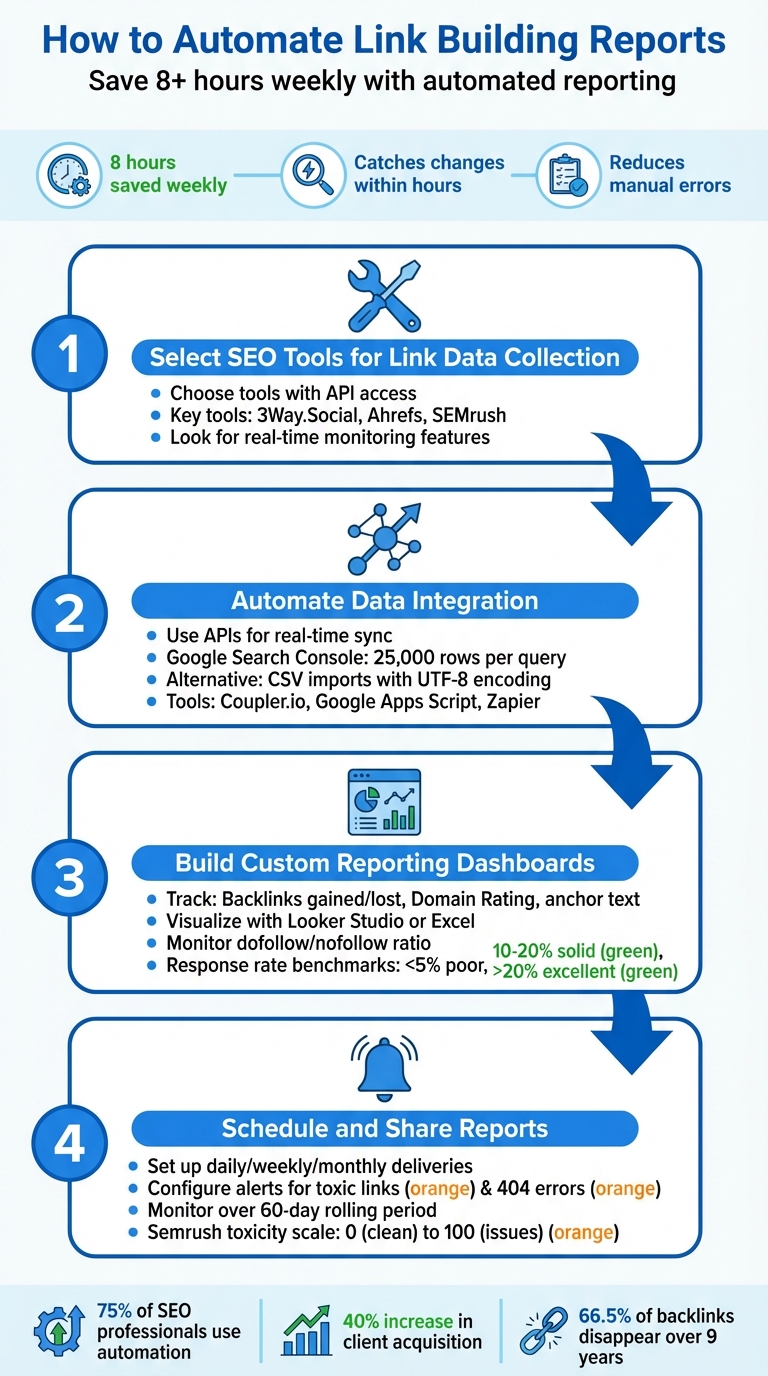
4-Step Process to Automate Link Building Reports
Step 1: Select SEO Tools for Link Data Collection
Identify Core Tools
Start by picking SEO tools that offer API access, integration features, and real-time monitoring. These tools eliminate tedious manual data entry, giving you instant insights.
For example, 3Way.Social combines AI-powered domain matching with CRM features, automatically tracking changes in backlinks, like shifts from do-follow to no-follow or 404 errors. Ahrefs, known for its extensive database, provides precise Domain Rating metrics – though the interface rounds numbers, the system internally uses decimals (e.g., 74.4). Meanwhile, SEMrush focuses on identifying toxic links and uncovering backlink gaps.
Choose tools that align with your workflow. For competitive analysis, SEMrush’s Backlink Gap tool is perfect for spotting missed opportunities. Once you’ve decided on the tools, the next step is setting up seamless API integrations.
Set Up Accounts and APIs
Integrating tools efficiently minimizes redundant tasks while keeping data accurate and error-free. Keep in mind that full API access often requires higher-tier subscriptions – for instance, Ahrefs’ complete API capabilities for automated dashboards usually come with an Enterprise plan. With API keys, you can directly import data into platforms like Google Sheets, custom dashboards, or CRMs such as HubSpot and Salesforce.
To simplify reporting, use middleware solutions like Coupler.io. These tools sync data from SEO APIs to warehouses like BigQuery or directly into Google Sheets, creating centralized dashboards that are easy for your team to access. This approach saves on user seats and allows you to tailor dashboards to the metrics you care about most. During setup, consider converting boolean fields (e.g., “is_dofollow”) into 1/0 formats to make calculations easier in visualization tools like Looker Studio. APIs can process thousands of backlinks in seconds, making them crucial for scaling your efforts.
sbb-itb-88880ed
Step 2: Automate Data Integration
Use APIs for Real-Time Data Sync
APIs are a game-changer when it comes to seamlessly pulling data from various SEO tools into platforms like Google Sheets, BigQuery, or Looker Studio. This eliminates the need for tedious manual updates. For instance, the Google Search Console API, accessible through the Google Cloud Console, provides up to 16 months of historical data – far surpassing the 1,000-row limit of its web interface. Even better, individual API queries can retrieve as many as 25,000 rows of data.
When setting up API access, small teams can use OAuth 2.0, while service accounts are ideal for full automation. For tools like Ahrefs, you’ll need API keys or tokens, often included with Enterprise plans. After authentication, automate data pulls through tools like Google Apps Script, Python, or no-code platforms such as Zapier.
Keep in mind that Google Search Console data typically lags by 2–3 days. To ensure complete datasets, schedule data pulls 3–4 days after the target date. The GSC API supports up to 1,200 queries per minute, but if you hit rate limits, implement exponential backoff retry logic to manage temporary failures. For Ahrefs, start by fetching historical data and then run daily scripts to append only the newest stats. This approach conserves API tokens and keeps your database streamlined.
“Automated Search Console monitoring catches ranking drops an average of 5 to 7 days earlier than manual weekly checks, giving you critical response time for recovery.” – Growth Nuts
If API limitations become a bottleneck, CSV imports are a reliable backup for capturing the data you need.
Import Data via CSV Files
When API limits or lack of direct integration pose challenges, CSV files provide a solid workaround. Always save your files in UTF-8 encoding and double-check the format using a text editor.
To clean up your CSV data, tools like Power Query in Excel can help. Use it to split columns, define data types, and eliminate duplicates. Rename columns for clarity (e.g., change “Link URL” to “URL”) and use pivot tables to aggregate metrics per URL. This process is particularly effective for pinpointing pages that need immediate SEO attention.
Before importing, trim unnecessary columns to reduce file size and avoid processing errors. If your platform requires it, compress the CSV files into .zip format. For large-scale reporting, automated scripts or AI tools can assist in cleaning, deduplicating, and enriching raw CSV exports.
Step 3: Build Custom Reporting Dashboards
Select Key Metrics to Track
Your dashboard should focus on metrics that align directly with your campaign goals. Keep an eye on monthly changes in new and lost backlinks, unique referring domains, Domain Authority (DA), Domain Rating (DR), and the anchor text mix. These metrics help measure campaign momentum and site credibility.
For newer websites, DA increases of 1–3 points per month are realistic, while more established sites generally see smaller gains of 0.5–1 point monthly. Maintain a balanced anchor text strategy, using a mix of branded, exact match, and generic anchors. Also, monitor your dofollow-to-nofollow ratio to avoid potential issues.
To link your efforts to business outcomes, track organic traffic growth, keyword ranking improvements, and referral traffic from new links. Go a step further by calculating cost per link and ROI – this makes it easier to show the financial value of your efforts. Internally, monitor outreach activity, including volume and response rates. A response rate below 5% suggests a problem, while 10–20% is solid, and anything above 20% is excellent.
“Link building without tracking is flying blind. You can’t optimize what you don’t measure.” – BacklinkGrid
With these metrics in place, use platform-specific tools and visualizations to provide a complete picture of your link-building performance.
Add 3Way.Social Metrics
If you’re using 3Way.Social for link exchanges, integrating its metrics can refine your dashboard’s focus on quality and performance. For example, track domain matching scores to identify partnerships that yield the best-quality placements. Record details like publication dates and referral traffic for each guest post.
Monitor the dofollow status of links from 3Way.Social partnerships. Set up alerts to catch any changes – like high-value links switching to nofollow or being removed – so you can take action quickly. You can also categorize placements (e.g., in-content contextual links, resource page listings, author bios) and score them on a scale of 1 to 5 based on their relevance and quality.
To streamline this process, sync 3Way.Social data with tools like Google Sheets or BigQuery, and feed it into your visualization platform. This way, you can combine these metrics with your other SEO data for a more unified view.
“We’ve seen reporting become the bottleneck once link building starts working. Automating the basics – new links, lost links, and placement status – saves more time than any outreach template.” Ian Naylor, Founder at 3Way Social
Set Up Report Visualizations
Turn your consolidated data into clear, actionable visuals. Scorecards at the top of your dashboard are perfect for executive summaries, showing key stats like total backlinks, unique referring domains, average DR, and the percentage of dofollow links. Use time-series charts with event markers to display link velocity – track new versus lost backlinks over time and tie changes to specific campaign actions.
For anchor text analysis, tools like tree maps or word clouds can highlight whether you’re overusing exact match keywords or maintaining a balanced branded mix. Add conditional formatting to flag risky links: green for low-risk (Toxic Score < 30), yellow for moderate risk (30–60), and red for high-risk links that might require disavowing.
Finally, integrate backlink data with Search Console insights to visualize how your new links are impacting rankings. Keep your visualizations interactive, allowing stakeholders to filter by date range or DR buckets. This makes it easier for them to explore specific segments without needing additional reports.
Step 4: Schedule and Share Reports
Configure Scheduled Report Deliveries
Once your dashboard is ready, take advantage of automation to keep everyone in the loop. Most SEO tools have built-in options for scheduling reports. Look for buttons like “Export to PDF” or “Schedule report”, often located in the top-right corner. You can set these reports to go out daily, weekly, or monthly, depending on when your team reviews performance data.
For formal updates, use recurring PDF emails, while live dashboards are perfect for providing real-time insights. If you’re using Semrush, their Base reports start at $10/month, offering weekly or monthly schedules along with integrations for Google Analytics and Search Console. For $20/month, Pro reports include daily or hourly scheduling, white-label SEO customization, and AI-generated summaries that highlight key results and areas needing attention.
“The best SEO reporting system is the one you’ll actually stick with.” – Brenna Kelly, Content Writer, Semrush
When sending reports, tailor them to your audience. Some tools allow you to email reports to up to 10 recipients at once. For a professional touch, you can embed live dashboards directly into client portals using HTML iframe codes. If you’re working with 3Way.Social, consider including metrics like domain matching scores and guest post performance, alongside standard link-building data, to give a fuller picture of campaign progress.
With scheduled reports in place, set up alerts to quickly address any major changes.
Set Up Alerts for Critical Changes
Alerts add an extra layer of proactive monitoring to your automated reports and dashboards. For example, you can configure tools like Backlink Audit to run recrawls weekly, bi-weekly, or monthly, and send email notifications as soon as changes are detected.
Semrush uses a 100-point scale to evaluate backlinks – where 0 means a clean profile and 100 indicates potential issues. It also applies over 60 toxicity markers to assess link quality.
Set up tiered alerts to stay on top of critical events. Use real-time notifications for urgent issues, like toxic link detections, traffic spikes, or valuable links turning into 404 errors. For less pressing updates, schedule periodic digests. Most link-building tools, through their Monitor reports, track backlink changes over a rolling 60-day period, categorizing links as Active, Lost, Broken, Undefined, or Rejected. This lets you act fast if an important link disappears.
If you’re monitoring brand mentions or PR coverage, enable AI-based PR alerts to get instant notifications when mentions or coverage increase. To avoid mistakenly removing links that might seem harmful but actually drive traffic, sync your audit tools with Google Search Console and Google Analytics for real-time backlink data.
🤫 I Built an Advanced Backlink Report Tool Using Make.com
How to Automate Link Building – Conclusion
Automating link-building reports can completely change how you handle SEO campaigns. Just look at these numbers: 75% of SEO professionals now rely on automation to reduce manual reporting tasks, and agencies using automated tools see a 40% increase in client acquisition on average.
It’s not just about saving time – automation improves data accuracy too. By pulling fresh data directly from APIs, automated systems avoid common human errors like outdated screenshots or missed data points. Plus, proactive alerts help you respond quickly to critical changes, which is vital when you realize that 66.5% of backlinks disappear over a nine-year period.
“Automated reporting isn’t about replacing human insight – it’s about amplifying it so marketers can focus on strategy rather than spreadsheets.” – Rand Fishkin, Founder, SparkToro
Platforms like 3Way.Social take this to the next level. They combine AI-driven domain matching with real-time monitoring, offering automated branded reports and instant alerts when links go missing. Unlike spreadsheets, this system keeps all your key metrics – like ABC link exchanges, guest post performance, and domain matching scores – in one place. This streamlined approach means you can monitor your campaign’s progress without juggling multiple tools.
How to Automate Link Building – FAQs
Which link-building metrics matter most for my goals?
When it comes to link-building, the metrics you track will depend heavily on what your campaign aims to achieve. Some of the most important ones to keep an eye on include:
- Number of new backlinks and referring domains: These give you a clear picture of how successful your link acquisition efforts have been.
- Backlink quality: This includes factors like relevance, diversity, and trustworthiness – essential for building a strong link profile.
- Domain authority: A higher authority signals stronger, more impactful links.
- Anchor text diversity: Ensuring variety in your anchor texts helps maintain a natural and balanced profile.
- Traffic and engagement data: These metrics show how links are contributing to your site’s visibility and user interaction.
By keeping tabs on these metrics, you can ensure your reports accurately reflect your progress toward achieving your SEO goals.
How do I automate data pulls without breaking API limits?
To automate data retrieval while staying within API limits, consider approaches like batching requests, scheduling data pulls at regular intervals, and using API pagination to handle smaller chunks of data efficiently. If you’re syncing APIs with tools like Google Sheets or Excel, setting up incremental updates to fetch only new data can save time and resources. Additionally, automation platforms or custom scripts can help regulate request frequency, maintain accuracy, and ensure you stay within the API’s usage quotas.
What alerts should I set up to catch lost or risky backlinks fast?
To keep track of lost or potentially harmful backlinks, it’s a good idea to set up alerts for new backlinks, lost ones, and any shifts in link quality. Tools such as Google Search Console or premium SEO platforms can provide real-time updates. These alerts help you stay on top of your backlink profile, allowing you to respond quickly and safeguard your SEO performance.