How to Automate Link Building with Python Scripts
Automate backlink research, outreach, and scheduling with Python scripts, APIs, and tools to scale link-building workflows.

Last Updated on October 9, 2026 by Becky Halls
Automating link building can save you hours of manual work, improve efficiency, and help scale your SEO efforts. Python is a powerful tool for this, handling tasks like backlink analysis, data extraction, and email outreach. Here’s what you need to know:
- Why Automate? Manual link building is time-consuming, with 73% of marketers securing fewer than 10 links monthly and outreach taking an average of 8 days per link.
- Tools You Need: Python libraries like
requests,BeautifulSoup, andpandasmake it easy to scrape data, analyze backlinks, and manage outreach. - Key Steps: Set up Python, configure APIs for tools like Ahrefs, clean data, and automate email outreach with libraries like
smtpliboryagmail. - Scheduling Scripts: Use Cron (macOS/Linux) or Task Scheduler (Windows) to run Python scripts automatically, ensuring consistent operation.
- Enhance Workflow: Combine Python with platforms like 3Way.Social for link exchanges and monitoring.
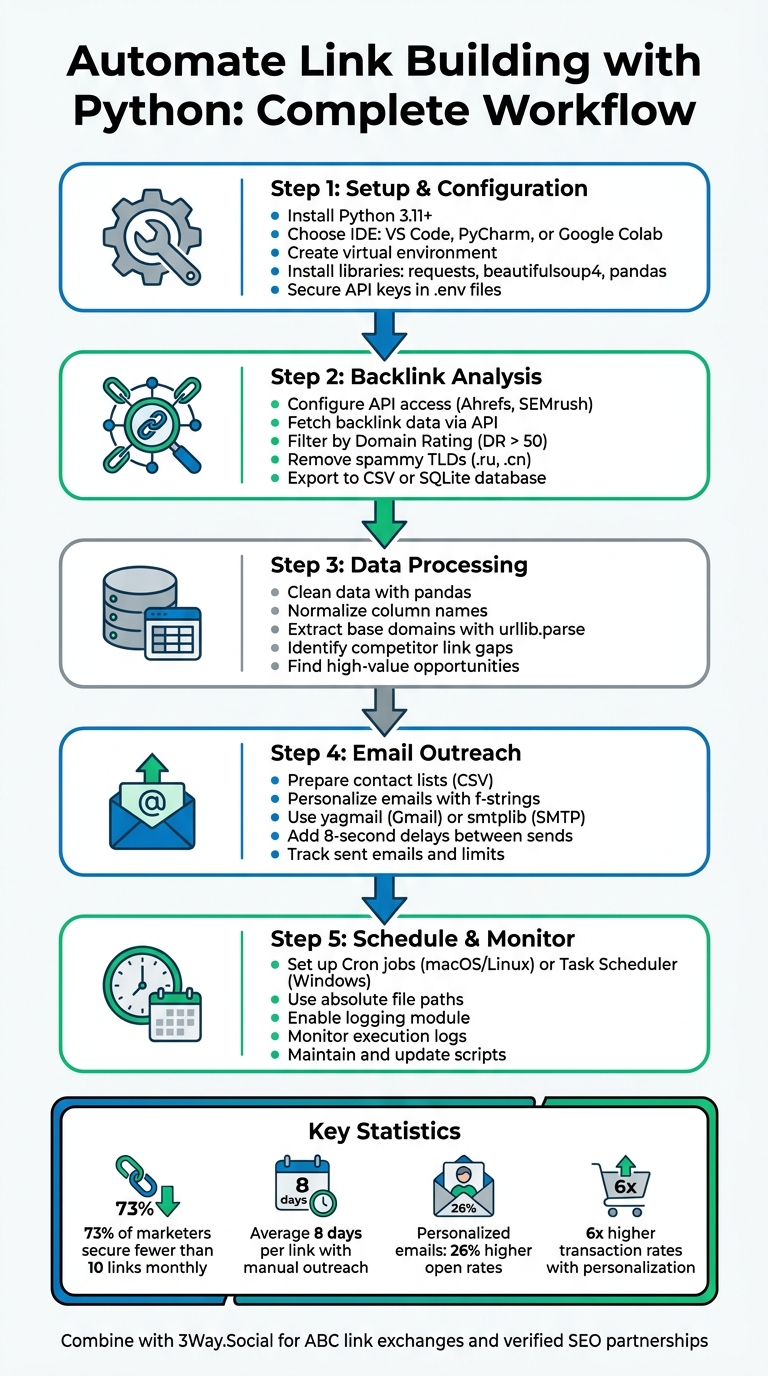
Python Link Building Automation Workflow: 5-Step Process
How to Automate Your SEO Using Python w/ David Krevitt
sbb-itb-88880ed
Python Setup and Required Libraries
To get started, you’ll need Python 3.11 or newer. You can download it from Python.org, as newer versions are better equipped to handle modern SEO tools and APIs. Once downloaded, run the installer and make sure to add Python to your system’s PATH during installation.
For your development environment, Visual Studio Code (VS Code) is a favorite among SEO professionals. It offers flexibility, intuitive Python extensions, and seamless Git integration. If you’re looking for a browser-based alternative with no installation required, Google Colab is a fantastic option. It lets you run Python scripts directly in your browser, making it perfect for quick analyses and team collaboration. Another excellent choice is PyCharm, which provides professional-grade tools, including built-in debugging capabilities.
“SEO is filled with repetitive, time-consuming tasks that Python can automate in minutes.”
– Ryan Law, Director of Content Marketing, Ahrefs
Once Python is installed, it’s good practice to set up a virtual environment for your project. This keeps your libraries isolated, avoiding version conflicts. Open your terminal or command prompt, navigate to your project folder, and run:
python -m venv venv Activate the virtual environment with:
- Windows:
venv\Scripts\activate - macOS/Linux:
source venv/bin/activate
Next, install the essential libraries:
pip install requests beautifulsoup4 pandas - Requests manages HTTP communication with websites and APIs.
- BeautifulSoup extracts meaningful data from HTML.
- Pandas helps process large datasets, such as CSV exports of backlinks. This data is essential when evaluating complex strategies like ABC link exchanges.
For email outreach, Python’s built-in smtplib is a useful tool, while openpyxl is great for working with Excel files. A quick tip for security: avoid hardcoding API keys in your scripts. Instead, store them in .txt or .env files.
Installing Python and Configuring Your Environment
A well-configured environment can make your workflow smoother. After installing Python, choose the right IDE for your needs. VS Code is a top choice for its Git integration and file system management. For quick tests or sharing code with teammates, Google Colab offers a no-setup-required experience. However, keep in mind that Colab sessions are temporary and have limited access to local files.
Python Libraries for Link Building Tasks
Different libraries handle various parts of the link-building process. Requests and BeautifulSoup are essential for web scraping. Requests fetches HTML from target sites, while BeautifulSoup parses it to extract elements like meta descriptions or niche backlinks.
Pandas is unbeatable for cleaning and analyzing backlink data. It’s particularly effective for processing CSV exports from tools like Ahrefs, allowing you to filter data by key metrics.
“The pandas library excels at reading and manipulating this type of data [backlink exports].”
– Volodymyr Zhyliaev
For email outreach, smtplib enables sending personalized emails, and yagmail simplifies the process even further. If the websites you’re working with rely heavily on JavaScript, Selenium can automate browser tasks like form submissions or portal logins. Additionally, when working with APIs from tools like Ahrefs, SEMrush, or Google Search Console, combine Requests with the json module to retrieve and process data. With variables, loops, and functions, you can automate the majority of repetitive SEO tasks, making these libraries indispensable.
Automating Backlink Analysis with APIs
Using Python to connect with SEO tool APIs can turn backlink analysis into a smooth, automated process. Instead of manually logging into tools like Ahrefs and exporting data, you can create scripts to fetch fresh backlink data, filter it for quality, and save it in formats ready for further analysis – all with minimal effort.
Configuring API Access
Start by heading to your SEO platform’s account settings to generate an API key. Keep in mind that tools like Ahrefs Lite limit exports to 2,500 rows per report, so apply filters early to focus on links that matter most.
To get started, install the required package:
pip install python-ahrefs Then, initialize the API client in your script:
api = AhrefsApi(token="YOUR_TOKEN") For better security, avoid hardcoding your API token directly into the script. Instead, use Python’s os module to load your token from a .env file. This protects sensitive information and keeps your code cleaner.
Wrap your API calls in try-except blocks to handle errors like connection timeouts or invalid tokens gracefully. This is especially useful for scripts running on a schedule or overnight, where interruptions could otherwise halt the entire process.
Once authentication is configured, you’re ready to build your automated backlink analysis script.
Building a Backlink Analysis Script
Use API endpoints such as:
api.backlinks(domain, "refdomains") to pull referring domain data. Convert the JSON response into a Pandas DataFrame for easier manipulation and analysis.
To avoid API throttling, add a delay between requests:
time.sleep(2) If you’re analyzing multiple domains, use list comprehensions to loop through your target list and combine the results into a single master file.
After retrieving the data, clean and filter it to focus on high-value links. Normalize column names by converting them to lowercase and replacing spaces with underscores. Use Python’s urllib.parse library to extract base domains from full URLs, making it easier to group and compare competitor profiles.
Filter out low-quality links by setting specific criteria, such as a Domain Rating (DR) above 50 and excluding redirect links. Additionally, remove spammy TLDs (e.g., .ru, .cn) and irrelevant keywords like “casino” to refine your dataset further.
For deeper analysis, you can replicate advanced features like “Link Intersect.” By performing competitor backlink analysis and comparing your backlink DataFrame with competitor DataFrames to find domains where competitors have multiple links, but your site has none. This can highlight untapped opportunities.
Export your cleaned and filtered data using:
df.to_csv('backlinks_filtered.csv', index=False) Alternatively, store the data in a local SQLite database for long-term use:
df.to_sql('backlinks_data') This automated process not only saves time but also allows you to focus on strategic tasks like identifying opportunities and building relationships, instead of getting bogged down by repetitive data handling.
| Task | Python Library | Purpose |
|---|---|---|
| API Connection | python-ahrefs | Connects to the Ahrefs API using an API token |
| Data Manipulation | pandas | Cleans, filters, and analyzes backlink data |
| URL Parsing | urllib.parse | Extracts base domains from full URLs |
| Rate Limiting | time | Introduces delays to prevent API throttling |
| Storage | sqlite3 or openpyxl | Saves results to databases or Excel files |
Automating Email Outreach with Python
Once you’ve pinpointed your link-building opportunities, automating your email outreach can save you tons of time. Python can handle everything – from cleaning up contact lists to sending out customized emails – while still keeping that personal touch that makes outreach successful.
Preparing and Formatting Email Lists
Before you start sending emails, it’s crucial to have an organized, clean list of contacts. Start by loading your leads from a CSV file into a Pandas DataFrame. Make sure your columns include email, contact_name, website, and source_url. Then, clean up the data by converting all emails to lowercase, trimming extra spaces, and removing duplicates:
df['email'] = df['email'].str.lower().str.strip() df.drop_duplicates(subset=['email']) This step ensures your outreach remains consistent and efficient, aligning perfectly with your broader SEO strategy for securing high-authority backlinks.
For emails written in obfuscated formats, use Python’s .replace() method to normalize them. You’ll also want to filter out generic addresses like noreply@ or support@ by maintaining a blocklist of such entries. Use a simple regex check to validate email formats – ensuring every email contains an “@” symbol and a valid domain suffix. Once your list is cleaned, save it back into a CSV file with clear headers to keep track of each contact’s details.
Creating an Email Automation Script
Python makes it easy to automate email sending. For Gmail users, yagmail is a great library, while smtplib works well for other SMTP servers. If you’re using Gmail, make sure to generate a 16-character App Password in your Google Account’s security settings instead of relying on your primary password.
To keep your credentials secure, store them in a .env file and load them into your script using Python’s os module. Once your connection is set up, you can loop through your contact list using Pandas, personalizing each email with f-strings:
f"Hi {row['contact_name']}, I noticed your article on {row['website']}..." Personalization matters. Emails that feel tailored to the recipient are far more effective. For instance, personalized emails drive 6 times higher transaction rates compared to generic ones, and subject lines with personalization see a 26% higher open rate.
To avoid being flagged as spam, add a delay between emails using time.sleep(8). Also, wrap your email-sending logic in try-except blocks to handle errors gracefully. Track how many emails you’ve sent and stop the script automatically once your daily limit is reached.
Here’s a quick breakdown of useful Python libraries for email automation:
| Library | Best Use Case | Key Advantage |
|---|---|---|
| Yagmail | Gmail-specific outreach | Simple syntax; easily handles attachments and HTML |
| smtplib | General SMTP (e.g., Outlook) | Built into Python; highly flexible |
| Pandas | List management | Great for handling large CSV/Excel files |
With your script ready, the next step is to schedule it for regular operation, ensuring your outreach runs smoothly and consistently.
Using 3Way.Social to Complement Python Automation
Python scripts are great for handling tasks like data analysis and email automation, but they don’t cover every aspect of link building. By combining Python with a specialized platform like 3Way.Social, you can create a streamlined process that takes you from discovery to link acquisition with greater efficiency.
Adding 3Way.Social to Your Workflow
Python is excellent for data extraction and initial filtering, while 3Way.Social steps in to manage link exchange and monitoring. Here’s how they can complement each other:
- Use Python scripts to uncover competitor backlinks, filter for high Domain Rating (DR > 50), and identify gaps in your backlink profile.
- Once you’ve pinpointed high-value opportunities, switch to 3Way.Social to handle the actual link acquisition process with verified SEO professionals.
This setup saves you from the often tedious cold email outreach stage. Instead, 3Way.Social’s AI-powered domain matching connects you with niche-relevant partners, seamlessly complementing the data you’ve gathered using Python.
For instance, after running a Python script like find-link-opportunities.py, you can use the urlparse library to extract base domains from your results. These domains can then be matched with potential partners in 3Way.Social’s network. The platform supports ABC link exchanges, which are more secure and less likely to raise red flags with search engines compared to direct reciprocal links.
3Way.Social Features for Link Building
3Way.Social brings powerful tools to strengthen and diversify your backlink profile. One standout feature is its ability to secure permanent do-follow links, ensuring the authority you gain through your efforts remains intact over time. You can even use Python libraries like requests or BeautifulSoup to periodically check that these links remain active and maintain their do-follow status.
The platform’s AI-driven domain matching and variety of link options help ensure that your placements meet high-quality standards. For example, you can analyze your anchor text distribution (e.g., branded vs. exact match) using Python’s pandas library, then request specific types of links through 3Way.Social to maintain a balanced and effective backlink profile.
Scheduling Python Scripts for Continuous Operation
Creating automated scripts is just the start; ensuring they run consistently is key to keeping your SEO efforts on track. Once you’ve developed Python scripts for tasks like backlink analysis or email outreach, scheduling them to execute automatically saves you from manual work and keeps everything running smoothly.
Setting Up Cron Jobs (macOS/Linux) or Task Scheduler (Windows)
On macOS/Linux, Cron is your go-to tool for scheduling. It uses a file called “crontab” to define when and how commands or scripts run. To edit your crontab, open Terminal and type crontab -e. Each line in the crontab specifies a time schedule (in five fields: minute, hour, day of the month, month, and day of the week) followed by the command to execute. For instance:
0 9 * * *runs a script daily at 9:00 AM.*/15 * * * *runs a script every 15 minutes.
Always use absolute paths for everything – your Python interpreter, script, and any related files – because Cron operates in a minimal environment. For example:
0 9 * * * /usr/bin/python3 /home/user/scripts/outreach.py >> /home/user/logs/link_building.log 2>&1 If you’re using a virtual environment, point to its Python executable like this:
/path/to/venv/bin/python /path/to/backlink_analysis.py On macOS, make sure to grant “Full Disk Access” to both Terminal and /usr/sbin/cron under Privacy & Security in System Settings. Without this, your scripts may fail to access files or directories. To confirm your scheduled jobs, use crontab -l to list them.
For Windows, Task Scheduler provides a user-friendly way to automate scripts. Press Win + R, type taskschd.msc, and hit Enter. From there:
- Create a “Basic Task”, give it a name, and set a trigger (e.g., daily, weekly, or at logon).
- Choose “Start a program” and specify the full path to your Python executable in the “Program/script” field.
- In “Add arguments”, include the full path to your Python script.
- Fill the “Start in” field with your script’s directory to ensure relative paths work properly.
For added convenience, some developers create a .bat file to activate their virtual environment and run the script. This also simplifies logging. For example:
>> "C:\path\to\logs\script.log" 2>&1 In Task Scheduler settings, select “Run whether user is logged on or not” so the task executes even if your computer is locked. If you’re using a laptop, uncheck “Start the task only if the computer is on AC power” under the Conditions tab to avoid interruptions when running on battery power.
Monitoring and Maintaining Your Scripts
Since scheduled scripts operate silently in the background, it’s easy to miss failures. Using Python’s logging module can help you track execution timestamps, successes, and errors, providing a record to review if something goes wrong.
During the first week of scheduling a new script, check the log files regularly. Look for recurring errors or signs that the script isn’t running as intended, such as missing data or failed file access. If issues arise, double-check that all file paths are absolute and that your virtual environment is activated before the script runs.
As your requirements change, you may need to tweak your scripts – whether it’s adjusting API rate limits, updating email templates, or targeting different domain metrics. Always test any updates manually before adding them back into your automated schedule to avoid small errors snowballing into bigger problems over time.
Conclusion
Using Python to automate link building transforms hours of tedious manual work into tasks completed in mere seconds. With scripts handling jobs like data extraction, cleaning CSV files, backlink analysis, and managing outreach, you can shift your focus to more strategic efforts. As Python developer Muhummad Zaki aptly states: “Automation doesn’t save time at first. It compounds time later”. By automating these workflows, you can uncover opportunities and process data on a scale that’s impossible to achieve manually.
Pairing Python automation with 3Way.Social creates an efficient and scalable link-building workflow. While Python scripts handle tasks like analyzing metrics such as Domain Rating or Domain Authority to identify potential targets, 3Way.Social connects you with a network of vetted SEO professionals for secure ABC link exchanges. The platform’s AI-driven domain matching and quality control filters complement your automated research by linking you with authoritative sites in your niche.
Python’s versatility further enhances your capabilities, automating complex processes like data validation and filtering. This not only mimics advanced features found in premium SEO tools but also helps eliminate low-quality domains, reducing errors from repetitive manual tasks.
Start small – try one or two scripts, test thoroughly, and expand your efforts as you grow more confident. Whether you’re scheduling daily backlink audits with cron jobs or running weekly competitor analyses using Task Scheduler, combining Python automation with 3Way.Social lets you scale your link-building efforts without adding to your workload. The result? More time for strategic planning and sustainable SEO growth that pays off over time. This streamlined approach transforms mundane tasks into opportunities for meaningful progress in your SEO strategy.
FAQs
How do I avoid getting blocked while scraping or using SEO APIs?
To steer clear of being blocked, it’s crucial to mimic natural browsing habits and respect server restrictions. Here are some practical tips:
- Add delays between requests: Implement rate limiting to prevent overwhelming servers with too many requests at once.
- Switch up user agents and IP addresses: Use proxies and rotate user-agent strings to make your activity harder to detect.
- Respect server guidelines: Always check the
robots.txtfile and stick to any API rate limits provided. - Use proper authentication: Ensure you’re using valid credentials and manage your sessions responsibly.
These steps can help maintain access while keeping your activity under the radar.
What’s the safest way to store API keys and email passwords in Python?
The best way to keep API keys and email passwords secure in Python is by avoiding hardcoding them directly into your code. Instead, use environment variables or configuration files that are excluded from version control.
For local development, you can store sensitive information in a .env file and load it at runtime using a library like python-dotenv. When deploying your application to the cloud, take advantage of the platform’s secure secret management services to safeguard your credentials effectively.
How can I track replies and follow-ups when outreach is automated?
To monitor replies and manage follow-ups in automated outreach with Python, you can incorporate reply tracking into your script. Libraries like imaplib can help you access and monitor inboxes directly, while email APIs with built-in reply detection offer a more streamlined approach. Another useful tactic is embedding unique identifiers or tracking pixels in your emails. These techniques enable you to log responses efficiently and automate follow-ups, ensuring your outreach stays timely and effective.