JavaScript SEO in 2026: what Google and AI crawlers actually see
Last Updated on November 9, 2026 by Becky Halls
Open your page, right-click, and choose “view source.” If the content you want to rank for isn’t actually in that HTML, you could have a problem – And in 2026 it’s a bigger problem than it used to be.
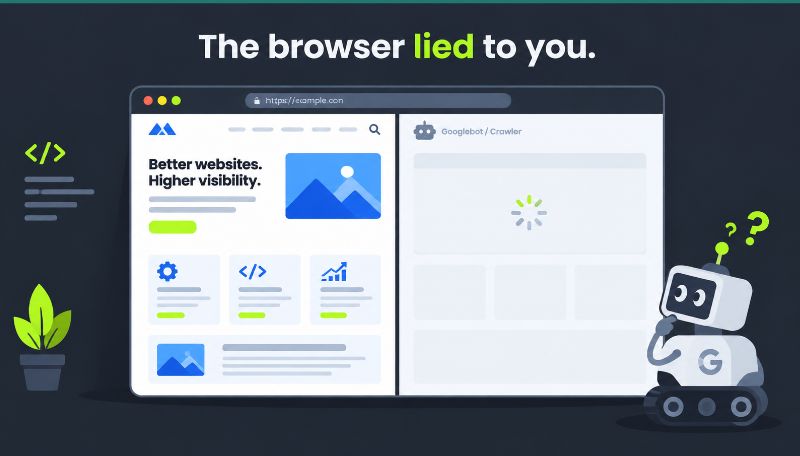
Loads of modern sites build their main content with JavaScript. The browser runs the code, the content appears, everything looks fine to you. The question is whether it looks fine to the things that rank you and cite you… I’ve found that often it doesn’t, so here we are introducing Javascript SEO!
Google reads the rendered page, not your source code
First, the good news – Google does run JavaScript. It renders the page the way a browser does, then indexes what’s there after the code has run. So the version Google judges is the finished, rendered page.
Martin Splitt, who works on exactly this at Google, made the point at an SEO event in 2025: “A lot of people are still looking at view source. That is not what we use for indexing. We use the rendered HTML.”
The catch is timing. Google crawls your HTML first, then comes back to render the JavaScript when it has resource to spare. People call this the two waves of indexing. Usually the gap is short. Sometimes it’s days. If your content only exists after rendering, it sits invisible until that second pass lands. For a news page or a time-sensitive launch, that delay costs you.
The newer problem: AI crawlers don’t run your JavaScript at all
This is the bit that’s changed the stakes. The crawlers behind AI answers are now a serious slice of your traffic, and they behave very differently from Googlebot.
Vercel ran a study with MERJ on AI crawler behaviour and the headline finding is blunt: “none of the major AI crawlers currently render JavaScript.” They’ll fetch your JavaScript files (ChatGPT pulled them on 11.50% of requests, Claude on 23.84%), but they don’t execute them. So any content that only appears after the code runs is simply not there as far as they’re concerned.
And these bots count for a lot of your traffic! On that same Vercel data, AI crawlers already make up around 28% of Googlebot’s volume, with GPTBot and Claude pulling close to a billion fetches a month across one network alone. If your key content is client-side rendered, you’re handing all of those crawlers a blank page. That study ran in late 2024, and it’s still the clearest read we have on how these bots work. If anything, the AI crawler share has grown since.
“I audit sites where the whole product description loads by JavaScript after the page settles. It looks perfect in Chrome, then you fetch it the way an AI bot does and there’s nothing there but a spinner. You can’t get cited for content a crawler never sees. Put the important words straight in the HTML that ships.” Peter Fox, Head of Dev at 3Way.Social
How to see what Google and AI actually get
You don’t have to guess – Here’s three quick checks:
Use Google Search Console’s URL Inspection tool, run a live test, and look at the rendered HTML and screenshot. That’s close to what Googlebot indexes. If your main content is missing there, Google is struggling too.
Disable JavaScript in Chrome (open DevTools, hit the command menu, “Disable JavaScript”), then reload the page. What’s left is roughly what a non-rendering crawler sees, including the AI bots. If the page goes blank or loses its main text, that’s your answer.
Compare view-source against the rendered DOM (right-click, Inspect). If your headings, body copy and links only show up in the rendered version, they depend on JavaScript to exist.
Do this on your top ten pages. It takes about half an hour and it’s the most useful thing you’ll do for technical SEO this month.
What to actually fix
The fix is mostly about where your content lives.
Server-side rendering is the clean answer. The server sends fully-formed HTML with the real content already in it, then JavaScript takes over for interactivity. Googlebot and the AI crawlers both get the content without running anything. Frameworks like Next.js, Nuxt and Astro make this the default now, so it’s rarely the fight it once was.
If a full rebuild isn’t on, prerendering or static generation for your important pages gets you most of the way. Google used to suggest a workaround where you serve crawlers a pre-rendered version, but it now treats that as a stopgap rather than advice, so I’d put the effort into real server rendering instead.
A few smaller things that catch people out:
Make your internal links proper <a href=""> tags. If navigation only fires through an onclick handler, non-rendering crawlers can’t follow it, and your deeper pages go undiscovered.
Don’t hide primary content behind a click or an infinite scroll that only works with JavaScript. If it matters for ranking, it belongs in the initial HTML.
Watch soft 404s. Splitt flagged this one too: a JavaScript route that fails often returns a 200 “OK” status with an error page, so Google thinks a broken page is fine and indexes the mess.
A 30-minute JavaScript SEO audit
Quick version you can run today.
Pick your five most important pages. For each: view source and search for a sentence of your main content. If it’s not there, flag it. Then disable JavaScript and reload. If the page breaks, flag it. Then run the URL in Search Console’s live test and check the rendered HTML. Then click through your main nav with JavaScript off and see what still works.
Anything that fails two of those checks goes on the fix list, server rendering first. You’ll usually find one or two pages doing real damage and a handful that are fine. That focus is worth more than a 90-page audit that sits in a folder.
Javascript SEO FAQs
Does Google rank JavaScript sites?
Yes. Google renders JavaScript and indexes the rendered page. The risk is delay (the two-wave gap) and anything that fails to render, like soft 404s or content behind events it won’t trigger.
Why do AI crawlers matter for JavaScript SEO?
Because they don’t render JavaScript at all. Tools like ChatGPT and Perplexity read the raw HTML. If your content only appears after the code runs, those tools can’t see it, and they can’t cite a page they never read.
Is server-side rendering always the answer?
It’s the most reliable one for content that needs to be seen by crawlers. For pages that don’t need to rank or be cited (a logged-in dashboard, say), client-side rendering is perfectly fine. Match the approach to the page’s job.
How do I know if my site has a rendering problem?
Disable JavaScript in your browser and reload your key pages. If the content disappears, crawlers that don’t render (and that’s all the AI ones) are seeing the same empty page.
What’s the two waves of indexing?
Google crawls your HTML first, then renders the JavaScript in a second pass later. If your content only exists after rendering, it waits for that second wave, which can take anywhere from minutes to days.
Does structured data need rendering too?
If your schema is injected by JavaScript, Google can usually pick it up on render, but the first crawl and the AI crawlers won’t. Putting JSON-LD in the server HTML is the safer bet.
By Peter Fox, Head of Dev Team at 3way.social. I spend a lot of time fetching clients’ pages the way a crawler does and explaining why the browser lied to them.